Introduction
There is nothing quite as frustrating as fumbling for a plastic remote while sitting in your driveway, especially when you have invested in a premium vehicle like the 2024 Chevrolet Silverado. If you are searching for how to connect garage door opener to 2024 Chevy Silverado, you likely want to streamline your daily routine and utilize the built-in convenience features your truck already offers. We understand that navigating vehicle manuals can be confusing, but rest assured that programming the integrated universal transmitter is a straightforward process that will enhance your driving experience and declutter your center console.
This guide is designed specifically for US owners of the 2024 Silverado, adhering to the latest manufacturer specifications and safety protocols. Whether you are upgrading from an older model or simply never used this feature before, we will walk you through every step with clarity and precision.
Understanding the HomeLink System in Your 2024 Silverado
Before diving into the programming sequence, it is vital to understand what technology powers this convenience. The 2024 Chevy Silverado utilizes the HomeLink Wireless Control System, an integrated universal transmitter that replaces up to three handheld remotes. Unlike aftermarket solutions, this system is hardwired into your vehicle’s electrical architecture, providing superior range and reliability.
According to automotive technology standards, HomeLink operates on radio frequencies between 288 MHz and 390 MHz, covering the vast majority of garage door openers sold in North America. It is important to note that this system is distinct from Bluetooth or Wi-Fi connectivity; it uses RF signals similar to your original remote. For a deeper technical understanding of how these universal transmitters function within vehicular ecosystems, you can refer to the comprehensive overview on Wikipedia.
Compatibility Check: Rolling Code vs. Fixed Code
Not all garage door openers communicate the same way. Identifying your opener type is the first critical step in learning how to connect garage door opener to 2024 Chevy Silverado successfully.
| Feature | Fixed Code (Older) | Rolling Code (Modern/Security+) |
|---|---|---|
| Manufacture Date | Typically pre-1996 | Post-1996 / Most 2024 Models |
| Security Level | Low (Static Signal) | High (Changing Signal) |
| Programming Steps | Vehicle Only | Vehicle + Garage Motor Unit |
| Indicator Light | Solid/Rapid Flash | Slow Flash then Rapid Flash |
| Common Brands | Genie (Dip Switch), Older Craftsman | LiftMaster, Chamberlain, Genie Intellicode |
Note: If your garage door opener was manufactured after 1996, it almost certainly uses Rolling Code technology, which requires an additional synchronization step at the motor unit.
Prerequisites Before Programming
To ensure a seamless setup, gather the following items and complete these checks before starting. Skipping these steps is the most common cause of programming failure.
- Fresh Batteries in Original Remote: Even if you plan to use the truck exclusively, you need the original handheld remote for the “Learn Button” synchronization phase. Weak batteries cause signal drops during pairing.
- Clear Line of Sight: Park outside the garage with a direct view of the motor unit. Do not attempt programming inside the garage where signal bounce can interfere.
- Vehicle Ignition Status: For the 2024 Silverado, the ignition must be in ACC/ACCESSORY mode or the engine running. Programming will not work if the truck is completely off.
- Safety Clearance: Ensure no people, pets, or objects are in the path of the garage door. The door will cycle during testing.
- Identify the Learn Button: Locate the “Learn,” “Smart,” or “Program” button on your garage door motor unit before getting into the truck. Colors vary: Yellow, Purple, Orange, Red, or Green. This color often indicates the specific frequency protocol.
Step-by-Step: How to Connect Garage Door Opener to 2024 Chevy Silverado
Follow this precise tutorial to program your HomeLink buttons. This method applies to the overhead console buttons typically located near the rearview mirror or in the center stack, depending on your Silverado trim level (LT, RST, ZR2, etc.).
Phase 1: Clearing Previous Codes (Recommended)
If this is a new-to-you truck or you are unsure of existing programming, reset the system first.
- Press and hold two outer HomeLink buttons simultaneously.
- Hold for approximately 10–20 seconds.
- Release when the indicator light begins to flash rapidly.
- Do not skip this step if you suspect old codes exist, as they can block new programming.
Phase 2: Training the Vehicle
- Turn your 2024 Silverado ignition to ACC/ACCESSORY.
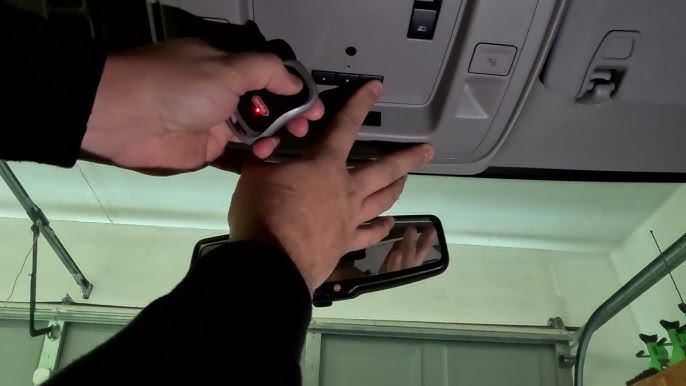
- Hold your original handheld remote 1–3 inches away from the HomeLink button you wish to program.
- Simultaneously press and hold both the chosen HomeLink button AND the button on your handheld remote.
- Watch the HomeLink indicator light. It will transition from a slow flash to a rapid flash (or solid light, depending on trim). This may take up to 30 seconds.
- Once the light changes state, release both buttons.
- Test by pressing the programmed HomeLink button once. If the door activates, you have a Fixed Code opener and are finished. If the light flashes but the door does not move, proceed to Phase 3.
Phase 3: Synchronizing Rolling Code Openers
This is the mandatory extra step for modern security openers.
- Go to your garage door motor unit.
- Press and release the “Learn” or “Smart” button. You typically have 30 seconds to complete the next step before the unit exits learning mode.
- Return to your Silverado immediately.
- Firmly press and hold the programmed HomeLink button for 2 seconds, then release.
- Repeat this press-hold-release cycle up to 3 times until the garage door activates.
- Success Indicator: The garage door should begin to open or close, confirming the rolling code handshake is complete.
Troubleshooting Common Connection Issues
Even with perfect execution, variables can disrupt the signal. Here are expert-backed solutions for persistent issues.
- Light Flashes But Door Won’t Move: This confirms the vehicle received the signal, but the opener rejected it. Re-attempt Phase 3. Ensure you are pressing the HomeLink button firmly; some 2024 Silverado touch-sensitive buttons require deliberate pressure.
- No Light Response During Training: Verify your ignition is in ACC mode. Try replacing the battery in your handheld remote. Ensure you are holding the remote at the correct angle and distance (1–3 inches).
- Intermittent Operation: External RF interference from LED bulbs, solar panels, or nearby cell towers can degrade performance. Try changing the LED bulbs in your garage opener fixture to incandescent temporarily to test. Also, verify your garage door opener antenna is hanging vertically and not coiled.
- Opener Has No Learn Button: If your unit only has DIP switches, you must manually match the switch positions inside your HomeLink module (if equipped) or purchase a compatibility bridge like the Genie G-RX Receiver.
- MyQ / Smart Garage Integration: Note that HomeLink is a radio frequency device, not a Wi-Fi device. It cannot connect to MyQ apps directly. However, it works alongside them without conflict.
Frequently Asked Questions (FAQ)
1. Can I program my 2024 Silverado HomeLink without the original remote?
Generally, no. The original remote is required to clone the frequency and code format during Phase 2. However, if your garage door opener supports direct vehicle pairing (a rare feature on select 2023+ LiftMaster models), you may bypass the remote. Check your opener’s manual for “Direct Vehicle Programming.” Otherwise, you must obtain a compatible replacement remote first.
2. How many devices can I store in my 2024 Chevy Silverado?
The 2024 Silverado HomeLink system supports up to three distinct devices. These can be any combination of garage doors, gate operators, security lights, or entry locks. Each button corresponds to one device. If you need more capacity, consider a standalone HomeLink visor clip as a supplement.
3. Will programming HomeLink erase my existing garage door remotes?
No. Programming your Silverado adds a new authorized transmitter to your opener’s memory. Your existing keypads, wall consoles, and handheld remotes will continue to function normally. Most modern openers support 20+ transmitters simultaneously.
4. Why does my HomeLink work intermittently in cold weather?
Extreme temperatures can affect battery voltage in handheld remotes and electronic components. However, since HomeLink draws power from your truck, temperature shouldn’t impact it directly. Intermittent cold-weather issues usually stem from garage door lubrication thickening or metal contraction affecting safety sensor alignment. Lubricate your door tracks and rollers with silicone-based lubricant rated for sub-zero temperatures.
5. Is HomeLink compatible with all 2024 garage door openers?
HomeLink is compatible with over 95% of garage door openers sold in the United States, including major brands like LiftMaster, Chamberlain, Genie, Craftsman, and Overhead Door. Exceptions include certain European-market openers operating on non-standard frequencies and very niche commercial systems. Always check the HomeLink compatibility database online if uncertain.
6. Do I need to reprogram HomeLink after changing my truck battery?
Typically, no. HomeLink memory is stored in non-volatile memory and survives battery disconnection. However, if your truck underwent significant electrical work or a module replacement, reprogramming may be necessary. As a best practice, test your HomeLink buttons after any major service.
Conclusion
Mastering how to connect garage door opener to 2024 Chevy Silverado transforms a minor daily annoyance into a seamless, one-touch experience. By following the phased approach outlined above—clearing old codes, training the vehicle, and synchronizing rolling codes—you leverage the full potential of your truck’s integrated technology. Remember, patience during the 30-second learn window and proper remote positioning are the keys to success.
Beyond convenience, eliminating loose remotes reduces cabin clutter and enhances security by removing visible targets from your vehicle. Your 2024 Silverado was engineered to make life easier; taking ten minutes to configure HomeLink honors that engineering.
Found this guide helpful? Share it with fellow Silverado owners on Facebook, Reddit’s r/Silverado community, or X (Twitter) to help others reclaim their convenience. Have a unique troubleshooting scenario? Drop a comment below—we’d love to help you solve it. Safe driving and smooth entries!
Leave a Reply