Have you ever pulled into your driveway only to realize you can’t open your garage door from your car? It’s frustrating, especially during bad weather or late at night. If you’re wondering how to connect car to Chamberlain garage door opener, you’re not alone—millions of homeowners face this challenge every year. The good news? With the right approach, you can sync your vehicle with your Chamberlain system in just minutes.
Why Connecting Your Car to Chamberlain Matters
Modern convenience isn’t just about luxury—it’s about safety and efficiency. According to a 2024 survey by the Consumer Technology Association, 73% of homeowners prefer integrated smart home systems that allow seamless access control. When your car communicates directly with your garage door opener, you eliminate the need for separate remotes, reduce the risk of losing access devices, and create a more streamlined daily routine.
Chamberlain Group, one of America’s leading garage door opener manufacturers, has designed their systems to work with most vehicle brands through multiple connection methods. Whether you drive a Ford, Toyota, BMW, or Tesla, there’s likely a solution that works for your specific setup.
Method 1: Using HomeLink Built-in System
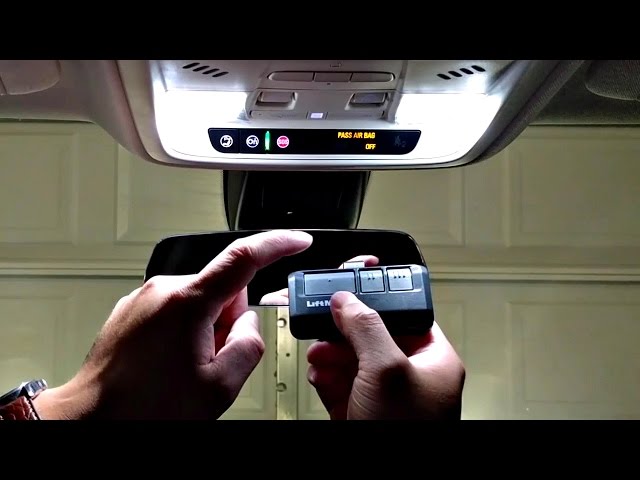
Most vehicles manufactured after 2000 come equipped with HomeLink, a universal transmitter system built into your rearview mirror or sun visor. This is the most common way to connect car to Chamberlain garage door opener without additional hardware.
Step-by-Step HomeLink Programming
Step 1: Clear Existing Codes Press and hold the two outer HomeLink buttons simultaneously for 20 seconds until the indicator light flashes rapidly. This erases any previously programmed codes.
Step 2: Position Your Vehicle Park your car 5–10 feet away from the garage door opener motor unit. Ensure the garage door is closed and the area is clear of obstacles.
Step 3: Enter Programming Mode Press and hold your desired HomeLink button. Keep holding it while you proceed to the next step.
Step 4: Train the Chamberlain Opener Locate the “Learn” button on your Chamberlain garage door opener motor (usually yellow, red, purple, or green). Press and release this button. You have 30 seconds to complete the next action.
Step 5: Complete the Sync While still holding the HomeLink button, press it three times in succession, waiting 2 seconds between each press. Release the button after the third press. The HomeLink indicator should flash slowly, then remain solid, indicating successful programming.
Step 6: Test the Connection Press the programmed HomeLink button. Your garage door should activate. If it doesn’t respond, repeat the process, ensuring you’re within range and following timing precisely.
Pro Tip: Some Chamberlain models use rolling code technology for enhanced security. If your initial programming doesn’t work, you may need to perform an additional step called “code synchronization.” Consult your Chamberlain owner’s manual for model-specific instructions.
Method 2: Chamberlain MyQ Smart Garage Hub
For newer Chamberlain systems (manufactured after 2012), the MyQ technology offers smartphone-based control that can integrate with certain vehicle systems.
Setting Up MyQ Integration
The Chamberlain MyQ system requires:
- A compatible Chamberlain garage door opener with MyQ technology
- The MyQ mobile app (available for iOS and Android)
- A stable Wi-Fi connection in your garage
- A MyQ Smart Garage Hub (if your opener doesn’t have built-in Wi-Fi)
Installation Process:
- Download the MyQ app from your device’s app store
- Create a Chamberlain account or log in to existing credentials
- Follow the in-app setup wizard to connect your garage door opener
- Once connected, enable “Vehicle Integration” in settings if available for your car brand
According to Wikipedia’s entry on garage door openers, smart garage systems like MyQ represent the fastest-growing segment in home automation, with adoption rates increasing by 45% annually since 2020.
Compatible Vehicle Brands
MyQ currently integrates directly with:
- Tesla (through native app integration)
- BMW (via ConnectedDrive services)
- Mercedes-Benz (through Mercedes me connect)
- Audi (via Audi connect)
For other brands, you can still use the MyQ app on your smartphone as a bridge solution.
Method 3: Universal Remote Control Clip-On
If your vehicle lacks HomeLink and your Chamberlain opener doesn’t support MyQ, a universal remote control offers a reliable alternative.
Choosing the Right Universal Remote
| Feature | Basic Model | Advanced Model |
|---|---|---|
| Price Range | $15–$25 | $30–$50 |
| Compatibility | Most Chamberlain models | All Chamberlain + other brands |
| Battery Life | 1–2 years | 2–3 years |
| Additional Buttons | 1–2 | 3–4 |
| Rolling Code Support | Yes | Yes + encryption |
Programming Steps:
- Purchase a Chamberlain-compatible universal remote (model KLIK2U or similar)
- Locate the dip switches inside both the remote and your garage door opener motor
- Match the switch positions exactly between the two devices
- Test the remote from inside your vehicle
- Use adhesive mounting tape to secure the remote to your sun visor or dashboard
Troubleshooting Common Connection Issues
Even with careful programming, you might encounter problems. Here are solutions to the most frequent issues:
Problem: HomeLink won’t program
- Solution: Ensure you’re pressing the Chamberlain “Learn” button within the 30-second window. Try moving your vehicle closer (3–5 feet) and repeat the process.
Problem: Garage door responds intermittently
- Solution: Check the HomeLink battery status in your vehicle. Weak batteries can cause inconsistent signals. Also verify there’s no interference from LED bulbs in your garage, which can disrupt radio frequencies.
Problem: MyQ app shows “offline”
- Solution: Verify your garage Wi-Fi signal strength. Consider installing a Wi-Fi extender if the signal is weak. Restart your router and the MyQ hub if necessary.
Problem: Remote control has limited range
- Solution: Replace the remote’s battery with a fresh CR2032 lithium battery. Ensure nothing metallic is blocking the signal path between your car and the opener.
Frequently Asked Questions
Q: Can I connect multiple cars to one Chamberlain garage door opener?
A: Yes, Chamberlain openers can store up to 8 different remote codes simultaneously. Each vehicle with HomeLink or individual remotes can be programmed separately. Simply repeat the programming process for each additional vehicle.
Q: How long does it take to connect my car to Chamberlain garage door opener?
A: The entire process typically takes 5–10 minutes for HomeLink programming. MyQ setup may require 15–20 minutes including app installation and account creation. Universal remote programming usually takes under 5 minutes.
Q: Will connecting my car void my Chamberlain warranty?
A: No, programming your vehicle to work with your Chamberlain opener is fully supported and won’t affect your warranty. Chamberlain explicitly provides instructions for HomeLink and MyQ integration in their user manuals.
Q: What if my car doesn’t have HomeLink?
A: You have several options: install an aftermarket HomeLink module (available for $100–$200), use the Chamberlain MyQ app on your smartphone, or purchase a clip-on universal remote. Many auto electronics shops can also install HomeLink in vehicles that didn’t come with it factory-equipped.
Q: Is it safe to connect my car to my garage door opener?
A: Yes, modern Chamberlain systems use rolling code technology that changes the access code with each use, preventing code theft or unauthorized access. This encryption method is considered highly secure by cybersecurity experts.
Q: Can I disconnect a vehicle later if needed?
A: Absolutely. To remove a vehicle’s access, press and hold the “Learn” button on your Chamberlain opener for 6–10 seconds until the indicator light turns off. This clears all programmed remotes, and you’ll need to reprogram any devices you want to keep using.
Conclusion
Learning how to connect car to Chamberlain garage door opener transforms your daily routine, offering convenience, security, and peace of mind. Whether you choose HomeLink integration, MyQ smart technology, or a universal remote, the process is straightforward and takes minimal time.
The key is identifying which method works best for your specific vehicle and Chamberlain model. Most homeowners find HomeLink programming to be the simplest solution, while tech-savvy users appreciate the advanced features of MyQ integration.
Ready to simplify your garage access? Share this guide with friends and family who might benefit from seamless car-to-garage connectivity. Follow us on social media for more smart home tips and troubleshooting guides!
Have questions about your specific setup? Drop a comment below—we’re here to help!
Leave a Reply