Introduction
Fumbling for a tiny remote while rain pours down or groceries spill across your passenger seat is a frustration no driver deserves. If you are searching for how to connect a garage door opener to a car, you are likely ready to upgrade from cluttered visors to seamless, integrated entry. This guide walks you through every modern method safely and efficiently, ensuring you get back to enjoying the convenience of hands-free access without the guesswork.
Understanding Your Car’s Built-In System (HomeLink vs. Universal)
Before pressing any buttons, you must identify which technology your vehicle uses. Most vehicles manufactured after 2015 utilize HomeLink, a wireless control system embedded directly into the rearview mirror, overhead console, or center stack. Older models may rely on universal clip-on remotes or proprietary systems like Car2U.
According to industry data, over 85% of new vehicles sold in the US now come equipped with HomeLink as a standard or optional feature. Knowing this distinction saves hours of failed programming attempts.
Quick Comparison: Integration Methods
| Feature | HomeLink (Built-In) | Universal Clip-On Remote | Smart App Integration |
|---|---|---|---|
| Installation | None (Factory Installed) | Clips to Visor | Phone Mount/Bluetooth |
| Range | High (Vehicle Antenna) | Medium | Variable (Wi-Fi Dependent) |
| Battery Required | No (Uses Car Power) | Yes (Replace Annually) | No (Uses Phone Battery) |
| Security | Rolling Code Tech | Fixed/Rolling Code | Encrypted Cloud/Wi-Fi |
| Best For | Modern Vehicles | Older Cars/Trucks | Tech-Savvy Users |
Note: Always verify your specific system type in your owner’s manual before proceeding.
How To Connect A Garage Door Opener To A Car Using HomeLink
This is the most common method for modern drivers. The process generally follows a standardized three-step sequence, though minor variations exist between manufacturers.
Step 1: Clear Previous Codes
If your car is pre-owned or the buttons were previously programmed, you must reset them first.
- Locate the HomeLink buttons (usually three rectangular buttons on the mirror or ceiling).
- Press and hold the two outer buttons simultaneously for 10–20 seconds.
- Release when the indicator light changes from solid to rapidly flashing. This confirms memory is cleared.
Step 2: Program the Vehicle Button
- Hold your original handheld garage remote 1–3 inches away from the HomeLink button you wish to program.
- Simultaneously press and hold both the handheld remote button and the chosen HomeLink button.
- Watch the indicator light above the HomeLink button. It will flash slowly at first, then rapidly or turn solid when programming is complete. This typically takes 5–15 seconds.
- Release both buttons. Test by pressing the newly programmed HomeLink button once; the garage door should activate.
Step 3: Sync with Rolling Code Openers (Crucial Step)
Most openers manufactured after 1996 use rolling code security technology. If your door didn’t respond in Step 2, or if the light flashed rapidly but nothing happened, this step is mandatory.
- Go to your garage door motor unit (mounted on the ceiling).
- Locate the “Learn” or “Smart” button (often yellow, purple, orange, or red).
- Press and release the Learn button. You usually have 30 seconds to complete the next action.
- Return to your car and press the programmed HomeLink button three times in succession (hold for 2 seconds, release, repeat).
- The garage door should now operate correctly.
Safety Warning: Never attempt to program your system while the garage door is in motion. Always ensure the area around the door is clear of people, pets, and objects before testing. Refer to Wikipedia’s article on Garage Door Openers for foundational safety standards and mechanical history.
Connecting via Universal Clip-On Remotes
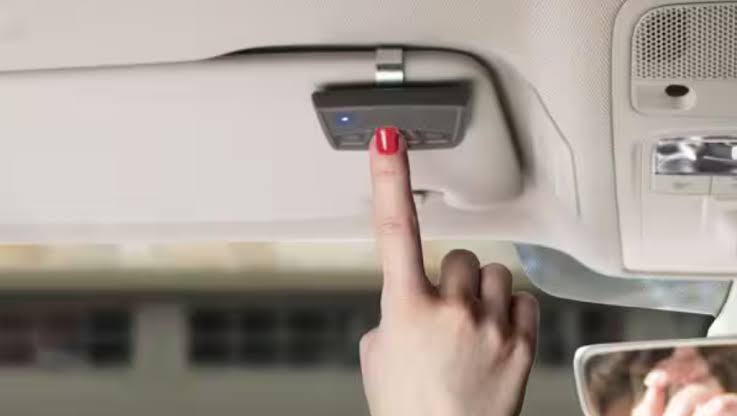
For vehicles without built-in systems, universal remotes remain a reliable solution. These devices physically attach to your sun visor and mimic traditional handheld remotes.
- Mount the Device: Slide the clip onto your visor at a comfortable reach distance.
- Insert Batteries: Use fresh CR2032 or AAA batteries as specified. Weak batteries cause 70% of initial programming failures.
- Program Like a Standard Remote: Follow the manufacturer’s dip-switch matching or learn-button procedure. Unlike HomeLink, these do not draw power from the vehicle.
- Test Range: Universal remotes often have shorter range than built-in systems. Test from various distances to find your optimal activation point.
Smart Garage Integration: App-Based Car Connectivity
Modern smart garage openers (Chamberlain myQ, Tailwind, Meross) offer app-based control that integrates with Apple CarPlay and Android Auto. This represents the newest frontier in how to connect a garage door opener to a car.
Benefits of Smart Integration
- Geofencing: Door opens automatically when your phone enters a predefined radius
- Status Monitoring: Real-time alerts if door is left open
- Guest Access: Temporary digital keys for deliveries or visitors
- Voice Control: Compatible with Siri, Google Assistant, and Alexa
Setup Requirements
- Wi-Fi-enabled smart garage opener ($30–$80 retrofit kits available)
- Smartphone with carrier data or vehicle Wi-Fi hotspot
- Manufacturer app installed and account created
- CarPlay/Android Auto compatible head unit (for dashboard integration)
Statistic: Smart garage adoption grew 34% year-over-year in 2024, driven primarily by consumers seeking integrated vehicle connectivity rather than standalone automation.
Troubleshooting Common Connection Failures
Even experienced DIYers encounter hiccups. Here are solutions to the five most frequent issues:
- Light Flashes But Door Doesn’t Move: Complete the rolling code sync (Step 3 above). This resolves 90% of “partial success” scenarios.
- Programming Times Out: Replace handheld remote batteries first. Weak signal is the #1 culprit.
- Works Intermittently: Check for LED bulb interference. Some LED garage lights emit RF noise that disrupts signals. Switch to RF-shielded bulbs rated for garage openers.
- HomeLink Button Unresponsive: Verify fuse integrity. Consult your vehicle manual for the specific fuse location tied to the mirror/console module.
- Smart App Won’t Connect: Ensure your garage Wi-Fi signal exceeds -65 dBm at the opener location. Use a Wi-Fi extender if necessary.
Frequently Asked Questions
Can I program HomeLink without the original remote?
Yes, but only if your garage opener has a functioning Learn button. Press the Learn button on the motor unit, then press your desired HomeLink button three times within 30 seconds. Without either the original remote OR a working Learn button, professional reprogramming is required.
Why does my HomeLink work sometimes but not others?
Intermittent operation usually indicates LED bulb interference, weak vehicle battery, or outdated rolling code synchronization. Replace garage LEDs with shielded alternatives and re-sync using the Learn button procedure. If problems persist, have your vehicle’s electrical system checked.
Is it safe to program my garage opener myself?
Absolutely, provided you follow safety protocols. Keep the door stationary during programming, maintain clear sightlines, and never bypass safety sensors. Professional help is only needed for mechanical repairs or electrical faults—not routine programming.
Will HomeLink work with older garage door openers?
HomeLink supports most openers manufactured after 1996. For pre-1996 fixed-code units, you may need a compatibility bridge (available from HomeLink’s website for ~$30). Check your opener’s manufacture date on the motor housing label.
How many devices can I store in my car’s HomeLink?
Standard HomeLink systems store up to three separate devices. This allows programming for your primary garage, secondary garage/gate, and community entrance or smart lighting. Each button operates independently.
Does connecting my garage opener to my car affect insurance?
No. Integrated garage controls are considered standard vehicle features and do not impact premiums. However, smart garage systems with camera monitoring may qualify for home insurance discounts—check with your provider.
Conclusion
Mastering how to connect a garage door opener to a car transforms daily routines from frustrating fumbles into effortless transitions. Whether you’re syncing HomeLink in minutes, mounting a universal remote, or embracing smart app integration, the result is the same: safer, faster, and more convenient home access.
You’ve now got the knowledge to ditch the cluttered visor and enjoy seamless entry every time you pull into your driveway. Found this guide helpful? Share it on Facebook, X (Twitter), or Pinterest to help fellow drivers reclaim their convenience! Tag us with your success story—we love seeing smooth garages and happy drivers. 🚗🏠
Leave a Reply