Are you tired of fumbling with multiple remotes every time you pull into your driveway? You’re not alone. Many homeowners struggle with integrating their garage door systems with their vehicles, but learning how to connect Chamberlain garage door opener to car can transform your daily routine into a seamless, hands-free experience. Whether you have a brand-new vehicle with built-in HomeLink technology or an older model requiring a universal remote, this comprehensive guide will walk you through every step.
Why Connecting Your Garage Opener to Your Car Matters
Modern convenience isn’t just about luxury—it’s about safety, efficiency, and peace of mind. According to the International Door Association, over 70% of American homes have garage doors, yet nearly 40% of homeowners still use separate remotes rather than integrated systems. This disconnect creates unnecessary hassle and potential security vulnerabilities.
When you successfully integrate your Chamberlain garage door opener with your vehicle, you gain several significant benefits:
- Enhanced Security: No more lost or stolen handheld remotes
- Weather Protection: Stay dry and comfortable during rain or snow
- Time Efficiency: Eliminate the search for misplaced remotes
- Increased Property Value: Integrated smart home features appeal to buyers
Understanding Your Chamberlain Garage Door Opener Model
Before attempting any connection process, identifying your specific Chamberlain model is crucial. Chamberlain manufactures several series, each with slightly different programming requirements.
Common Chamberlain Series
| Series | Key Features | Compatibility |
|---|---|---|
| B-Series | Belt-drive, quiet operation | Most HomeLink systems |
| C-Series | Chain-drive, durable | Universal remotes, HomeLink |
| W-Series | Wall-mounted, space-saving | Limited car integration |
| Smart Series | Wi-Fi enabled, app control | MyQ app, HomeLink |
To locate your model number, check the motor unit housing—typically found on the back or side panel. The model number usually appears as a combination of letters and numbers (e.g., B970, C450, or WLD1200).
Pro Tip: If you cannot locate your model number, consult your original installation manual or visit Chamberlain’s official support page with your purchase date and installer information.
Method 1: Using HomeLink (Built-In Car System)
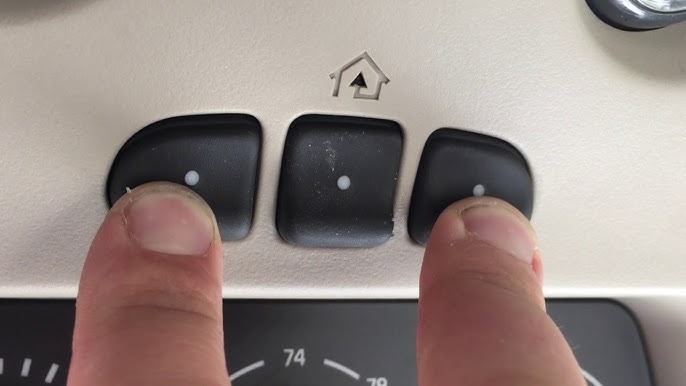
HomeLink is the most common integrated system found in modern vehicles, with over 60 million vehicles equipped worldwide. If your car has three buttons near your rearview mirror or sun visor, you likely have HomeLink.
Step-by-Step HomeLink Programming
Step 1: Clear Existing Codes Press and hold the two outer HomeLink buttons simultaneously for 10-20 seconds until the indicator light flashes rapidly. This ensures no previous codes interfere with programming.
Step 2: Position Your Vehicle Park your car 3-6 feet away from the garage door opener motor unit. Ensure the ignition is in the “On” or “Accessory” position, but do not start the engine.
Step 3: Initiate Learning Mode Locate the “Learn” button on your Chamberlain garage door opener motor unit. This button is typically colored yellow, purple, red, or orange and located on the back panel. Press and release this button—the indicator light will begin blinking, giving you 30 seconds to complete the next step.
Step 4: Program HomeLink Within 30 seconds, press and hold your chosen HomeLink button while simultaneously pressing the existing Chamberlain remote control button. Hold both buttons until the HomeLink indicator light changes from slow blinking to rapid flashing (approximately 10-30 seconds).
Step 5: Test the Connection Press the programmed HomeLink button three times. Your garage door should respond on the second or third press. If it doesn’t work, repeat steps 3-4, ensuring you’re within range and timing is correct.
Troubleshooting HomeLink Issues
If the standard method fails, try the “Rolling Code” procedure:
- Press the HomeLink button you wish to program
- Within 2 seconds, press the Chamberlain remote button
- Release both buttons
- Repeat this sequence 3-4 times
- Test the connection
For newer Chamberlain models with Security+ 2.0 technology, you may need to press the Learn button twice instead of once during Step 3.
Method 2: Using a Universal Remote Control
If your vehicle lacks HomeLink or you prefer a separate remote, universal garage door remotes offer excellent compatibility. Popular options include the Chamberlain KLIK1U, Genie GT912, or LiftMaster 890MAX.
Programming a Universal Remote
Step 1: Choose Compatible Remote Verify that your universal remote explicitly lists Chamberlain compatibility. Check the packaging or manufacturer website for supported brands and frequencies (typically 315 MHz or 390 MHz).
Step 2: Access Learning Mode Similar to HomeLink programming, press the Learn button on your Chamberlain motor unit. The LED will illuminate or blink, indicating readiness.
Step 3: Sync the Remote Within 30 seconds, press and hold the button on your universal remote that you want to program. Hold for 2-3 seconds until the garage door opener’s lights flash or you hear a click.
Step 4: Verify Operation Test the remote from various distances—start at 10 feet and gradually move farther away. Most quality remotes operate effectively up to 100 feet in open spaces.
Comparison: HomeLink vs. Universal Remote
| Feature | HomeLink | Universal Remote |
|---|---|---|
| Convenience | Always in car | Can be lost/misplaced |
| Cost | Free (built-in) | $20-$50 |
| Installation | Moderate difficulty | Easy |
| Battery Replacement | N/A | Required annually |
| Multiple Doors | Up to 3 devices | Varies by model |
Advanced Tips for Optimal Performance
Signal Interference Solutions
Garage door openers operate on radio frequencies susceptible to interference from:
- LED light bulbs (replace with incandescent if issues arise)
- Nearby wireless routers
- Large metal objects or vehicles
- Electrical panels
If you experience inconsistent operation, try relocating your Wi-Fi router or changing your garage door opener’s frequency if your model allows it.
Maintaining Security Standards
The National Institute of Standards and Technology recommends regularly updating garage door opener codes, especially after moving into a new home or if a remote is lost. Chamberlain’s rolling code technology changes the access code with each use, providing enhanced security against code-grabbing devices.
Integrating with Smart Home Systems
Many newer Chamberlain models feature MyQ technology, enabling smartphone control and voice assistant integration. While this doesn’t directly connect to your car, it provides backup access and monitoring capabilities. You can receive alerts when your garage door opens or closes, adding an extra layer of security awareness.
Frequently Asked Questions
Q: How long does it take to connect Chamberlain garage door opener to car?
A: The entire process typically takes 5-15 minutes for first-time users. Experienced users can complete HomeLink programming in under 5 minutes. Universal remote setup usually requires only 2-3 minutes.
Q: Can I program multiple cars to one Chamberlain garage door opener?
A: Yes, Chamberlain openers can accommodate multiple transmitters. Most models support up to 8-10 different remotes or HomeLink systems simultaneously. Each vehicle must be programmed individually following the standard procedures.
Q: What if my car doesn’t have HomeLink?
A: You have several alternatives: purchase a universal remote control ($20-$50), install an aftermarket HomeLink module ($100-$200), or use Chamberlain’s MyQ smartphone app as a backup solution. Some auto dealerships also offer HomeLink installation services for older vehicles.
Q: Why won’t my HomeLink program to my Chamberlain opener?
A: Common causes include: being too far from the motor unit, dead batteries in your handheld remote, incorrect timing during programming, or incompatible frequencies. Try moving closer to the garage, replacing remote batteries, and ensuring you press buttons within the 30-second window after activating Learn mode.
Q: Is it safe to leave my garage door opener connected to my car?
A: Yes, modern Chamberlain openers use rolling code technology that changes the access code with each use, making it extremely difficult for thieves to intercept and replicate signals. Additionally, keeping the remote in your car reduces the risk of losing it compared to carrying a separate device.
Q: Can I disconnect a previously programmed car from my Chamberlain opener?
A: Absolutely. To erase all programmed remotes and HomeLink systems, press and hold the Learn button on your motor unit for 6-10 seconds until the indicator light turns off. This clears all memory, and you’ll need to reprogram all devices. To remove individual devices, consult your specific model’s manual for selective deletion procedures.
Conclusion
Learning how to connect Chamberlain garage door opener to car is a straightforward process that delivers lasting convenience and security benefits. Whether you choose HomeLink integration or a universal remote, the investment of 10-15 minutes pays dividends every single day.
Remember to identify your specific Chamberlain model, follow the programming steps carefully, and test your connection from various distances. With proper setup, you’ll enjoy seamless garage access that enhances your daily routine.
Did this guide help you connect your Chamberlain garage door opener to your car? Share this article with friends and family who might benefit from simplified garage door integration. Follow us on social media for more smart home tips and troubleshooting guides!
Leave a Reply