Introduction
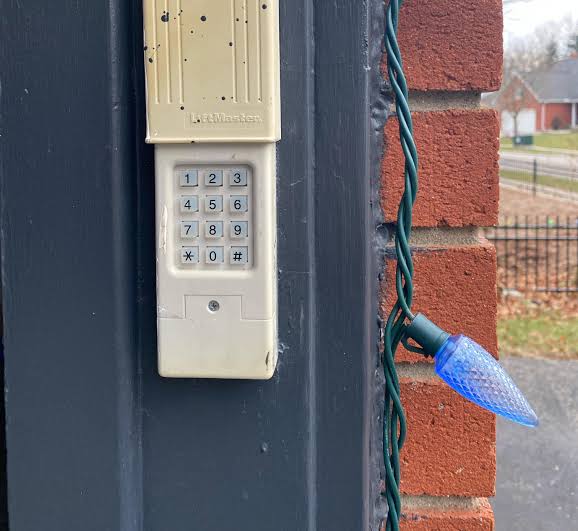
We have all been there: you pull into the driveway, realize you forgot your remote, and panic sets in as you wonder if you can still secure your home. It is a frustrating scenario, but modern technology offers a reliable solution. Knowing how to close a garage door with a keypad is not just a convenience; it is a critical skill for maintaining home security and ensuring peace of mind when traditional access methods fail.
Whether you are dealing with a new installation or troubleshooting an existing system, this guide will walk you through the process with clarity and confidence. We will cover everything from basic operation to advanced troubleshooting, ensuring you never feel locked out again.
Understanding Your Garage Door Keypad System
Before diving into the specific steps, it is essential to understand how these systems work. Most wireless keypads operate on radio frequencies (typically 315 MHz or 390 MHz in the US) that communicate directly with your garage door opener’s receiver. Unlike smart apps that rely on Wi-Fi, keypads offer a direct, hardwired-level reliability without needing an internet connection.
According to industry standards, most keypads are designed for both opening and closing operations. However, safety features often require a secondary action to close the door if the safety sensors are obstructed or if the door was opened via a wall console rather than the keypad itself.
Expert Insight: “The majority of residential garage door issues stem from user error regarding safety sensor alignment rather than hardware failure. Always check your sensors first.” – International Door Association (IDA)
For a deeper understanding of the mechanical components involved, you can refer to the general overview of garage doors on Wikipedia.
Step-by-Step: How To Close A Garage Door With A Keypad
Closing your garage door using a keypad is generally straightforward, but the exact method depends on whether your door is currently open or partially closed. Follow these precise steps to ensure safe and successful operation.
Step 1: Locate and Wake Up the Keypad
Most outdoor keypads have a weather-resistant cover. Slide the cover up or down to reveal the number pad. Some models require you to press a specific button (often labeled “Enter” or a lock icon) to wake up the backlight before entering code.
Step 2: Enter Your Personal Identification Number (PIN)
Type in your unique 4-to-8 digit PIN. Ensure you press each button firmly. If your keypad has a backlight, it should flash or stay lit to indicate the code was accepted.
- Tip: If you have multiple users, ensure you are using the correct PIN assigned to your profile if your system supports user-specific tracking.
Step 3: Press the “Close” or “Enter” Button
This is the critical step where many users hesitate. After entering the PIN:
- Look for a button labeled “Close,” “Lock,” or simply “Enter.”
- Press and hold this button for 2–3 seconds. You should hear a click from the motor unit inside the garage.
- Release the button. The door should begin its descent immediately.
Step 4: Monitor the Descent
Stand clear of the door path. Watch the door as it closes. If the door reverses immediately after touching the ground, your limit settings may need adjustment. If it reverses before touching the ground, check your safety sensors.
Troubleshooting Common Keypad Issues
Even the best systems encounter glitches. Here is a breakdown of common problems and their solutions.
| Issue | Possible Cause | Solution |
|---|---|---|
| Keypad Unresponsive | Dead Batteries | Replace with fresh AA or AAA batteries. Check polarity. |
| Door Reverses Immediately | Obstructed Sensors | Clean the lens of the safety eyes near the floor. Ensure nothing blocks the beam. |
| Code Not Accepted | Incorrect PIN | Reset your PIN following the manufacturer’s manual. Ensure you aren’t hitting “Clear” by mistake. |
| Intermittent Signal | Frequency Interference | Move other wireless devices away from the opener. Reprogram the keypad to a new frequency if supported. |
Why Won’t My Keypad Close the Door?
If you enter the code and nothing happens, consider these three factors:
- Safety Sensor Alignment: The most common reason a door refuses to close is misaligned safety eyes. These small sensors near the floor must face each other directly. If the LED light on one sensor is blinking instead of solid, they are misaligned. Adjust them until both lights are steady.
- Travel Limit Settings: If the door thinks it is already closed, it won’t respond to a close command. You may need to adjust the travel limits on the motor unit itself.
- Lock Mode Enabled: Some smart openers have a “Vacation Mode” or “Lock Mode” that disables remote and keypad access for security. Check your main wall console or app to ensure this mode is disabled.
Security Best Practices for Keypad Users
Using a keypad is convenient, but it introduces potential security vulnerabilities if not managed correctly. Protect your home with these professional tips.
- Change Default Codes Immediately: Never use the factory-set PIN (often 1234 or 0000). Create a unique code that is not easily guessable, such as your birthdate or address.
- Avoid Simple Patterns: Do not use sequential numbers like 1234 or repeated digits like 1111. Hackers and opportunistic thieves often try these common combinations first.
- Regularly Update Your PIN: Change your code every 6–12 months, especially if you have had service technicians or house guests who knew the code.
- Shield Your Entry: When entering your code, use your body or hand to shield the keypad from view. Shoulder surfing is a real threat in densely populated neighborhoods.
Keypad vs. Remote vs. Smartphone App: Which Is Best?
Choosing the right access method depends on your lifestyle. Here is a quick comparison to help you decide.
- Keypad:
- Pros: No batteries to charge frequently, works without internet, easy for guests/delivery drivers.
- Cons: Can be exposed to weather, requires physical presence.
- Remote Control:
- Pros: Convenient from inside the car, long-range signal.
- Cons: Easy to lose, batteries die unexpectedly, no audit trail.
- Smartphone App:
- Pros: Control from anywhere, receive notifications, integrate with smart home ecosystems.
- Cons: Relies on Wi-Fi/internet, potential cybersecurity risks, learning curve for older users.
Verdict: For most homeowners, a hybrid approach is best. Use the keypad for daily entry and guest access, keep a remote in the car for convenience, and use the app for monitoring when away from home.
FAQ Section
1. Can I close my garage door with a keypad if the power is out?
No. Most standard garage door openers require electricity to operate the motor. If the power is out, you must use the manual release cord (usually a red rope hanging from the opener rail) to disconnect the door from the motor and lift it manually. The keypad will not function without power to the motor unit.
2. How do I reset my garage door keypad code?
The process varies by brand, but generally involves:
- Locating the “Learn” button on the motor unit inside the garage.
- Pressing and holding the “Learn” button until the indicator light blinks.
- Entering your new PIN on the keypad within 30 seconds.
- Pressing “Enter” to save. Always consult your specific model’s manual for exact steps.
3. Is it safe to leave my garage door keypad code visible?
It is not recommended to write your code on the keypad itself. However, hiding the keypad under a fake rock or in an obscure location is also risky if discovered. The best practice is to memorize your code and ensure the keypad cover is always closed when not in use to prevent wear and tear from weather elements.
4. Why does my keypad work to open the door but not close it?
This is often a safety feature. If the door was opened using a wall switch inside the garage, some openers require you to press the wall switch again to close it, disabling remote/keypad closing for safety. Additionally, check if the safety sensors are blocked, as this will prevent closing regardless of the input method.
5. Can I add a keypad to an old garage door opener?
Yes, in most cases. As long as your opener has a “Learn” button (common in models manufactured after 1993), you can purchase a universal wireless keypad compatible with your brand (Chamberlain, LiftMaster, Genie, etc.). Ensure the frequency matches your opener’s specifications.
6. How often should I replace the batteries in my keypad?
Typically, keypad batteries last between 1 to 2 years, depending on usage and temperature extremes. Cold weather can significantly reduce battery life. If you notice the backlight dimming or the response time slowing down, it is time to replace the batteries proactively.
Conclusion
Learning how to close a garage door with a keypad empowers you to take control of your home’s security and accessibility. By following the steps outlined above—entering your PIN, pressing the close button, and monitoring the sensors—you can ensure smooth operation every time. Remember to maintain your system by checking sensor alignment and updating your codes regularly.
Don’t let a forgotten remote ruin your day. With a properly configured keypad, you always have a secure way to enter and exit your home.
Found this guide helpful? Share it with your neighbors on Facebook or Twitter to help them secure their homes too! Stay safe and stay connected.
Leave a Reply