Introduction
There is nothing quite as unsettling as realizing your garage door security might be compromised, whether you have lost a remote, moved into a new home, or suspect unauthorized access. If you are searching for how to clear all codes from LiftMaster garage door opener systems, you are taking the correct first step toward reclaiming your peace of mind and home safety. This comprehensive guide will walk you through the exact reset procedures with empathy and precision, ensuring even complete beginners can secure their property without calling a technician.
Why You Need to Reset Your LiftMaster Opener
Before diving into the technical steps, it is vital to understand why this process matters. According to industry security standards, previous owners, tenants, or service personnel may still possess active transmitters that grant entry to your home. Unlike changing a physical lock, garage door openers rely on digital handshakes that persist until manually erased.
Resetting your system does not just remove old remotes; it establishes a fresh security baseline. This is particularly crucial because modern garage door openers utilize rolling code technology that, while secure, still requires user management to remain effective against physical theft of transmitters.
How Do I Clear All Codes From My LiftMaster Garage Door Opener?
This is the most critical section of our guide. The method varies slightly depending on whether your unit has a standard “Learn” button or a dual-band frequency system. Below is the universal master reset procedure applicable to most Security+ 2.0 and older models.
Step-by-Step Master Reset Instructions
Follow these steps precisely to ensure a complete wipe of all paired devices:
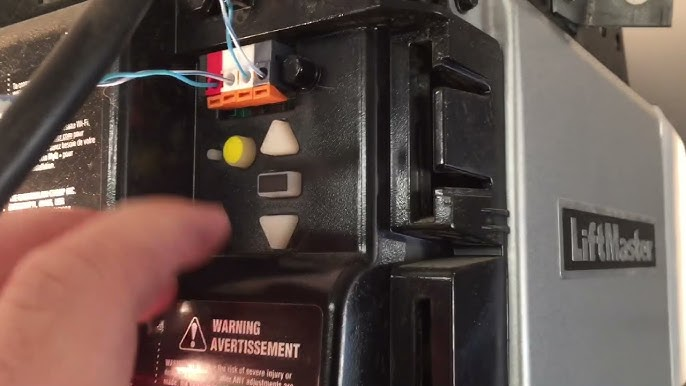
- Locate the Learn Button: Find the colored square button on the back or side of the motor unit. It is typically yellow, orange, red, or purple. Remove the light lens cover if necessary.
- Press and Hold: Press and hold the Learn button down firmly. Do not release it immediately.
- Wait for the LED Indicator: Continue holding for approximately 6 to 10 seconds. The LED light next to the button will turn on, then eventually go out completely.
- Release the Button: Once the LED turns off, release the Learn button. This confirms that all remote controls, keyless entry pads, and MyQ accessories have been erased from memory.
- Test the System: Try using an old remote. The door should not respond. If it does, repeat the process, ensuring you held the button long enough for the light to extinguish.
⚠️ Safety Warning: Never attempt to adjust the travel limits or force settings during this process. Only interact with the Learn button and antenna area. Always keep hands clear of moving parts.
What Is the Difference Between Clearing Codes and Reprogramming?
Many homeowners confuse “clearing” with “reprogramming.” Understanding this distinction saves time and frustration.
| Feature | Clearing All Codes | Reprogramming a Remote |
|---|---|---|
| Purpose | Erases every device from memory | Adds a single new device |
| Button Action | Hold Learn button 6–10 seconds | Press & release Learn button once |
| LED Behavior | Light turns ON then OFF | Light blinks or stays solid briefly |
| Result | Factory-fresh security state | One additional active transmitter |
| When to Use | Lost remote, new ownership, security breach | Adding a car visor clip or spare remote |
Key Takeaway: Always clear first if security is a concern, then reprogram only the devices you currently own and trust.
How Do I Reset Specific Devices After Clearing All Codes?
Once you have successfully learned how to clear all codes from LiftMaster garage door opener units, your system is essentially blank. You must now re-add authorized devices. Here is the optimized workflow:
Re-pairing Standard Remotes
- Press and release the Learn button (LED will illuminate or blink).
- Within 30 seconds, press and hold the button on your remote control.
- Release when the motor unit lights flash or you hear two clicks.
- Test immediately.
Re-pairing Wireless Keypads
- Enter your desired 4-digit PIN on the exterior keypad.
- Press and hold the ENTER button.
- While holding ENTER, press and release the Learn button on the motor unit.
- Release the ENTER button when the opener lights flash.
Re-pairing MyQ Smart Devices
MyQ hubs and smart garage controllers require a slightly different handshake. After clearing codes, press the Learn button twice quickly before initiating the pairing sequence in the MyQ app. This signals the opener to accept Wi-Fi-enabled accessories rather than standard RF remotes.
Common Mistakes When Resetting LiftMaster Openers
Even experienced DIYers encounter issues. Avoid these frequent pitfalls:
- Releasing Too Early: Holding the Learn button for only 2–3 seconds merely puts the unit into programming mode; it does not erase codes. You must wait for the LED to turn off.
- Ignoring Battery Issues: Weak batteries in remotes can cause failed reprogramming attempts that mimic a failed reset. Replace all transmitter batteries before starting.
- Forgetting Exterior Keypads: Many users clear the motor unit but forget that some older keypads store independent memory. Consult your keypad manual for its specific reset procedure.
- Not Testing All Entry Points: After resetting, verify that every entry method (wall console, remotes, keypad, smartphone) functions correctly before considering the job complete.
Expert Tips for Maintaining Garage Door Security
Clearing codes is reactive; true security is proactive. Industry professionals recommend the following best practices:
- Annual Code Audit: Reset and reprogram your system once per year, even without known incidents.
- Use Rolling Code Technology: Ensure your opener uses Security+ 2.0 or newer. Fixed-code openers manufactured before 1996 are vulnerable to code grabbing and should be replaced entirely.
- Disable Unused Transmitters: If you have four remotes but only use two, do not program the extras. Store them unpaired.
- Monitor MyQ Activity Logs: Smart openers provide access history. Review logs monthly for unrecognized entries.
Frequently Asked Questions (FAQ)
Q1: Will clearing all codes delete my wall-mounted control panel?
No. The hardwired wall console is not a wireless transmitter and does not use the Learn button memory. It will continue to function normally after a full code clear. Only wireless devices (remotes, keypads, MyQ) are affected.
Q2: How do I know if my LiftMaster uses Security+ 2.0?
Check the color of the Learn button. A yellow Learn button indicates Security+ 2.0 technology. Orange, red, purple, or green buttons indicate older rolling-code or fixed-code systems. The reset procedure remains identical, but compatibility with newer accessories differs.
Q3: Can someone else reprogram my opener after I clear it?
Only if they have physical access to the motor unit’s Learn button. The Learn button is intentionally located inside the garage to prevent external tampering. This is why securing interior garage access is equally important to digital security.
Q4: My opener has no Learn button. How do I clear codes?
Units without a Learn button are likely pre-1993 fixed-code models using DIP switches. These cannot be digitally cleared. Instead, you must physically change the switch positions on both the motor unit and every remote to create a new code combination. Consider upgrading to a modern rolling-code system for superior security.
Q5: How often should I clear and reset my garage door codes?
Security experts recommend performing a full reset annually, immediately upon moving into a new home, after losing any remote, or following any suspected security incident. Regular resets eliminate dormant access points accumulated over time.
Q6: Does clearing codes affect the auto-reverse safety sensors?
Absolutely not. Photo-eye sensors and auto-reverse mechanisms are hardwired safety systems independent of the wireless receiver memory. Your door’s compliance with federal safety standards remains intact throughout the reset process.
Conclusion
Learning how to clear all codes from LiftMaster garage door opener systems is one of the most impactful yet overlooked home security tasks you can perform. By following the step-by-step master reset procedure outlined above, you eliminate unauthorized access points, establish a clean security foundation, and gain confidence in your home’s protection. Remember: annual resets, proper device management, and understanding the difference between clearing and reprogramming are the pillars of lasting garage door security.
Found this guide helpful? Share it with friends, family, or neighbors who might be unknowingly vulnerable. Tag us on social media or forward this article to someone who recently moved into a new home — a simple share could prevent a break-in. Your community’s safety starts with informed homeowners like you. 🔒🏡
Leave a Reply