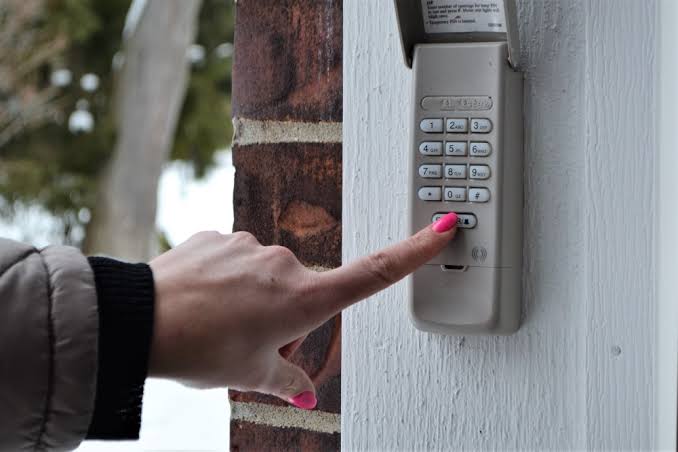
Worrying about your home’s security is completely normal, especially when you suspect someone might know your entry code or you have just moved into a new house. It is a common scenario that catches many new homeowners off guard, leaving them feeling vulnerable and stressed about their property’s safety. If you find yourself asking, “How To Change The Password On My Garage Door Opener,” you are not alone, and fixing it is much easier than you might think. Let’s walk through the simple, actionable steps to secure your garage, protect your valuable belongings, and give you total peace of mind without spending a fortune on professional service calls.
How To Change The Password On My Garage Door Opener: Step-by-Step Guide
When it comes to home safety, taking immediate action is always the best approach. Changing your entry code is a straightforward process, but it requires a bit of attention to detail and the right tools. Whether you have a chain-drive, belt-drive, or screw-drive system, the logic behind the security keypad remains largely the same across major brands like Chamberlain, LiftMaster, and Genie.
Before you begin, you will need a sturdy step ladder, a flashlight, and your new desired code. Safety first! Ensure the ladder is placed on a flat, stable surface and stands at least 3 feet away from any moving mechanical parts or the door tracks.
Here is the exact, step-by-step process to update your security code:
- Locate the “Learn” Button: Grab your ladder and carefully look at the main motor unit mounted on your ceiling. You are looking for a small button, often labeled “Learn,” “Smart,” or “Program.” It is typically located on the back or side panel, near the hanging antenna wire. The button color usually indicates the radio frequency of your unit (common colors are yellow, red, purple, or orange).
- Press the Learn Button: Press and quickly release the Learn button. Do not hold it down, as holding it for too long will erase all remote controls from the system’s memory! Once pressed, an LED indicator light will turn on and stay lit for exactly 30 seconds. This is your programming window.
- Enter Your New PIN: Quickly go to your external wall keypad. Within that 30-second window, type in your desired 4-digit PIN. Make sure you press the buttons firmly.
- Confirm the Code: After typing the four digits, press and hold the “ENTER” or “SEND” button. Hold it firmly for 3 to 5 seconds until the motor unit’s LED light blinks or you hear a distinct mechanical click from the ceiling unit.
- Test the System: Step back to a safe distance of 5 feet and enter your new code to ensure the door opens and closes smoothly without hesitation.
If the light blinks or clicks, congratulations! You have successfully updated your security perimeter.
How to Reset a Keypad Without the Old Password
What if you bought a new house and do not know the current code? Or maybe you simply forgot it after a long vacation? Do not panic. You can still perform a factory reset to regain access without needing the old credentials.
To wipe the old memory, you need to access the motor unit again.
- First, locate the “Learn” button as described above.
- Instead of a quick tap, press and hold the Learn button for exactly 10 seconds.
- Watch the LED indicator light carefully. It will turn on, and then it will turn off.
- When the light goes out, all previously programmed keypads, car visor remotes, and wireless entry systems have been completely erased from the system’s memory.
Now, you can follow the standard 4-step programming guide above to set a brand new master password. Remember, because you wiped the memory, you will need to reprogram your car visor remotes and handheld clickers as well!
Smart Garage Door Openers vs. Traditional Keypads
Upgrading your home security often brings up the debate between modern smart devices and classic hardware. Both have their unique advantages, and understanding them can help you make the best choice for your lifestyle.
According to the history of the Garage door opener, modern units have evolved significantly from simple pull-cords to advanced Wi-Fi-enabled security hubs that integrate seamlessly with smart home ecosystems.
Let’s look at a quick comparison table to help you decide which system is right for your daily routine:
| Feature | Traditional External Keypad | Smart Wi-Fi Garage Controller |
|---|---|---|
| Cost | Low ($20 – $40) | Moderate ($100 – $150) |
| Setup | Requires ladder & manual button pressing | App-based setup via smartphone |
| Remote Access | No (only local PIN entry) | Yes (open/close from anywhere globally) |
| Guest Access | Must share the main PIN with guests | Can grant temporary, expiring digital keys |
| Battery Life | 1 to 2 years (standard 9V battery) | Plugged into USB or standard wall outlet |
| Internet Reliance | Works perfectly during Wi-Fi outages | Requires stable internet for remote features |
While smart openers offer incredible convenience and real-time alerts, traditional keypads remain highly reliable and do not rely on your home’s internet connection to function.
Tips for Creating a Strong Garage Door PIN
Your code is the first line of defense for your home and your family. Treat it with the exact same level of respect you give your front door deadbolt or your online banking password.
According to a recent security survey by the Electronic Security Association (ESA), nearly 30% of homeowners never change their default garage door codes, leaving them highly vulnerable to opportunistic neighborhood break-ins.
“Changing your access code every six months is a simple yet highly effective deterrent against unauthorized entry,” notes David Reynolds, a certified home security specialist and locksmith.
Here are some golden rules for picking a highly secure PIN:
- Avoid obvious numbers: Never use your house number, birth year, anniversary date, or simple sequences like 1-2-3-4 or 0-0-0-0.
- Use a memorable pattern: Try using the numerical equivalent of a word that means something to you on a phone dial pad, but isn’t easily guessed by neighbors or delivery drivers.
- Change it seasonally: Make it a strict habit to update your code when you change your smoke detector batteries or adjust your clocks for daylight saving time.
Common Troubleshooting Issues
Sometimes, technology does not cooperate on the first try. If your keypad is not responding or the door refuses to open after entering your new code, here are a few quick and easy fixes.
- Check the Battery: The most common culprit is a dead or weak battery. Most keypads use a standard 9-volt alkaline battery. Replace it with a premium brand and try programming again.
- Clean the Buttons: Dirt, pollen, and debris can get stuck under the rubber membrane over time. Wipe the keypad down with a slightly damp cloth and mild dish soap.
- Check the Range: Make sure you are standing within 2 to 3 feet of the door while entering the code. Standing too far back can cause signal dropouts.
- Inspect the Antenna: Ensure the thin wire antenna hanging from the motor unit is pointing straight down towards the floor and is not tangled, cut, or tucked inside the metal casing.
Frequently Asked Questions (FAQ)
1. How often should I change my garage door PIN? For optimal security, you should update your PIN every 6 to 12 months. You should also change it immediately if you lose a remote control, move into a new house, hire temporary contractors, or suspect someone has observed you entering the code.
2. What happens if I forget my new garage door password? If you forget the code, you will need to perform a hard reset on the motor unit by holding the “Learn” button for 10 seconds. This wipes the internal memory completely, allowing you to program a fresh code from scratch.
3. Can I use the same PIN for my car’s built-in garage opener? No, your car’s built-in system (like HomeLink or Car2U) uses a separate radio frequency signal, not the keypad PIN. However, you will need to press the “Learn” button on the motor unit to sync your car’s transmitter after a full system reset.
4. Do I need a ladder to change the password? Yes, in most cases. The main “Learn” button is located on the ceiling-mounted motor unit. Unless you have a modern smart Wi-Fi controller that allows digital resets via a mobile app, a sturdy step ladder is absolutely required.
5. Why did my remote stop working after I changed the password? If you held the “Learn” button for too long during the reset process, you likely erased all paired devices from the system. You will simply need to press the Learn button once and quickly press the button on your handheld remote to re-sync it to the main unit.
6. Is it safe to use my home address as my PIN? Absolutely not. Using your address, birth year, or any publicly available information makes it incredibly easy for intruders to guess your code. Always use a randomized, non-sequential 4-digit number that has no personal connection to your public identity.
Conclusion
Securing your home does not require expensive security systems, monthly monitoring fees, or professional installers. Knowing exactly How To Change The Password On My Garage Door Opener empowers you to take control of your family’s safety in just a few minutes. By following these simple, actionable steps, maintaining strong codes, and troubleshooting minor issues yourself, you ensure your home remains a safe, impenetrable haven for years to come. Regular maintenance of your entry codes is just as important as checking your smoke detectors or locking your front windows.
If you found this comprehensive guide helpful, please share it with your friends, neighbors, and family on social media! Helping a loved one secure their home is one of the best, most practical gifts you can give. Have you successfully updated your garage door code today? Did you run into any unique troubleshooting steps? Let us know about your experience in the comments below, and stay safe!
Leave a Reply