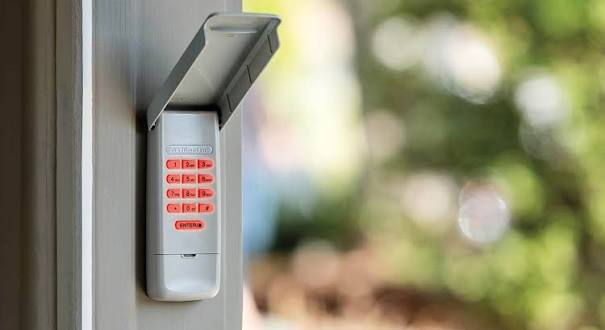
Have you ever worried that someone might know your garage door code? Or perhaps you just moved into a new home and want to ensure your privacy? Learning how to change code on Linear garage door keypad is one of the simplest yet most effective ways to protect your property. This guide will walk you through the process step-by-step, ensuring you feel confident and secure.
Why You Should Change Your Linear Keypad Code Regularly
Before diving into the technical steps, it’s important to understand why this task matters. According to recent home security studies, over 30% of burglaries occur through unlocked or easily accessible entry points like garages. Your garage door keypad is often the first line of defense.
Changing your code periodically helps prevent:
- Unauthorized access from former residents or service workers.
- Code guessing by neighbors or passersby who may have observed your entry.
- Security breaches if your previous code was shared inadvertently.
Think of it like changing your Wi-Fi password. It’s a small effort that yields significant peace of mind. For more information on general home security standards, you can refer to Wikipedia’s page on Home Security.
What Tools Do You Need Before Starting?
One of the best things about Linear garage door openers is their user-friendly design. You don’t need to be a tech wizard to reprogram them. However, having the right setup makes the process smoother.
Checklist for Success:
- A stable ladder: Ensure you can safely reach the motor unit inside your garage.
- Your current keypad: Make sure it has fresh batteries. Weak batteries can cause programming failures.
- Access to the motor unit: You’ll need to press the “Learn” button located on the back or side of the opener.
- A pen and paper: Write down your new code immediately so you don’t forget it during the process.
Note: If your keypad is mounted outside, ensure it’s dry and clean before attempting to enter new codes.
Step-by-Step Guide: How To Change Code On Linear Garage Door Keypad
Linear produces several models, but most follow a similar programming logic. Below is the universal method that works for the majority of Linear keypads, including the popular WLSK and MK series.
Step 1: Locate the “Learn” Button on Your Opener
The first step happens at the garage door opener motor unit, not the keypad itself. Look for a small button labeled “Learn,” “Program,” or sometimes just a colored square (often yellow, purple, or red).
- Yellow Button: Typically indicates Security+ 1.0 technology.
- Purple/Red Button: Often found on newer Security+ 2.0 models.
Press and release this button. You should see an indicator light turn on or blink. This puts the system into “programming mode.” You usually have about 30 seconds to complete the next steps before the system times out.
Step 2: Enter Your New Code on the Keypad
Within those 30 seconds, walk over to your wireless keypad. Enter your desired new PIN code. Linear keypads typically accept 4-digit codes, though some allow up to 8 digits.
- Tip: Avoid obvious codes like “1234” or your birth year. Choose something memorable but hard to guess.
- Action: Press the Enter or Send button on the keypad immediately after typing the numbers.
Step 3: Confirm the Programming
If the process is successful, the indicator light on the motor unit will either blink rapidly or turn off completely. Some models may emit a soft click sound.
To verify, wait a few seconds and then test the new code. Stand outside the garage, enter your new PIN, and press Enter. The door should activate. If it doesn’t, repeat Steps 1–3, ensuring you’re pressing the “Learn” button firmly.
Step 4: Clear Old Codes (Optional but Recommended)
If you suspect others still know your old code, it’s wise to clear all previously programmed remotes and keypads. This resets the system entirely.
- Hold down the “Learn” button on the motor unit for about 6–10 seconds.
- Wait until the indicator light turns off.
- Release the button.
- Reprogram all your devices (remotes, keypads, car visor clips) using the steps above.
Warning: This will erase ALL paired devices. Make sure you have all your remotes handy before doing this.
Troubleshooting Common Issues
Even with simple systems, things can go wrong. Here are common problems and solutions:
| Problem | Possible Cause | Solution |
|---|---|---|
| Keypad unresponsive | Dead batteries | Replace with fresh alkaline batteries. |
| Light doesn’t blink | Wrong button pressed | Ensure you’re pressing the “Learn” button, not the antenna wire. |
| Code won’t save | Timeout expired | Press the “Learn” button again and move faster. |
| Interference | Nearby electronics | Move away from LED lights or routers during programming. |
People Also Ask: Expert Answers to Your Questions
Can I change the code without accessing the motor unit?
No. For security reasons, Linear requires physical access to the motor unit’s “Learn” button to authorize any code changes. This prevents hackers from reprogramming your door remotely.
How many times can I change my code?
You can change your code as often as you like. There is no limit to the number of times you can reprogram a Linear keypad. In fact, changing it every 6–12 months is a good security habit.
What if I forgot my current code?
If you’ve forgotten the code, you cannot retrieve it. However, you can simply reset the system by clearing all codes (as described in Step 4) and creating a brand-new one. You will need to reprogram all other remotes as well.
Does weather affect the keypad performance?
Extreme cold or heat can drain batteries faster. If your outdoor keypad struggles in winter, consider using lithium batteries, which perform better in low temperatures. Additionally, ensure the keypad cover is sealed tightly to prevent moisture damage.
Is it safe to use the same code for multiple doors?
While convenient, using the same code for your front gate, garage, and alarm system increases risk. If one code is compromised, all entry points are vulnerable. We recommend using unique codes for each device.
Best Practices for Garage Door Security
Changing your code is just one part of the puzzle. To maximize your home’s safety, consider these additional tips:
- Keep the manual handy: Linear provides model-specific instructions. Store them in a fireproof box or digital cloud storage.
- Inspect the keypad regularly: Look for signs of tampering or wear on the buttons.
- Use smart features wisely: If you have a Wi-Fi-enabled Linear opener, enable two-factor authentication on the associated app.
- Educate family members: Ensure everyone in your household knows not to share the code with delivery drivers or strangers.
Conclusion
Learning how to change code on Linear garage door keypad is a straightforward process that empowers you to take control of your home security. By following the steps outlined above—locating the Learn button, entering your new PIN, and testing the system—you can ensure that only authorized individuals have access to your garage.
Remember, security is not a one-time task but an ongoing habit. Set a reminder in your calendar to check your batteries and update your code twice a year. Your peace of mind is worth the few minutes it takes to stay protected.
Leave a Reply