Introduction
Losing access to your garage or worrying about outdated security can be incredibly stressful for any homeowner. If you are wondering how to change code on garage door keypad Overhead Door models use, you are in the right place. This simple, step-by-step guide will help you regain control, protect your property, and boost your home’s security in just a few minutes.
Why You Should Regularly Update Your Garage Door Keypad Code
Your garage door is often the largest and most vulnerable entry point to your home. According to recent home security studies, nearly 30% of residential burglaries involve unauthorized access through a garage. Regularly updating your keypad code is a fundamental defense mechanism.
You should especially consider a code change if:
- You recently moved into a new home.
- You lost a keypad or suspect it was compromised.
- A contractor or house sitter no longer needs access.
- It has been more than 12 months since your last update.
Modern garage door openers utilize rolling code technology, which dynamically changes the access signal every time the door is activated. This prevents “code grabbers” from intercepting and replaying your signal. However, the static PIN you type on the keypad still requires manual, periodic updates to maintain maximum security.
What You Need Before Programming Your Overhead Door Keypad
Before you begin, gather the following items to ensure a smooth, uninterrupted process:
- A sturdy step ladder: To safely reach the motor unit mounted on your garage ceiling.
- A fresh battery: Most Overhead Door keypads use a 9V or two AA alkaline batteries. Pro tip: For optimal electronic performance during programming, ensure the battery is fresh and the ambient temperature is between 22–28°C (71–82°F).
- Your owner’s manual: Helpful for identifying specific button colors or locations on your exact model.
- A pen and paper: To write down your new 4-digit PIN before you start.
Step-by-Step: How To Change Code On Garage Door Keypad Overhead Door
Follow these concrete, easy-to-follow steps to successfully reprogram your wireless keypad.
Step 1: Locate the “Learn” or “Program” Button
Climb your step ladder and locate the motor unit of your garage door opener. Look for a small button labeled “Learn,” “Program,” or “Smart.” This button is typically colored red, purple, orange, or green and is situated near the hanging antenna wire.
Step 2: Clear the Old Memory (Optional but Recommended)
If you want to erase all previously programmed remotes and keypads (highly recommended for new homeowners), press and hold the “Learn” button for about 6–10 seconds. Release it only when the indicator LED light turns off. Warning: This will erase all connected devices, and you will need to reprogram them.
Step 3: Initiate Programming Mode on the Motor Unit
Press and release the “Learn” button once. The indicator LED will illuminate or begin to blink, signaling that the unit is in programming mode. You typically have 30 seconds to complete the next step before the mode times out.
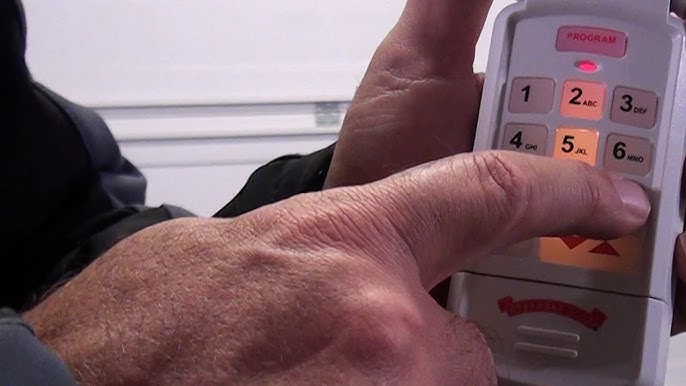
Step 4: Enter Your New PIN on the Keypad
Walk over to your external wireless keypad. Type in your new 4-digit PIN. Security best practice: Avoid obvious sequences like 1234, 0000, or your birth year.
Step 5: Sync the Keypad with the Opener
Immediately after entering the PIN, press and hold the “Enter” or “Program” button on the keypad for 3 seconds. Release the button. You should see the keypad’s LED light blink, confirming it has sent the signal to the motor unit.
Step 6: Test the New Code
Wait for the motor unit’s LED light to stop blinking or turn off. Then, walk back to the keypad, enter your new 4-digit PIN, and press “Enter.” The garage door should activate and move accordingly. If it does, congratulations—you have successfully learned how to change code on garage door keypad Overhead Door systems!
Overhead Door Keypad Models: Intellicode vs. Standard
Not all Overhead Door openers are identical. Understanding your system type helps prevent programming errors. Below is a quick comparison to help you identify your setup.
| Feature | Intellicode® Models (Modern) | Standard Fixed-Code Models (Older) |
|---|---|---|
| Security Level | High (Rolling code technology) | Low (Static, easily copied code) |
| Programming Method | Single “Learn” button press | Multiple DIP switch alignments |
| Keypad Compatibility | Requires Intellicode-compatible keypad | Requires universal fixed-code keypad |
| Indicator Light | Solid or blinking LED during sync | Often lacks a modern LED indicator |
Note: If your system uses tiny physical switches (DIP switches) inside both the motor and the keypad, you must manually match the switch positions (up/down) to change the code, rather than using a “Learn” button.
Troubleshooting Common Keypad Programming Issues
Even with careful execution, minor hiccups can occur. Here is how to resolve the most frequent problems:
- The keypad light does not turn on: Replace the battery. Ensure the battery terminals are clean and the battery is inserted with the correct polarity.
- The motor unit light blinks, but the door does not move: You may have missed the 30-second window. Return to the motor unit, press the “Learn” button again, and re-enter the PIN on the keypad more quickly.
- The code works intermittently: Check for wireless interference. Large metal objects, LED light bulbs, or nearby Wi-Fi routers can occasionally disrupt the 315–390 MHz frequency used by garage door openers.
- The “Learn” button is unresponsive: Ensure the garage door opener is plugged in and that the circuit breaker has not tripped.
Frequently Asked Questions (FAQ)
Q1: Can I change the keypad code without accessing the motor unit?
A: No. For critical security reasons, you must physically press the “Learn” button on the motor unit to authorize any new keypad. This prevents unauthorized individuals from programming their own devices from the outside.
Q2: How many wireless keypads can I program to one Overhead Door opener?
A: Most modern Overhead Door openers can support between 3 to 4 wireless keypads, alongside multiple handheld remote controls. Check your specific model’s manual for the exact capacity.
Q3: What should I do if I forget my newly programmed code?
A: Unfortunately, there is no “backdoor” to retrieve a forgotten PIN. You will need to repeat the clearing process (Step 2) and program a brand-new 4-digit code from scratch.
Q4: Does changing the keypad code affect my existing handheld remote controls?
A: If you only program a new keypad without holding down the “Learn” button to clear the memory, your existing remotes will continue to work perfectly. If you clear the memory, you must reprogram all remotes as well.
Conclusion
Knowing how to change code on garage door keypad Overhead Door models is an essential skill for every homeowner. By taking just five minutes to update your PIN, you significantly reduce the risk of unauthorized access, protect your valuables, and gain invaluable peace of mind. Remember to choose a unique, non-sequential code and test it thoroughly before stepping away from the garage.
Found this guide helpful? Share this article on Facebook, Twitter, or Pinterest to help your friends, family, and neighbors keep their homes safe and secure!
Leave a Reply