If your garage code has been shared, forgotten, or you simply want better security, learning How To Change Code On Craftsman Garage Door Opener is essential. Many homeowners don’t realize that updating the access code regularly helps prevent unauthorized entry and keeps your home safer.
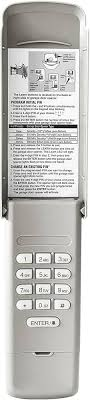
The good news is that changing the code on a Craftsman garage door opener is straightforward and doesn’t require advanced technical skills. With a few simple steps, you can reset and reprogram your system in minutes.
What Is a Craftsman Garage Door Opener?
A Craftsman garage door opener is a motorized system that allows you to open and close your garage door using a remote control or keypad.
Read too: Tc1 Tricode Garage Door Opener Remote W/ Clip Chamberlain: Complete Guide
These systems operate using radio frequency communication between the opener unit and access devices. For a general understanding of how garage door systems work, you can refer to this overview:
https://en.wikipedia.org/wiki/Garage_door_opener
Why Changing Your Garage Code Matters
Updating your garage code improves security and prevents:
- Unauthorized access from shared codes
- Break-ins using old or leaked PINs
- Signal hacking or code grabbing devices
- Access from lost or stolen remotes
Security experts often recommend changing access codes every 6–12 months for optimal protection.
Can You Change the Code on a Craftsman Garage Door Opener?
Yes — you can easily change the code on a Craftsman garage door opener without replacing the entire system.
Most Craftsman systems store access data inside the motor unit, meaning you can erase old codes and program a new one directly from the opener.
This process typically takes 5–10 minutes and requires physical access to the garage ceiling motor.
Step-by-Step: How To Change Code On Craftsman Garage Door Opener
Follow these steps carefully to successfully update your garage access code.
Step 1: Locate the Motor Unit
Go to your garage and find the main opener unit mounted on the ceiling. It usually includes:
- Light cover
- Antenna wire
- Control panel
Make sure the power is connected before proceeding.
Step 2: Find the “Learn” Button
Open the light cover or side panel and locate the LEARN button.
Depending on the model, it may be:
- Red
- Yellow
- Purple
- Green
This button is essential for resetting and reprogramming the system.
Step 3: Erase Old Codes
To remove all previous access codes:
- Press and hold the LEARN button for 6–10 seconds
- Wait until the LED light turns off
- Release the button
This action clears all stored remotes and keypad codes from memory.
Step 4: Program a New Code
Now you can set a new code:
- Enter your desired 4-digit PIN on the keypad
- Press and hold the ENTER button
- Wait for the garage light to blink or hear a click sound
- Release the button
Your new code is now saved in the system.
Step 5: Test the New Code
- Close your garage door
- Enter your new PIN
- Press ENTER
If the door opens, your new code is successfully programmed.
Troubleshooting Common Issues
Even though the process is simple, sometimes problems occur.
1. Keypad Not Responding
- Replace battery (usually 9V or CR2032)
- Check distance from motor unit
- Reprogram keypad again
2. Learn Button Not Working
- Unplug the opener for 30 seconds
- Plug it back in and retry
- Ensure power supply is stable
3. Code Not Saving
- Repeat full reset process
- Hold ENTER button longer (up to 15 seconds)
- Ensure no signal interference nearby
Pros and Cons of Changing Garage Code
| Pros | Cons |
|---|---|
| Improves home security | Requires physical access to motor |
| Prevents unauthorized entry | All devices must be reprogrammed |
| Quick process (under 10 min) | Risk of incorrect setup if rushed |
Expert Insight: Why Regular Code Changes Matter
According to cybersecurity principles used in smart home systems, access control devices like garage openers rely on rolling encryption signals to prevent unauthorized duplication.
This means changing your code regularly reduces the risk of signal capture or replay attacks, especially in older systems.
Security Tips for Craftsman Garage Openers
After learning How To Change Code On Craftsman Garage Door Opener, follow these safety tips:
- Use random 4-digit combinations
- Avoid birthdays or simple sequences (1234, 0000)
- Change codes every 6 months
- Do not share PINs with multiple users
- Disable unused remotes
When Should You Reset Instead of Just Changing Code?
You should perform a full reset if:
- You lost all remotes
- You suspect security breach
- The keypad is malfunctioning
- You bought a used garage opener system
Resetting clears all stored data, while changing the code only updates access settings.
FAQ: How To Change Code On Craftsman Garage Door Opener
1. How often should I change my Craftsman garage code?
Experts recommend every 6–12 months for better security.
2. Will changing the code delete my remote controls?
Yes, if you perform a full reset using the Learn button, all remotes will need reprogramming.
3. Do I need Wi-Fi to change the garage code?
No. Craftsman garage door openers operate using radio frequency, not internet.
4. What if my Learn button is not working?
Try unplugging the unit for 30 seconds, then reconnect and try again. If it still fails, the board may need servicing.
5. Can I change the code without accessing the motor unit?
No. Physical access to the motor is required for security reasons.
6. Why is my new code not working?
This usually happens if the programming step was interrupted. Repeat the setup and hold the ENTER button longer.
Conclusion
Learning How To Change Code On Craftsman Garage Door Opener is one of the easiest ways to improve your home security. With just a few minutes of effort, you can reset access, protect your garage, and ensure only trusted users can enter.
Regular code updates help prevent unauthorized access and give you peace of mind.
If this guide helped you, consider sharing it with friends or family who also use Craftsman garage systems — it might help them secure their homes too.
Leave a Reply