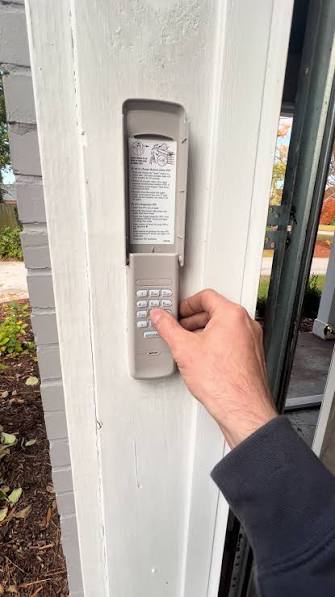
Have you ever worried that someone might know your garage door code? Perhaps a former neighbor, a contractor who finished work months ago, or even a family member who moved out still has access to your garage. Learning how to change code on Craftsman garage door opener keypad is one of the simplest yet most effective ways to enhance your home security. This guide will walk you through the process clearly and safely, ensuring your garage remains secure without any technical hassle.
Why Changing Your Keypad Code Matters for Home Security
Before diving into the technical steps, it is crucial to understand why regular code updates are essential. Many homeowners set their garage door codes once and never change them again. This practice creates a significant vulnerability. According to security experts, garages are among the most common entry points for burglars because they often provide direct access to the main house.
A static code that has been shared with delivery personnel, babysitters, or previous residents poses a risk. By changing your code periodically, you ensure that only authorized individuals can enter. Furthermore, if you suspect your code has been compromised, immediate action is necessary. The peace of mind that comes from knowing your garage is secure is invaluable.
Identifying Your Craftsman Garage Door Opener Model
Not all Craftsman garage door openers operate the same way. The method to reset or change the code depends largely on the age and model of your unit. Craftsman has produced several generations of openers, and distinguishing between them is the first critical step.
Older Models (Pre-2011)
Older models typically use dip switches or simple “Learn” buttons. These units often have a colored button (yellow, red, purple, or orange) located on the motor unit hanging from the ceiling. If your opener was installed before 2011, it likely uses fixed codes or early rolling code technology.
Newer Models (2011–Present)
Newer Craftsman openers use advanced Security+ 2.0 technology. These models feature a “Learn” button that is usually yellow, purple, or red, but the programming process is more streamlined. They communicate with keypads using encrypted signals, making them harder to hack but requiring specific steps to sync new devices.
To identify your model, look at the motor unit. There should be a label with the model number and serial number. You can also check the color of the “Learn” button, as this dictates the programming procedure.
| Model Era | Learn Button Color | Technology Type | Programming Complexity |
|---|---|---|---|
| Pre-2005 | Red or Orange | Fixed Code | Low |
| 2005–2010 | Yellow or Purple | Rolling Code | Medium |
| 2011–Present | Yellow, Purple, or Red | Security+ 2.0 | Medium-High |
If you cannot find the model number, consult your owner’s manual. If the manual is lost, many manufacturers provide digital copies online based on the serial number. For more detailed technical specifications on garage door safety standards, you can refer to Wikipedia’s page on Garage Door Openers, which provides historical context and technical evolution of these devices.
Step-by-Step Guide: How to Change Code on Craftsman Garage Door Opener Keypad
Now that you have identified your model, follow these precise steps to change your keypad code. Please note that safety is paramount. Ensure the garage door area is clear of people and objects before beginning.
Step 1: Locate the “Learn” Button
Climb a sturdy ladder to access the motor unit mounted on your garage ceiling. Look for the “Learn” button. It is typically located near the antenna wire hanging down from the unit. The button may be covered by a light lens cover in some models. Pressing this button will erase all previously programmed remotes and keypads, so be prepared to reprogram all your devices afterward.
Step 2: Erase Existing Codes
Press and hold the “Learn” button for approximately 6–10 seconds until the indicator light next to it turns off. This action clears the memory of the opener. Release the button once the light goes out. This step is crucial because it ensures that old codes, including the one you want to change, are no longer valid.
Step 3: Program the New Keypad Code
- Enter Your New Code: On your wireless keypad, enter your desired new PIN code. Choose a 4-digit number that is easy for you to remember but difficult for others to guess. Avoid obvious sequences like “1234” or “0000.”
- Press the “Learn” Button Again: Return to the motor unit and press the “Learn” button briefly. The indicator light should illuminate or blink, signaling that the opener is ready to receive a new signal.
- Sync the Keypad: Within 30 seconds of pressing the “Learn” button, go back to your keypad. Enter your new PIN code again, followed immediately by the “Enter” or “Send” button. Some models require you to hold the “Enter” button for a few seconds.
- Confirm Success: Watch the motor unit. The light should blink or turn off, indicating that the code has been accepted. You may also hear a click from the motor unit.
Step 4: Test the New Code
Wait for the motor unit light to stop blinking. Then, test your new code by entering it on the keypad. The garage door should activate. If it does not, repeat Steps 2 and 3, ensuring you are within the 30-second window.
Step 5: Reprogram Other Remotes
Since erasing the memory removed all other devices, you must now reprogram your car remotes and any additional handheld remotes. Follow the same process: press the “Learn” button on the motor unit, then press the button on your remote within 30 seconds. Repeat for each device.
Troubleshooting Common Issues
Even with careful following of instructions, issues can arise. Here are solutions to common problems:
- Keypad Not Responding: Check the battery in your keypad. A weak battery is the most common cause of failure. Replace it with a fresh 9-volt or AA battery, depending on your model.
- Light Blinks but Door Doesn’t Move: Ensure you are pressing the “Enter” button on the keypad after entering the code. Also, verify that the safety sensors at the bottom of the garage door tracks are aligned and unobstructed.
- Code Won’t Save: Make sure you are pressing the “Learn” button on the motor unit before entering the code on the keypad, not after. Timing is critical in the 30-second window.
- Interference from Other Devices: LED light bulbs in the garage opener can sometimes interfere with radio signals. If you recently changed to LED bulbs, try switching back to incandescent bulbs temporarily to see if this resolves the issue.
Best Practices for Choosing a Secure Garage Door Code
Choosing the right code is just as important as programming it correctly. Here are some expert tips:
- Avoid Personal Information: Do not use birth years, anniversaries, or address numbers. These are easily guessable.
- Use Random Numbers: Select a random 4-digit sequence. Write it down initially if needed, but store it securely.
- Change Regularly: Consider changing your code every 6–12 months, or immediately after anyone who knew the old code no longer needs access.
- Share Wisely: Only share your code with trusted individuals. If you hire a service provider, consider giving them a temporary code if your system supports it, or change the code after their work is complete.
FAQ Section
Q1: Can I change the code without erasing all other remotes?
On most older Craftsman models, no. Pressing the “Learn” button erases all memory. However, some newer Security+ 2.0 models allow you to add new devices without erasing existing ones by simply pressing the “Learn” button and syncing the new device. Check your specific manual to confirm if your model supports “adding” versus “resetting.”
Q2: What if I forgot my current code?
If you forgot your code, you must reset the system entirely. Follow the steps above to erase the memory using the “Learn” button on the motor unit. This will clear the forgotten code and allow you to set a new one. You will need to reprogram all remotes and keypads.
Q3: How often should I change my garage door code?
Security experts recommend changing your garage door code at least once a year. Additionally, change it immediately if you suspect it has been compromised, such as after moving into a new home, after a breakup, or after employing contractors who had access.
Q4: My keypad works intermittently. Is it broken?
Intermittent operation is usually due to low batteries or signal interference. First, replace the batteries. If the problem persists, check for nearby electronic devices that might cause interference. If neither solves the issue, the keypad itself may be faulty and need replacement.
Q5: Can I use a smartphone app instead of a keypad?
Many newer Craftsman openers are compatible with the MyQ app, which allows you to control your garage door via smartphone. This can be a more secure and convenient alternative to a physical keypad, as you can grant and revoke access remotely. Check if your model is MyQ-compatible.
Q6: What do I do if the “Learn” button doesn’t work?
If the “Learn” button is unresponsive, ensure the opener is plugged in and receiving power. Check the circuit breaker. If power is confirmed, the logic board inside the motor unit may be faulty. In this case, contact Craftsman customer support or a professional technician for repair or replacement.
Conclusion
Learning how to change code on Craftsman garage door opener keypad is a straightforward process that significantly boosts your home security. By following the steps outlined above, you can ensure that only authorized individuals have access to your garage. Remember to identify your model correctly, erase old codes properly, and choose a strong, random PIN.
Regularly updating your code and maintaining your keypad batteries will keep your system running smoothly. Don’t wait for a security breach to take action. Take control of your home safety today.
If you found this guide helpful, please share it on social media to help friends and family secure their homes too. Your network will thank you for the valuable tip!
Leave a Reply