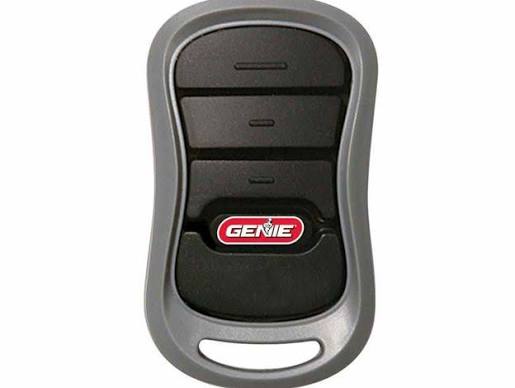
Losing or breaking your garage door remote can be a frustrating experience, leaving you wondering about the hassle and expense of getting a new one. If you are asking how much to replace a garage door opener remote, you will be relieved to know that it is often a quick and affordable fix. This comprehensive guide will walk you through the exact costs, types of remotes available, and simple steps to get your garage working smoothly again without breaking the bank.
How Much To Replace A Garage Door Opener Remote: 2026 Cost Breakdown
The cost of replacing a garage door remote varies based on the type of remote you choose and whether you install it yourself or hire a professional. On average, homeowners spend between $15 and $100 for a complete replacement.
Here is a realistic breakdown of what you can expect to pay in the current market:
- Universal Remotes ($15 – $40): These are the most budget-friendly options. They are designed to work with most major brands and are widely available at local hardware stores.
- OEM Remotes ($30 – $60): Original Equipment Manufacturer remotes are made by the same company that built your opener (e.g., LiftMaster, Chamberlain, Genie). They guarantee perfect compatibility.
- Smart Garage Controllers ($30 – $100+): These devices connect to your home Wi-Fi, allowing you to open and monitor your garage via a smartphone app. They often include advanced security and notification features.
- Professional Programming/Installation ($50 – $100): If you are not comfortable handling the setup yourself, a local garage door technician can program the new remote for a modest service fee.
Universal vs. OEM Remotes: Which Should You Choose?
Choosing between a universal and an OEM remote is a common dilemma for homeowners. To help you make an informed decision, here is a quick comparison of their core features:
| Remote Type | Average Cost | Compatibility | Best For |
|---|---|---|---|
| Universal Remote | $15 – $40 | High (Most major brands) | Budget-conscious homeowners needing a quick fix. |
| OEM Remote | $30 – $60 | Exact (Specific brand only) | Users wanting guaranteed compatibility and seamless setup. |
| Smart Controller | $30 – $100+ | Varies (Requires Wi-Fi) | Tech-savvy users and smart home ecosystem integration. |
Universal Remotes: Pros and Cons
- Pros: Highly affordable, widely available, and often capable of controlling up to three different garage doors.
- Cons: May require more complex programming steps, and some highly secure or older openers might not support them.
OEM Remotes: Pros and Cons
- Pros: Guaranteed compatibility, straightforward programming, and consistent, durable build quality.
- Cons: Slightly more expensive and usually only available through specific dealers or the manufacturer’s official website.
Step-by-Step Guide to Programming Your New Remote
Programming a new garage door remote is easier than most people think. You do not need any special tools, just a sturdy ladder and about five minutes of your time. Follow these concrete steps to sync your new remote safely:
- Locate the “Learn” Button: Find the motor unit of your garage door opener. Look for the “Learn” or “Smart” button. It is typically located on the back or side of the motor housing and is usually colored yellow, red, purple, or green.
- Clear Old Codes (Recommended): Press and hold the “Learn” button for about 6 to 10 seconds until the indicator LED turns off. This wipes the memory clean, ensuring no old, lost, or stolen remotes can access your garage.
- Activate Programming Mode: Press the “Learn” button once briefly and release it. The indicator LED will illuminate or start blinking, signaling that the unit is ready to receive a new code.
- Sync the Remote: Within 30 seconds, press and hold the button on your new remote that you want to use. Hold it for 2 to 3 seconds, then release.
- Confirm Success: The motor unit’s LED will blink, or you will hear two distinct clicks from the mechanism. This confirms the remote is successfully programmed. Test it immediately by pressing the button to open and close the door.
Note: Always refer to your specific manufacturer’s manual. Some older models (pre-1993) use physical DIP switches inside the remote that must be manually matched to the switches on the motor unit.
Security Considerations for Your Garage Remote
When replacing your remote, security should be a top priority. Modern garage door openers use advanced encryption to prevent unauthorized access. According to Wikipedia’s documentation on garage door openers, modern systems utilize rolling code technology, which changes the access code every single time the remote is used. This makes it nearly impossible for thieves to intercept and replicate the signal.
If your current opener is more than 15 years old and uses fixed DIP-switch codes, it may be vulnerable to “code grabbing” attacks. In such cases, investing in a new opener with Security+ 2.0 or similar rolling code features is a wise long-term decision for your home’s safety.
When to Call a Professional
While DIY replacement is straightforward, there are specific scenarios where calling a professional is the best route:
- Your garage door opener is an outdated model that no longer supports modern, secure remotes.
- You want to integrate your garage with a smart home ecosystem (like Amazon Alexa or Google Home) and need help configuring the Wi-Fi bridge.
- The remote is not the actual issue, but the opener’s receiver board is faulty. A technician can accurately diagnose this for a standard $50–$100 service call.
Frequently Asked Questions (FAQ)
1. Can I use a universal remote for any garage door opener?
Most universal remotes are designed to work with the majority of major brands manufactured after 1993, including LiftMaster, Chamberlain, Genie, and Craftsman. However, they may not be compatible with very old models (pre-1993) or exclusive proprietary commercial systems. Always check the packaging for a detailed compatibility list before purchasing.
2. How long does a garage door remote battery last?
On average, a standard 3V CR2032 coin-cell battery in a garage door remote lasts between 1 to 3 years, depending on usage frequency. If you notice the remote only works when you are standing very close to the door, it is likely time for a battery replacement, which typically costs less than $5.
3. Is it cheaper to buy a remote online or at a hardware store?
Buying online (e.g., Amazon, manufacturer websites) is often cheaper and offers a much wider selection of universal and OEM remotes. However, purchasing from a local hardware store like Home Depot or Lowe’s provides the advantage of immediate availability and the ability to ask store associates for hands-on compatibility advice.
4. Can I replace just the remote, or do I need a whole new opener?
You can absolutely replace just the remote. There is no need to purchase a completely new garage door opener unless the motor unit itself is failing, making excessive grinding noises, or lacking modern safety features like auto-reverse photoelectric sensors.
5. How do I know if my remote is broken or just has a dead battery?
First, replace the battery with a brand-new, high-quality one. If it still does not work, try reprogramming it from scratch. If the remote fails to program, the internal circuit board may be physically damaged. You can also test if the wall-mounted button inside the garage works; if it does, the issue is isolated entirely to the handheld remote itself.
Conclusion
Replacing a lost or broken garage door remote does not have to be a stressful or expensive endeavor. By understanding exactly how much to replace a garage door opener remote, you can confidently choose between a budget-friendly universal option or a premium OEM model. With just a few minutes of DIY programming, you can restore convenience, reliability, and security to your daily routine.
If you found this guide helpful, please share it on social media with friends, family, and neighbors who might be struggling with their own garage door woes. Your simple share could save someone time, money, and a lot of everyday frustration!
Leave a Reply