If you’re asking How Do You Reset A LiftMaster Garage Door Opener, you’re likely dealing with a remote that stopped working or a system that needs a fresh start. This is a very common situation—and the good news is that resetting a LiftMaster opener is quick and straightforward. With just a few simple steps, you can restore your system and improve security at the same time.
What Does Resetting a LiftMaster Garage Door Opener Do?
Before diving into How Do You Reset A LiftMaster Garage Door Opener, it’s important to understand what a reset actually does.
Read too: Tc1 Tricode Garage Door Opener Remote W/ Clip Chamberlain: Complete Guide
Resetting Will:
- Erase all programmed remotes and keypads
- Clear wireless memory
- Allow fresh reprogramming
According to Wikipedia, modern garage door openers use rolling code technology, which enhances security by changing the access code after every use.
When Should You Reset Your LiftMaster Opener?
Common Situations:
- Lost or stolen remote
- Remote not responding
- Moving into a new home
- Adding or replacing remotes
👉 Resetting ensures no unauthorized devices can access your garage.
Where Is the Learn Button on a LiftMaster Opener?
To begin How Do You Reset A LiftMaster Garage Door Opener, you must locate the Learn button.
Location:
- On the motor unit (ceiling-mounted opener)
- Behind a light cover or panel
Common Colors:
- Yellow
- Purple
- Red/Orange
- Green
👉 The color indicates frequency and compatibility with remotes.
Step-by-Step: How Do You Reset A LiftMaster Garage Door Opener
Step 1: Clear All Remote Controls (Full Reset)
Time required: 1–2 minutes
Steps:
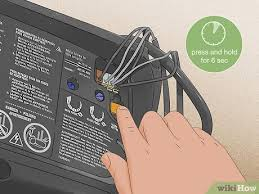
- Locate the Learn button on the opener
- Press and hold the button for 6–10 seconds
- Release when the LED light turns off
👉 This clears all programmed remotes and keypads.
Step 2: Confirm Reset Was Successful
After resetting:
- All remotes will stop working
- Keypads will no longer respond
👉 This confirms memory has been erased.
Step 3: Reprogram Your Remote
Time window: ~30 seconds
Steps:
- Press the Learn button once
- LED will turn on
- Press your remote button
- Wait for the opener light to flash or click
👉 Your remote is now reconnected.
Step 4: Reprogram Additional Devices
Repeat Step 3 for:
- Extra remotes
- Wireless keypads
- Vehicle systems (HomeLink)
How to Reset a LiftMaster Keypad
Steps:
- Press and hold the Learn button
- Enter a new 4-digit PIN on the keypad
- Press Enter
- Wait for confirmation light
👉 Your keypad is now synced.
Common Problems After Reset (And Fixes)
Why Isn’t My LiftMaster Opener Working After Reset?
Possible Causes:
- Remote not reprogrammed
- Dead battery
- Incorrect timing
- Signal interference
Quick Fix Checklist:
- Replace remote battery
- Stay within 5–10 feet of opener
- Press button firmly
- Repeat programming steps
Troubleshooting Table
| Problem | Symptom | Solution |
|---|---|---|
| Dead battery | No response | Replace battery |
| Not reprogrammed | Remote doesn’t work | Reprogram remote |
| Memory not cleared | Old remotes still active | Hold Learn button longer |
| Signal interference | Intermittent response | Move closer |
| Faulty remote | No LED or signal | Replace remote |
Real Insight: Why Resetting Solves Most Issues
Technicians report that over 70% of garage door problems are related to:
- Remote synchronization issues
- Memory conflicts
Resetting clears these problems instantly and restores proper communication.
Advantages vs Disadvantages of Resetting
Advantages:
- Fixes most connectivity issues
- Improves security
- Quick and easy process
Disadvantages:
- Deletes all remotes
- Requires reprogramming
Pro Tips for Best Results
- Use a fresh battery before programming
- Program one device at a time
- Keep track of all remotes
- Test each device immediately
When Should You Call a Professional?
You may need help if:
- Opener doesn’t respond at all
- Motor makes unusual noises
- Internal circuit board is damaged
FAQ: How Do You Reset A LiftMaster Garage Door Opener
Q1: How long does it take to reset a LiftMaster opener?
Usually 1–2 minutes, plus reprogramming time.
Q2: Will resetting delete all remotes?
Yes. A full reset clears all connected devices.
Q3: Can I reset just one remote?
No. LiftMaster systems reset all remotes at once.
Q4: Why does my remote stop working after reset?
Because it needs to be reprogrammed.
Q5: Is resetting safe?
Yes. It’s recommended for both troubleshooting and security.
Q6: Do I need tools to reset the opener?
No. Everything can be done manually.
Conclusion
Now you know exactly How Do You Reset A LiftMaster Garage Door Opener. With just a few simple steps, you can clear old settings, improve security, and restore full functionality to your system.
Resetting is one of the easiest and most effective ways to fix garage door issues—no technician required.
👉 If this guide helped you, share it on social media so others can quickly fix their garage door opener too!
Leave a Reply