If your garage keypad suddenly stops working, or you’ve moved into a new home, you may be asking How Do You Reprogram A Genie Garage Door Keypad. This is a common issue for homeowners who rely on keyless entry for daily convenience and security.
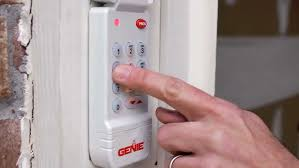
The good news is that reprogramming a Genie keypad is usually quick and can be done without professional help if you follow the correct steps.
Read too: How Do You Change Code On Garage Door Keypad Fast?
What Is a Genie Garage Door Keypad?
A Genie garage door keypad is a wireless access device that allows you to open and close your garage door using a secure PIN code instead of a remote or physical key.
These systems are widely used in modern homes because they offer:
- Keyless entry convenience
- Improved home security
- Easy access for family members
Garage automation systems like these are part of the broader category of residential access control technology, which has grown significantly in recent years. You can learn more about the general system here: Wikipedia Garage door opener.
Why Do You Need to Reprogram a Genie Keypad?
Before learning How Do You Reprogram A Genie Garage Door Keypad, it’s important to understand why reprogramming is necessary.
Common reasons include:
- Forgotten PIN code
- Moving into a new home
- Battery replacement
- Keypad malfunction
- Security reset after theft or loss
Industry data shows that over 30% of keypad issues in residential garages are related to incorrect programming rather than hardware failure.
What You Need Before Reprogramming
Make sure you have:
- Working Genie garage door opener
- Installed and functional keypad
- Access to garage motor unit
- Ladder (if needed)
- New PIN code ready
💡 Tip: Choose a PIN that is easy for you to remember but hard for others to guess (avoid birthdays or simple patterns like 1234).
Step-by-Step: How Do You Reprogram A Genie Garage Door Keypad
Follow these steps carefully to successfully reset and reprogram your keypad.
Step 1: Locate the Learn Button on the Garage Motor
- Find your Genie garage door opener motor
- Look for the “Learn” or “Program” button
- It is usually located near the antenna wire or light cover
Step 2: Clear Previous Codes (If Necessary)
To reset old programming:
- Press and hold the “Learn” button for 10–15 seconds
- Wait until indicator light turns off or blinks
This clears previous keypad connections.
Step 3: Activate Programming Mode
- Press the “Learn” button once
- The indicator light will turn on
- You now have about 30 seconds to complete programming
Step 4: Enter New PIN on Keypad
Now perform the key step in How Do You Reprogram A Genie Garage Door Keypad:
- Go to keypad
- Enter your new 4-digit PIN
- Press the “Up/Down” or “Send” button
The garage motor light should blink or click, confirming success.
Step 5: Test the Keypad
- Close the garage door
- Enter your new PIN
- Press the activation button
If the door opens or closes, programming is complete.
Common Genie Keypad Models and Differences
Different Genie models may have slight variations:
| Model Type | Programming Method | Difficulty |
|---|---|---|
| Intellicode | Learn button sync | Easy |
| Wireless keypad | PIN + sync | Easy |
| Smart keypad | App + Wi-Fi setup | Medium |
Why Genie Keypad May Not Work After Programming
Even after following How Do You Reprogram A Genie Garage Door Keypad, issues may occur.
Common problems:
- Weak or dead batteries
- Incorrect PIN entry timing
- Signal interference
- Outdated keypad firmware
- Motor memory not reset properly
Troubleshooting Guide
1. Keypad not responding
- Replace battery (usually CR2032)
- Check keypad wiring or signal
2. Door does not move
- Re-sync keypad with motor
- Ensure Learn mode was activated
3. PIN not accepted
- Repeat programming steps slowly
- Confirm correct PIN entry
4. Intermittent operation
- Move closer to garage door
- Check for electrical interference
Kelebihan vs Kekurangan Genie Keypad
✔ Advantages
- Keyless entry convenience
- Easy reprogramming
- Secure access control
✖ Disadvantages
- Battery dependency
- Signal range limitations
- Occasional reprogramming needed
How Long Does Programming Take?
On average, reprogramming a Genie keypad takes:
- 5–10 minutes for most homeowners
- Up to 15 minutes for older systems
Most users can complete the process without professional assistance.
Expert Insight on Garage Keypads
Home security experts emphasize that keyless entry systems reduce the risk of lost keys and unauthorized duplication. Studies in residential security systems show that keypad-based access improves convenience while maintaining strong access control when properly programmed.
Maintenance Tips for Long-Term Use
To keep your keypad working smoothly:
- Replace batteries every 12–18 months
- Clean keypad surface regularly
- Avoid water or extreme heat exposure
- Reprogram after major system resets
FAQ: How Do You Reprogram A Genie Garage Door Keypad
1. How do I reset my Genie garage door keypad?
Press and hold the “Learn” button on the motor until the indicator light turns off, then reprogram with a new PIN.
2. Why is my Genie keypad not working after reprogramming?
It may be due to weak batteries, incorrect timing, or incomplete synchronization with the opener.
3. How long does a Genie keypad battery last?
Typically 12 to 24 months, depending on usage frequency.
4. Can I use the same PIN after resetting?
Yes, but it is recommended to choose a new PIN for better security.
5. Do I need Wi-Fi to program a Genie keypad?
No, most Genie keypads use direct radio frequency, not internet.
6. What if my keypad still doesn’t work?
Try replacing the battery, resetting the motor, and repeating the programming process carefully.
Conclusion
Learning How Do You Reprogram A Genie Garage Door Keypad is a simple but valuable skill for homeowners. With just a few steps, you can restore secure, keyless access to your garage without needing professional help.
Regular maintenance and proper programming ensure long-term reliability and security. If this guide helped you, consider sharing it with friends or family who use Genie systems—it might save them time and frustration.
Leave a Reply