Introduction
There is nothing quite as frustrating as sitting in your driveway, rain pouring down, realizing you cannot remember how to sync your vehicle’s built-in transmitter with your home’s entry system. If you are asking yourself, “How do you program your car to your garage door?” you are certainly not alone; this is one of the most common automotive maintenance questions for new homeowners and used car buyers alike. Fortunately, modern vehicles use standardized protocols that make this process straightforward once you understand the specific method required for your make and model. This comprehensive guide will walk you through every step, ensuring you achieve a secure, reliable connection without needing to call a professional technician.
Understanding Vehicle-to-Garage Communication Protocols
Before pressing any buttons, it is vital to understand that not all systems communicate in the same language. Most North American vehicles manufactured after 1998 utilize one of two primary integrated remote systems: HomeLink or Car2U. Identifying which system your vehicle uses is the first step in answering the question of how do you program your car to your garage door successfully.
According to industry data from Gentex Corporation (the manufacturer of HomeLink), over 85% of new vehicles sold in the United States come equipped with integrated transmitters. However, the programming logic differs significantly between older “fixed-code” openers and newer “rolling-code” security systems.
| Feature | Fixed-Code Openers | Rolling-Code Openers | Smart Technology Openers |
|---|---|---|---|
| Manufacture Era | Pre-1996 | 1996 – Present | 2017 – Present |
| Security Level | Low (Static Signal) | High (Changing Signal) | Highest (Encrypted/Wi-Fi) |
| Programming Steps | 1-Step Sync | 2-Step Sync + Learn Button | App-Based or Bridge Required |
| Common Brands | Genie/LiftMaster (Old) | Chamberlain/Craftsman | MyQ / Aladdin Connect |
Understanding these distinctions prevents wasted time. For instance, attempting a fixed-code sequence on a rolling-code opener will fail repeatedly. For a deeper technical understanding of radio frequency transmission standards used in these devices, readers can refer to the Wikipedia entry on garage door opener technology, which outlines the evolution of dip switches to encrypted rolling codes.
Step-by-Step: Programming HomeLink Systems
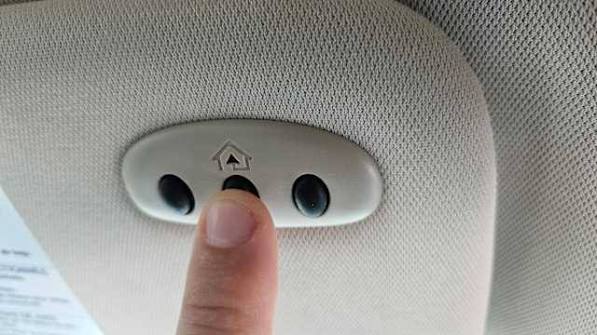
HomeLink is the dominant standard in the US market. If your vehicle has three buttons located on the rearview mirror, overhead console, or visor, you likely have this system. Below is the definitive tutorial on how do you program your car to your garage door using HomeLink.
Phase 1: Clearing Previous Codes
Always start with a clean slate, especially if you purchased a used vehicle.
- Locate the two outer HomeLink buttons.
- Press and hold them simultaneously for 10–20 seconds.
- Release when the indicator light begins to flash rapidly. This confirms memory is erased.
Phase 2: Training the Vehicle Transmitter
This step teaches your car the unique signal of your handheld remote.
- Sit in the driver’s seat with the ignition in the “ON” or “ACC” position (engine off is usually sufficient, but check your manual).
- Hold your original garage remote 1–3 inches away from the HomeLink button you wish to program.
- Simultaneously press and hold both the HomeLink button and your handheld remote button.
- Watch the HomeLink indicator light. It will flash slowly at first, then rapidly once trained. This typically takes 5–30 seconds.
- Release both buttons. Test by pressing the programmed HomeLink button once; the garage door should activate.
Phase 3: Synchronizing Rolling-Code Openers
If your door did not open in Phase 2, or if it opened but stopped immediately, you have a rolling-code opener requiring extra synchronization.
- Locate the “Learn” or “Smart” button on your actual garage motor unit (usually on the back or side panel).
- Press and release the Learn button. You typically have 30 seconds to complete the next step.
- Return to your vehicle and firmly press and hold the programmed HomeLink button for 2 seconds, then release. Repeat this press-hold-release cycle up to 3 times.
- The garage door should now operate correctly via your vehicle.
Alternative Method: Programming Car2U Systems
Some Ford, Lincoln, and Subaru models use Car2U instead of HomeLink. The query “how do you program your car to your garage door” requires a different approach for these vehicles because they lack the initial training phase with a handheld remote.
- Press and hold the two outer Car2U buttons for 20 seconds until the LED flashes green.
- Press the Learn button on your garage motor unit.
- Within 30 seconds, return to the car and press the desired Car2U button for 1 second.
- Wait for the garage door to move or the motor light to blink, confirming the link.
- Note: Car2U systems often require a compatibility bridge for newer Security+ 2.0 openers. Check your vehicle owner’s manual for specific bridge requirements.
Troubleshooting Common Programming Failures
Even when following instructions perfectly, users sometimes encounter issues. Here are expert-backed solutions to the most frequent obstacles when figuring out how do you program your car to your garage door.
- LED Flashes But Door Won’t Move: This almost always indicates an incomplete rolling-code sync. Repeat Phase 3 above, ensuring you press the vehicle button firmly and hold for the full 2-second duration.
- Signal Range Is Extremely Short: Weak batteries in your original handheld remote can corrupt the training signal. Replace the CR2032 battery in your hand remote before retraining the car, even if the hand remote still works independently.
- Intermittent Operation: Electrical interference from LED bulbs in the garage fixture can block RF signals. Swap to incandescent bulbs temporarily to test; if operation improves, install RF-shielded LED bulbs rated for garage openers.
- Vehicle Requires Ignition On: Some European luxury brands (BMW, Mercedes, Audi) require the engine to be running or ignition in “Run” position during programming due to CAN-bus power management. Always consult your specific owner’s manual.
Safety and Security Best Practices
Programming convenience should never compromise home security. Modern rolling-code technology changes the access code with every use, making signal interception nearly impossible. However, physical security remains paramount.
- Never Leave Remotes Visible: Even with rolling codes, a thief who gains physical access to your vehicle can press the programmed button. Use a sunshade or store valuables out of sight.
- Update Motor Firmware: If your opener supports Wi-Fi connectivity, ensure firmware is current to patch known vulnerabilities.
- Reprogram After Moving: When selling a home or buying a used car, always clear all previous codes to prevent unauthorized access by prior owners or tenants.
- Test Auto-Reverse Monthly: Place a 2×4 board on the floor under the door. The door must reverse upon contact. This safety feature is unrelated to programming but is critical for preventing injury.
Frequently Asked Questions (FAQ)
Can I program my car to my garage door without the original remote?
Generally, no. Integrated systems like HomeLink require cloning an existing signal. However, if your opener has a “Learn” button and your vehicle supports direct-to-motor pairing (rare, mostly newer Tesla and some GM models), you may bypass the handheld remote. Otherwise, purchase a compatible universal remote first, program it to the motor, then use it to train your car.
Why does my programmed button only work when the car is running?
This is a manufacturer-specific design choice, not a malfunction. Many vehicles limit transmitter power when in accessory mode to preserve battery life. BMW, Audi, and some Toyota models require the ignition in “ON” or engine running for full RF output. Consult your owner’s manual to confirm expected behavior.
How many garage doors can I program into my car?
Most HomeLink and Car2U systems support three independent channels. This allows you to program your primary garage, a detached workshop, and a community gate. Each button operates independently and can control different brands or frequencies simultaneously.
Will programming my car reset my existing wall-mounted keypad?
No. Programming a vehicle transmitter adds a new authorized device; it does not erase previously paired keypads, remotes, or smart home integrations. The only action that clears all devices is holding the “Learn” button on the motor unit for 10+ seconds until the LED goes out.
My garage opener is older than 1996. Can I still program my modern car?
Yes, but with limitations. Fixed-code openers use static DIP switch patterns that are less secure. While HomeLink can replicate these signals, experts strongly recommend upgrading to a rolling-code opener for security. If upgrading isn’t possible, follow the fixed-code programming sequence in your vehicle manual, which typically involves setting virtual DIP switches via button press combinations.
Does extreme weather affect programming success?
Temperature extremes can impact battery voltage in handheld remotes and RF component performance. If programming fails in very cold (<32°F/0°C) or hot (>100°F/38°C) conditions, attempt the process in a climate-controlled environment or wait for moderate temperatures. Lithium batteries perform better than alkaline in extreme conditions.
Conclusion
Mastering the answer to “How do you program your car to your garage door” empowers you with daily convenience and enhances your home’s functional integration. Whether you own a HomeLink-equipped sedan or a Car2U truck, the process follows logical, repeatable steps that prioritize security and reliability. By understanding your opener type, following precise timing sequences, and adhering to safety best practices, you eliminate frustration and gain seamless access for years to come.
Remember, technology evolves rapidly. If your current opener lacks rolling-code security or smart features, consider this programming session as motivation to upgrade to a modern system that offers both enhanced protection and easier vehicle syncing.
Found this guide helpful? Share it with friends, family, or neighbors who are struggling with their own garage door programming challenges! Tag us on social media or send this article to someone who just bought a new car or moved into a new home. Your share could save them hours of frustration and keep their home secure. Happy programming!
Leave a Reply