If your garage door remote suddenly stops working, or your system is acting unresponsive, you’re likely asking How Do I Reset My Genie Garage Door Opener in the simplest way possible. Many homeowners face this issue after power outages, battery changes, or remote replacement.
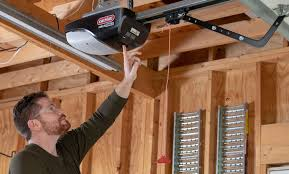
The good news is that resetting a Genie garage door opener is straightforward and can usually be done in just a few minutes without professional help.
Read too: Tc1 Tricode Garage Door Opener Remote W/ Clip Chamberlain: Complete Guide
What Is a Genie Garage Door Opener?
A Genie garage door opener is a motorized system that opens and closes your garage door using a remote control, keypad, or smart device. It uses advanced rolling code technology to ensure secure access.
Modern systems like Genie Intellicode improve security by changing the access code every time the remote is used. This prevents signal copying and unauthorized entry.
According to general wireless security principles explained by Wikipedia, rolling code systems are widely used in home automation because they significantly reduce hacking risks compared to fixed-code systems.
Why Do You Need To Reset Your Genie Garage Door Opener?
Before learning How Do I Reset My Genie Garage Door Opener, it’s important to understand the reasons behind it:
Common Reasons:
- Remote control stops working
- Power outage or surge
- Adding or removing remotes
- Keypad malfunction
- Security concerns (lost remote)
How Do I Reset My Genie Garage Door Opener (Step-by-Step)
Follow these instructions carefully for a successful reset.
Step 1: Locate the Program Button
Go to your garage motor unit (mounted on the ceiling).
Look for:
- A Program / Set button
- Usually near the antenna wire
- Sometimes labeled “Learn”
Step 2: Press and Hold the Program Button
- Hold the button for 10–15 seconds
- Watch for LED light changes
- Release when the light turns off or blinks
👉 This erases all stored remotes and keypads.
Step 3: Reprogram Your Remote
After reset, you must re-sync devices:
- Press the Program button once
- LED light turns on for 30 seconds
- Press your remote button for 2–3 seconds
- Wait for confirmation click or flash
Step 4: Test the System
- Wait 5–10 seconds
- Press remote again
- Confirm garage door responds
How Long Does It Take to Reset a Genie Garage Door Opener?
On average:
- Simple reset: 2–5 minutes
- Reset + reprogramming: 5–10 minutes
- Multiple devices: up to 15 minutes
Most homeowners can complete it quickly once familiar with the steps.
Types of Genie Garage Door Systems
1. Standard Remote System
- Basic wireless control
- Simple reset process
2. Intellicode System
- Rolling code security
- Higher protection level
3. Smart Wi-Fi Systems
- App-based control
- Remote access from smartphone
Genie Reset vs Reprogramming: What’s the Difference?
| Feature | Reset | Reprogram |
|---|---|---|
| Purpose | Clear memory | Add devices |
| Effect | Erases all remotes | Updates connection |
| Use Case | Security issue | New remote |
Common Problems After Resetting Genie Garage Opener
1. Remote Not Working
- Battery may be weak
- Programming not completed correctly
2. Door Not Responding
- Signal interference
- Sensors misaligned
3. Partial Function
- Incomplete reprogramming
- Timing errors
Expert Insight: Why Resetting Helps Security
Resetting your garage door opener removes all previously stored access codes. This is especially important if a remote is lost or stolen.
Home security experts recommend resetting garage systems immediately after ownership changes to prevent unauthorized access.
How To Reprogram After Reset
Once you complete the reset:
- Press Program button once
- Wait for LED light (30 seconds)
- Press remote button
- Wait for confirmation signal
Repeat for additional remotes if needed.
Maintenance Tips After Reset
To keep your Genie system working properly:
- Replace remote batteries every 12–18 months
- Test system monthly
- Keep sensors clean and aligned
- Avoid moisture exposure
Safety Tips Before Resetting Your Garage Opener
- Ensure garage door is closed
- Keep children away from moving parts
- Use stable ladder if needed
- Avoid pressing multiple buttons rapidly
FAQ: How Do I Reset My Genie Garage Door Opener
1. How do I reset my Genie garage door opener?
Press and hold the Program button for 10–15 seconds until the light turns off, then reprogram all remotes.
2. Why do I need to reset my Genie opener?
Resetting is needed when remotes stop working, after power outages, or for security reasons.
3. Will resetting delete all remotes?
Yes, it erases all programmed remotes and keypads.
4. How long does it take to reset a Genie garage door opener?
Typically 2–5 minutes, depending on how many devices you reprogram afterward.
5. Do I need Wi-Fi to reset my Genie system?
No, reset and basic programming work without internet connection.
6. What happens if reset does not work?
You may need to repeat the process or check for hardware issues like faulty buttons or sensors.
Conclusion
Learning How Do I Reset My Genie Garage Door Opener is essential for maintaining both convenience and security in your home. The process is quick, simple, and can restore full functionality in just a few minutes.
By understanding when and how to reset your system, you can prevent access issues and ensure smooth operation for years to come.
If this guide helped you, consider sharing it with friends or family who may also need help resetting their garage door opener.
Leave a Reply