Introduction
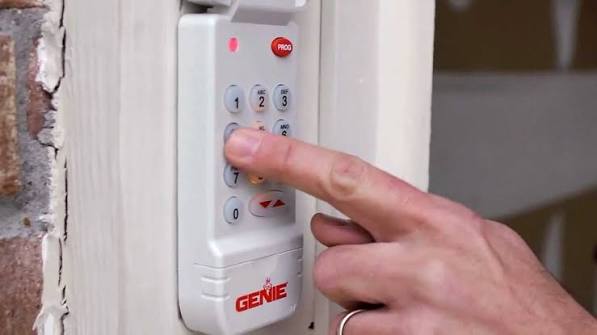
There are few things more frustrating than standing in your driveway, punching in your code, and watching your Genie keypad blink red instead of opening the door. Whether you have forgotten your PIN, moved into a new home, or suspect a security breach, knowing how do I reset my Genie garage door opener keypad is an essential homeowner skill. This comprehensive guide will walk you through the exact reset process safely and efficiently, ensuring you regain secure access to your garage without needing an expensive service call.
Why Would You Need to Reset Your Genie Keypad?
Before diving into the technical steps, it is helpful to understand why a reset might be necessary. Understanding the root cause can prevent future lockouts and improve your home security posture.
- Security After Moving: Previous owners or tenants may still have access codes. A factory reset ensures only authorized users can enter.
- Forgotten PIN Codes: Stress and busy schedules lead to memory lapses. Resetting allows you to establish a fresh, memorable code.
- Malfunctioning Electronics: Power surges or aging components can corrupt the keypad’s internal memory, requiring a hard reset to restore functionality.
- Adding New Users: While you can add codes, sometimes clearing old ones via a full reset is cleaner and more secure than managing a cluttered list of active PINs.
According to industry safety standards, regularly updating access codes is a best practice for residential security. For broader context on how these electromechanical systems integrate with home automation and security protocols, you can refer to general information on garage door openers to understand the underlying technology that makes wireless keypads possible.
Step-by-Step: How Do I Reset My Genie Garage Door Opener Keypad
This tutorial covers the most common Genie wireless keypad models (including the GK-R and G3T-R series). Always prioritize safety by keeping hands clear of moving door parts during programming.
Step 1: Locate the Learn Button on the Motor Unit
The reset process begins at the garage door opener motor head, not the keypad itself.
- Safely position a stepladder under the motor unit.
- Remove the light lens cover if necessary to access the control panel.
- Identify the “Learn” button. On most Genie units, this is a square button located near the antenna wire or behind the light lens. It may be labeled “Learn,” “Program,” or “Set.”
- Note the color of the LED indicator next to the button (usually blue, purple, or orange), as this confirms communication status.
Step 2: Clear Existing Keypad Codes
To perform a true reset, you must erase the current programming from the motor’s memory regarding the keypad.
- Press and hold the Learn button on the motor unit for approximately 10 seconds.
- Watch the LED indicator. It will typically flash or turn off completely, signaling that all remote and keypad codes have been erased.
- Release the button once the light changes state.
- Important: This clears all devices. You will need to reprogram your car remotes after this step.
Step 3: Reprogram the Wireless Keypad
Now that the slate is clean, program the keypad with a new PIN.
- Go to your exterior wireless keypad.
- Enter your desired 4-digit PIN. Choose a code that is easy to remember but hard to guess (avoid birthdays or sequential numbers like 1234).
- Immediately press and hold the “Send” or “Program” button on the keypad.
- Hold the button until the motor unit’s LED blinks or the door moves slightly. This usually takes 3–5 seconds.
- Release the button. The keypad light should stop flashing, indicating successful pairing.
Step 4: Test the New Code
Never assume the programming worked without verification.
- Wait at least 30 seconds before testing to allow the system to fully sync.
- Enter your new 4-digit PIN and press Send.
- Observe the door operation. It should open smoothly within 1–2 seconds of pressing Send.
- Test from various distances (up to 25 feet) to ensure signal strength is adequate.
Troubleshooting Common Reset Issues
Even with perfect instructions, hiccups happen. Use this table to diagnose problems quickly.
| Symptom | Probable Cause | Solution |
|---|---|---|
| Keypad lights flash but door doesn’t move | Dead batteries or weak signal | Replace with fresh alkaline batteries; check range |
| Motor LED never blinks during programming | Learn button not held long enough | Hold Learn button for full 10 seconds; verify power |
| Code accepted but door reverses immediately | Safety sensor misalignment | Check photo-eye sensors; ensure beam is unobstructed |
| Works intermittently | Radio frequency interference | Relocate keypad away from LED bulbs or Wi-Fi routers |
| No response at all | Keypad hardware failure | Inspect for water damage; consider replacement unit |
Pro Tip: If your keypad uses a 9-volt battery, replace it annually regardless of performance. Cold weather drastically reduces battery efficiency in outdoor electronics.
Best Practices for Keypad Security and Maintenance
Resetting your keypad is just the beginning. Maintaining security requires ongoing attention.
Choosing a Secure PIN
Avoid obvious patterns. Security experts recommend using a mnemonic device tied to a non-personal phrase rather than dates. Change your code every 6–12 months, or immediately after any personnel changes (contractors, house sitters, etc.).
Weatherproofing Your Keypad
Genie keypads are rated for outdoor use, but extreme conditions accelerate wear. Install the keypad under an eave or use a protective silicone cover if exposed to direct rain or snow. Inspect the rubber gasket around the battery compartment annually to prevent moisture intrusion.
Regular Functional Testing
Test your keypad monthly as part of routine garage door maintenance. This catches battery issues or signal degradation before they become emergencies. Combine this test with your safety reversal sensor check for comprehensive system health.
Frequently Asked Questions (FAQ)
Q1: Can I reset my Genie keypad without accessing the motor unit?
No. For security reasons, Genie designs require physical access to the motor’s Learn button to clear or add keypad codes. This prevents unauthorized individuals from resetting your system solely from the exterior keypad. If you cannot access the motor, contact a licensed technician.
Q2: How many PIN codes can a Genie keypad store?
Most standard Genie wireless keypads store one primary PIN for the main entry. Some advanced models support up to three separate user codes. Check your specific model’s manual for exact capacity. Regardless of capacity, always reset unused codes to maintain security hygiene.
Q3: Will resetting the keypad affect my car’s built-in garage opener?
Yes, if you perform a full system reset by holding the Learn button for 10+ seconds, all paired devices including car visor clips and built-in HomeLink systems will be erased. You will need to reprogram each device individually afterward. If you only want to change the keypad PIN without affecting other devices, some models allow PIN-only updates—consult your manual first.
Q4: My keypad works but the door stops halfway. Is this a keypad issue?
Typically, no. Mid-travel stoppages usually indicate safety sensor obstruction, force limit adjustment needs, or track binding. The keypad simply sends an open/close command; it does not control travel distance. Diagnose mechanical and sensor issues separately from keypad programming.
Q5: How often should I replace my Genie keypad batteries?
Replace batteries every 12 months as preventive maintenance, or immediately if you notice delayed response, dim indicator lights, or intermittent operation. Use only high-quality alkaline batteries; rechargeable varieties often provide inconsistent voltage that causes programming failures. Store spare batteries indoors to preserve shelf life.
Q6: Can weather damage cause permanent keypad failure?
Yes. While Genie keypads are weather-resistant, prolonged exposure to driving rain, ice accumulation, or UV radiation can degrade seals and corrode internal contacts. If your keypad shows visible corrosion, cracked housing, or persistent malfunction despite fresh batteries, replacement is safer than repeated repair attempts. Most replacement keypads cost under $40 and install in minutes.
Conclusion
Understanding how do I reset my Genie garage door opener keypad empowers you to maintain both convenience and security at your home’s most vulnerable entry point. By following the four-step reset process outlined above, troubleshooting common issues systematically, and adhering to security best practices, you can avoid costly service calls and enjoy reliable access for years to come. Remember that regular maintenance—battery replacements, seal inspections, and periodic code updates—is far less expensive than emergency repairs or security breaches.
If this guide helped you regain access to your garage, please share it with friends, family, or neighbors who might face the same frustrating lockout. A quick social media share could save someone hours of confusion and unnecessary expense. Have additional questions or unique Genie model quirks? Drop a comment below—we’re here to help keep your home secure and accessible.
Leave a Reply