Introduction
There are few things more frustrating than standing in your driveway, punching numbers into a keypad that simply refuses to respond. If you have ever asked yourself, “How do I reprogram my Genie garage door opener keypad?” you are not alone; this is one of the most common maintenance tasks for homeowners with Genie systems. Whether your batteries died, you moved into a new home, or the system glitched after a power outage, reprogramming is usually a quick fix that restores both security and convenience. This guide will walk you through the exact process safely and efficiently, ensuring you get back inside without calling a technician.
Understanding Your Genie Keypad Model
Before diving into the buttons, it is critical to identify which generation of hardware you own. Genie has manufactured garage door openers for decades, and the programming logic differs significantly between older fixed-code models and newer rolling-code technology. According to industry data, over 70% of residential garage door openers currently in use utilize rolling code technology to prevent signal theft, making accurate model identification the first step in successful reprogramming.
Identifying Intellicode vs. Fixed Code
- Intellicode (Rolling Code): Most Genie openers manufactured after 1995 use this technology. The keypad typically has a “Program” button and an LED indicator. These systems change the access code every time you use them, enhancing security.
- Fixed Code (Legacy): Older models (pre-1995) often use DIP switches or a simple learn button without an LED sequence. These are less secure and increasingly rare.
Expert Note: Always check the label on your motorhead unit or the back of the keypad itself. Matching the manual to your specific model prevents wasted effort. For a deeper understanding of how these security protocols evolved, you can refer to the Garage Door Opener entry on Wikipedia.org, which details the history of rolling code encryption standards.
Step-by-Step: How Do I Reprogram My Genie Garage Door Opener Keypad?
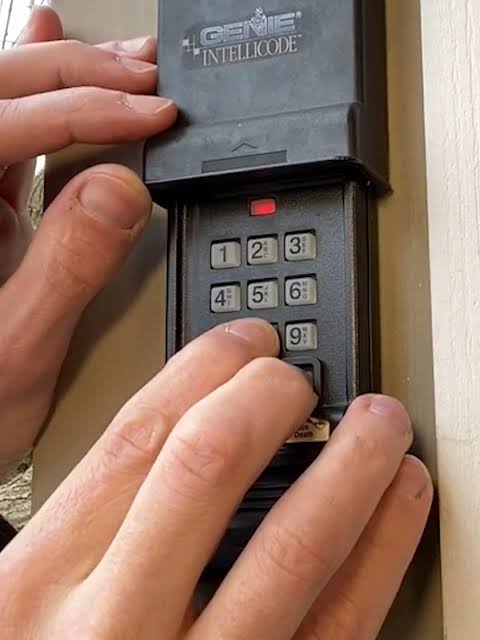
For the vast majority of modern Genie wireless keypads (such as the GK-R or G3T-R series paired with Intellicode openers), follow this precise tutorial. Ensure you have fresh AAA batteries installed before starting, as low voltage is the #1 cause of programming failure.
Phase 1: Clear Old Codes (Recommended)
If you are reprogramming due to a security concern or moving into a new house, start fresh.
- Locate the “Program” button and the “Up/Down” button on the keypad.
- Press and hold the Program button for approximately 3 seconds. The round LED will turn blue.
- While still holding Program, press and hold the Up/Down button.
- Release both buttons simultaneously. The LED should blink blue twice, then turn off.
- Result: All previous PINs are erased. The keypad is now in factory-reset mode.
Phase 2: Program the New PIN
This is the core answer to “how do I reprogram my Genie garage door opener keypad.”
- Press the Program button once. The LED turns blue.
- Enter your desired 3 to 6-digit PIN. Avoid obvious sequences like “1234” or repeating digits.
- Press the Up/Down button. The LED will blink blue.
- Press the Up/Down button a second time. The LED will blink rapidly and then turn off.
- Verification: Wait 5 seconds, then enter your new PIN and press Up/Down. The door should activate.
Phase 3: Syncing with the Motorhead (If Required)
Some newer Genie systems require the keypad to be “learned” at the motor unit after setting the PIN.
- Locate the Learn Button on the garage door opener motorhead (usually near the antenna wire).
- Press the Learn Button briefly. The indicator light will illuminate or flash.
- Within 30 seconds, go to your keypad, enter your new PIN, and press Up/Down.
- Repeat the PIN + Up/Down sequence if the motor light does not flash immediately.
- Test operation from outside.
Troubleshooting: When Reprogramming Fails
Even professionals encounter hiccups. Use this comparison table to diagnose issues quickly rather than guessing.
| Symptom | Likely Cause | Recommended Fix |
|---|---|---|
| LED never lights up | Dead battery or corrosion | Replace AAA batteries; clean contacts with vinegar |
| LED blinks red during programming | Invalid PIN entry or timeout | Start over; ensure presses are firm and within 10 seconds |
| Keypad programs but door won’t move | Signal interference or limit error | Check safety sensors; re-sync at motorhead; verify travel limits |
| Works intermittently | Weak signal or range issue | Relocate keypad away from metal obstructions; check antenna |
| Resets itself after 24 hours | Moisture damage or board failure | Inspect for water ingress; replace keypad if internal circuit is corroded |
Pro Tip: If you live in an area with extreme temperature swings, consider upgrading to a Genie keypad rated for -40°F to 150°F. Thermal expansion can cause intermittent contact failures in cheaper generic keypads.
Safety First: Critical Precautions
Reprogramming involves interacting with a heavy mechanical system. Never bypass safety sensors to test a new code. According to the Consumer Product Safety Commission, garage doors cause thousands of injuries annually, many preventable with proper maintenance.
- Keep hands clear: Never stand directly under the door while testing.
- Verify reversal: After reprogramming, place a 2×4 board flat on the floor under the door. Close the door; it must reverse upon contact. If it doesn’t, adjust the force settings immediately.
- Secure your PIN: Do not share your code with contractors or neighbors unless necessary. Change it annually or after any suspected compromise.
Frequently Asked Questions (FAQ)
1. Why does my Genie keypad keep losing its programming?
Frequent memory loss usually indicates failing batteries, moisture intrusion, or a faulty circuit board. Start by replacing batteries with high-quality alkaline cells. If the problem persists and the keypad is over 5 years old, UV exposure may have degraded the internal electronics, requiring replacement.
2. Can I program multiple PINs on one Genie keypad?
Yes, most modern Genie Intellicode keypads support up to 3 separate PINs. This is ideal for giving unique codes to family members, dog walkers, or service technicians. Each PIN follows the same programming sequence outlined above; simply repeat Phase 2 for each additional user without clearing existing codes.
3. Do I need to reprogram the keypad after changing the opener’s batteries?
No. Changing batteries in the motorhead backup battery or the remote does not affect keypad memory. However, if you perform a full factory reset on the opener motor itself (holding the learn button for 10+ seconds), all paired devices including keypads will be erased and must be reprogrammed.
4. Is there a universal Genie keypad that works with all models?
Genie offers universal keypads compatible with most Intellicode openers from 1995 onward. However, they are not compatible with pre-1995 fixed-code units or certain commercial-grade operators. Always verify compatibility using the model number on your motorhead before purchasing.
5. How often should I reprogram my garage door keypad for security?
Security experts recommend changing your garage door PIN at least once per year, or immediately after:
- Moving into a new home
- Losing a remote or suspecting unauthorized access
- Ending a relationship with someone who had the code
- Hiring temporary workers who no longer need access
Regular rotation minimizes risk from code-sharing and brute-force attempts.
6. What if my Genie keypad has no “Program” button?
Keypads without a dedicated Program button are likely legacy fixed-code models. These typically use a series of DIP switches inside the battery compartment or a slide-switch configuration. Consult the specific manual for your vintage model, as the programming method is entirely mechanical rather than digital. Consider upgrading to a modern Intellicode keypad for improved security and ease of use.
Conclusion
Knowing how do I reprogram my Genie garage door opener keypad empowers you to maintain home security independently and avoid unnecessary service calls. By correctly identifying your model, following the precise three-phase programming sequence, and adhering to safety protocols, you can restore reliable access in under ten minutes. Remember to test the auto-reverse feature after every reprogramming session and rotate your PIN annually for optimal protection.
Found this guide helpful? Share it with friends, family, or neighbors who might be locked out right now! Tag us on social media or leave a comment below with your Genie model—we love hearing success stories and helping our community stay secure. Don’t forget to bookmark this page for future reference; you’ll thank yourself the next time the keypad acts up!
Leave a Reply