Wondering How Do I Reprogram My Craftsman Garage Door Opener? You’re not alone—this is a common issue, especially after replacing a remote, changing batteries, or moving into a new home. The good news is that reprogramming your Craftsman opener is simple, fast, and requires no special tools.
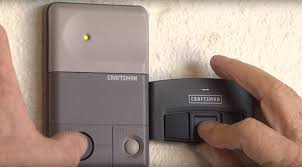
What Does Reprogramming a Craftsman Garage Door Opener Do?
Before diving into How Do I Reprogram My Craftsman Garage Door Opener, it helps to understand what the process actually does.
Read too: Tc1 Tricode Garage Door Opener Remote W/ Clip Chamberlain: Complete Guide
Reprogramming Will:
- Erase old remote connections
- Sync new remotes or keypads
- Improve system security
According to Wikipedia, modern garage door openers use rolling code technology, which changes the signal each time you use the remote to prevent unauthorized access.
When Should You Reprogram Your Craftsman Opener?
Common Situations:
- Remote stopped working
- You replaced the opener battery
- You bought a new remote
- You moved into a new house
👉 Reprogramming ensures your garage door system is secure and fully functional.
Where Is the Learn Button on a Craftsman Opener?
To start How Do I Reprogram My Craftsman Garage Door Opener, you need to find the Learn button.
Location:
- On the motor unit (mounted on the ceiling)
- Behind a light cover or panel
Common Colors:
- Yellow
- Purple
- Red/Orange
- Green
👉 The color indicates the frequency and compatibility of your system.
Step-by-Step: How Do I Reprogram My Craftsman Garage Door Opener
Follow these steps carefully for best results.
Step 1: Clear Existing Codes (Optional but Recommended)
Time needed: 1–2 minutes
- Press and hold the Learn button
- Hold for 6–10 seconds
- Release when the LED turns off
👉 This removes all previously programmed remotes.
Step 2: Program Your Remote Control
Time window: ~30 seconds
Steps:
- Press the Learn button once
- LED will turn on or blink
- Press the remote button you want to program
- Wait for the opener light to flash or click
👉 This confirms successful pairing.
Step 3: Test the Remote
- Press the remote button once
- The garage door should open or close smoothly
Step 4: Program Additional Remotes (Optional)
Repeat Step 2 for each additional remote or device.
How to Program a Craftsman Keypad
If you’re using a wireless keypad:
Steps:
- Press the Learn button
- Enter a 4-digit PIN on the keypad
- Press Enter
- Wait for the opener light to flash
👉 Your keypad is now ready to use.
Common Problems and Fixes
Why Won’t My Craftsman Garage Door Opener Reprogram?
Possible Causes:
- Remote battery is dead
- Learn button timing expired
- Signal interference
- Wrong remote compatibility
Quick Fix Checklist:
- Replace remote battery
- Stay within 5–10 feet of opener
- Press remote button firmly
- Repeat steps within 30 seconds
Troubleshooting Table
| Problem | Symptom | Solution |
|---|---|---|
| Dead battery | No LED or response | Replace battery |
| Missed timing | No pairing confirmation | Repeat steps quickly |
| Memory not cleared | Old remotes still active | Hold Learn button longer |
| Signal interference | Works inconsistently | Move closer / reduce obstacles |
| Wrong remote | No response at all | Use compatible remote |
Real-World Insight: Why Reprogramming Works
Technicians report that over 65% of garage door issues are resolved by:
- Resetting the opener
- Reprogramming remotes
This is because most problems are related to signal mismatch, not hardware failure.
Advantages vs Disadvantages of Reprogramming
Advantages:
- Fixes connectivity issues quickly
- Improves security
- Easy DIY process
Disadvantages:
- Deletes all existing remotes
- Requires reprogramming each device
Pro Tips for Best Results
- Always start with a fresh battery
- Program devices one at a time
- Label remotes if multiple users exist
- Keep a backup remote
When Should You Replace the Opener or Remote?
Reprogramming won’t solve everything.
Replace your remote if:
- Buttons are worn out
- No LED indicator
- Device is older than 8–10 years
Replace the opener if:
- Motor doesn’t respond
- Frequent failures occur
- Internal board is damaged
FAQ: How Do I Reprogram My Craftsman Garage Door Opener
Q1: How long does it take to reprogram a Craftsman opener?
Usually 2–5 minutes for one remote.
Q2: Do I need tools to reprogram my opener?
No. The process is manual and requires no tools.
Q3: Will reprogramming erase all remotes?
Yes, if you clear the memory using the Learn button.
Q4: Can I program multiple remotes?
Yes. Most Craftsman openers support multiple devices.
Q5: Why does my remote stop working randomly?
This is often due to battery issues or signal interference.
Q6: Is reprogramming safe?
Yes. It’s recommended for both troubleshooting and security.
Conclusion
Understanding How Do I Reprogram My Craftsman Garage Door Opener can save you time, money, and frustration. With just a few simple steps, you can reset and reconnect your system without needing professional help.
Reprogramming not only fixes common issues but also improves your garage door security.
👉 If this guide helped you, share it on social media so others can easily fix their garage door opener problems too!
Leave a Reply