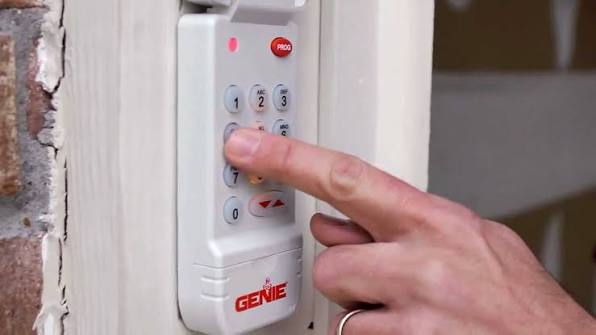
Have you ever stood in your driveway, pressing the remote button repeatedly, only to watch your garage door remain stubbornly closed? It is a frustrating experience that many homeowners face, especially after a power outage or when setting up a new vehicle. If you are wondering how do I program my Genie Intellicode garage door opener, you are not alone. This guide will walk you through the process clearly and safely, ensuring you regain control of your garage access without the need for an expensive service call.
Understanding the Genie Intellicode System
Before diving into the buttons and codes, it helps to understand what makes the Intellicode system unique. Unlike older fixed-code openers that used a simple, unchanging signal, Genie’s Intellicode technology uses rolling code encryption. This means the code changes every time you use the remote, providing a higher level of security against code grabbing or hacking.
According to Wikipedia, modern garage door openers have evolved significantly since their inception in the 1920s, with security becoming a primary focus in recent decades. The Intellicode system is designed to prevent unauthorized access, but this security feature also means that pairing a remote requires a specific synchronization process with the main motor unit.
Why Programming Might Be Necessary
There are several common scenarios where you will need to reprogram your opener:
- New Remote Purchase: You bought an additional remote or a keypad entry system.
- Power Outage: A significant power surge or outage may have reset the memory in the motor head.
- Remote Replacement: Your old remote was lost, stolen, or damaged.
- Security Refresh: You want to clear old codes from previous homeowners or tenants.
Step-by-Step Guide: How to Program a Genie Intellicode Remote
Programming your Genie Intellicode remote is generally a straightforward process if you follow the correct sequence. Most Genie Intellicode models (such as the 1035, 2033, or 4063 series) follow a similar pattern. Below is the standard procedure for most two-button and three-button remotes.
Step 1: Locate the Learn Button
First, you need to access the motor head unit inside your garage. Look for the Learn Button (also known as the Program Button). On most Genie Intellicode models, this button is located on the back or side of the motor unit. It is typically square or rectangular and may be colored purple, red, or orange, depending on the model year.
Note: You may need a sturdy ladder to reach the motor unit safely. Ensure the ladder is stable before climbing.
Step 2: Clear Old Codes (Optional but Recommended)
If you are experiencing interference or suspect security issues, it is wise to clear all previously programmed remotes. To do this:
- Press and hold the Learn Button for approximately 10 seconds.
- Wait until the indicator light next to the button turns off.
- Release the button. Warning: This will erase all existing remotes and keypads. You will need to reprogram every device you wish to use.
Step 3: Enter Programming Mode
- Press the Learn Button once briefly.
- The indicator LED will begin to blink slowly. This indicates the unit is ready to receive a new code. You usually have about 30 seconds to complete the next step.
Step 4: Sync the Remote
- Take your handheld remote and press the button you wish to program (e.g., Button 1).
- Press it firmly and release it.
- Watch the LED on the motor unit. It should flash rapidly or turn solid for a moment, indicating the code has been accepted.
- Test the remote by pressing the button again. The garage door should activate.
Step 5: Repeat for Additional Buttons
If your remote has multiple buttons (for example, one for the main door and one for a gate), repeat Steps 3 and 4 for each button you wish to program.
Troubleshooting Common Programming Issues
Even with clear instructions, things do not always go smoothly. Here are some frequent hurdles and how to overcome them.
The Remote Is Not Responding
If the door does not move after programming, check the following:
- Battery Health: Replace the battery in the remote with a fresh CR2032 or similar coin-cell battery. Weak batteries often fail during the programming handshake.
- Distance: Stand within 10–15 feet of the motor unit while programming. Signal strength is crucial during the initial sync.
- Interference: LED light bulbs in the garage can sometimes emit frequency interference. Try turning off nearby LED lights during programming.
The Learn Light Does Not Blink
If the LED on the motor unit does not blink after pressing the Learn button:
- Check if the opener is plugged in and receiving power.
- Ensure the safety sensors are aligned. If the sensor eyes are blocked or misaligned, the opener may enter a lockout mode.
- Verify that you are pressing the correct button. Some older models have a separate “Set” and “Program” button.
Comparison: Intellicode vs. Fixed Code Remotes
| Feature | Genie Intellicode (Rolling Code) | Older Fixed Code Systems |
|---|---|---|
| Security | High (Code changes every use) | Low (Static code vulnerable to copying) |
| Programming | Requires syncing with Learn Button | Often uses dip switches or jumpers |
| Compatibility | Specific to Intellicode remotes | Universal remotes often work |
| Reliability | Less prone to interference | Prone to signal overlap with neighbors |
Advanced Tips for Optimal Performance
To ensure your Genie Intellicode opener continues to function reliably after programming, consider these expert tips.
Maintain Sensor Alignment: The safety eyes near the floor must be clean and aligned. If the green LED on the receiving sensor is not lit, the door will not close, regardless of remote programming. Clean the lenses with a soft cloth monthly.
Update Your Keypad: If you use a wireless keypad outside your garage, it must also be programmed using the same Learn Button process. Enter your desired PIN, press the Learn Button on the motor, and then enter the PIN on the keypad within the 30-second window.
Check the Antenna: Ensure the hanging wire antenna on the motor unit is not wrapped around metal brackets or tucked behind the housing. It should hang freely to maximize signal reception.
Frequently Asked Questions (FAQ)
1. Can I program a universal remote to work with my Genie Intellicode opener?
Yes, but it must be specifically compatible with rolling code technology. Look for universal remotes that explicitly state compatibility with “Genie Intellicode” or “Rolling Code.” Generic fixed-code universals will not work.
2. How many remotes can I program to one Genie opener?
Most Genie Intellicode motor units can store up to 7–8 different remote controls or keyless entry devices. Check your specific model’s manual for the exact limit, as older units may have lower capacity.
3. What should I do if I lost my only working remote?
If you have no working remotes, you cannot enter programming mode using the remote method. However, you can still use the Learn Button on the motor unit. If you have a wireless keypad, you can use it to trigger the programming mode. Otherwise, you may need to purchase a new remote and program it directly via the motor head.
4. Does resetting the opener affect the wall console?
No, the wired wall console is hardwired directly to the motor unit and does not need to be reprogrammed after a reset. It will continue to work as long as the wiring remains intact.
5. Why does my remote work intermittently after programming?
Intermittent issues are often caused by weak batteries, radio frequency interference from nearby electronics, or a damaged antenna on the motor unit. Try replacing the battery first. If the issue persists, check for nearby sources of interference such as large metal objects or high-power electrical lines.
Conclusion
Learning how do I program my Genie Intellicode garage door opener is a valuable skill that saves time and money. By understanding the rolling code technology and following the simple steps of locating the Learn Button, entering programming mode, and syncing your remote, you can restore access to your garage quickly. Remember to keep your sensors clean and your batteries fresh to maintain optimal performance.
If this guide helped you get your garage door back in action, please share it with friends or family who might be struggling with their own openers. Secure your home and enjoy the convenience of a fully functional garage door today!
Leave a Reply