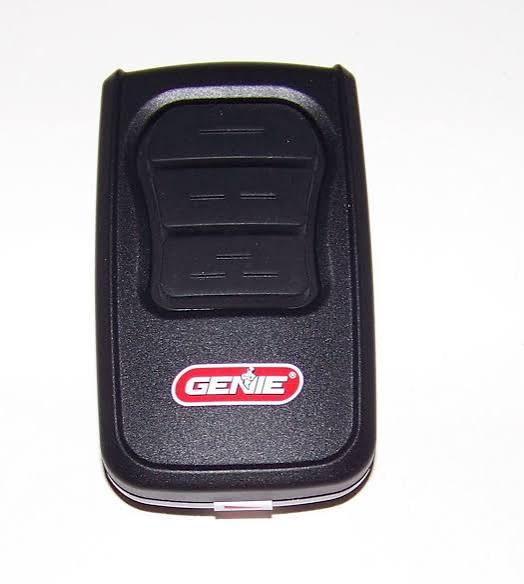
Is your Genie garage door remote refusing to cooperate? You’re not alone. Thousands of homeowners face this frustrating issue every year, often when they’re in a hurry or during bad weather. If you’re wondering how do I program my Genie garage door opener remote, you’ve come to the right place. This comprehensive guide will walk you through the process step-by-step, ensuring your remote works flawlessly with your opener.
Understanding Your Genie Garage Door Opener Model
Before diving into the programming process, it’s crucial to identify which Genie model you own. Genie produces several types of garage door openers, each with slightly different programming procedures. The most common models include:
- Genie Intellicode Series (uses rolling code technology)
- Genie Screw Drive Openers
- Genie Chain Drive Openers
- Genie Belt Drive Openers
Your model number is typically located on the motor unit’s label, usually found on the back or side of the opener. Common model numbers include G3052, H4000, ISD990, and ISLD990. Knowing your specific model ensures you follow the correct programming steps.
Pro Tip: If you can’t locate your model number, check your original purchase receipt or installation manual. Many newer Genie openers also have QR codes that link directly to digital manuals.
Why Programming Your Genie Remote Matters
A properly programmed remote offers more than just convenience—it enhances security and prevents unauthorized access to your garage. According to the International Association of Certified Home Inspectors, approximately 15% of home burglaries involve garage entry, making proper remote programming essential for home security.
Additionally, an unprogrammed or improperly programmed remote can:
- Drain batteries faster due to constant signal searching
- Cause interference with other electronic devices
- Lead to premature wear on your opener’s receiver
Step-by-Step Guide: How to Program Your Genie Garage Door Opener Remote
Method 1: Standard Programming for Most Genie Models
This method works for the majority of Genie garage door openers manufactured after 2005.
What You’ll Need:
- Your Genie garage door opener remote
- A stable ladder (if needed to reach the opener)
- Fresh batteries (recommended)
Steps:
- Locate the “Learn” Button Find the learn button on your Genie opener motor unit. It’s typically colored purple, red, orange, or green and located near the antenna wire.
- Clear Existing Codes (Optional but Recommended) Press and hold the learn button for approximately 10 seconds until the indicator light blinks or turns off. This clears all previously programmed remotes.
- Press the Learn Button Press the learn button once briefly. The indicator light should illuminate or blink, signaling that the opener is ready to receive a new code.
- Program the Remote Within 30 seconds, press and hold the button on your remote that you want to program. Hold it until the opener’s lights flash or you hear two clicks. This usually takes 2–5 seconds.
- Test the Remote Press the programmed button on your remote. The garage door should activate. If it doesn’t, repeat steps 3–4, ensuring you’re within 10 feet of the opener during programming.
Method 2: Programming Genie Intellicode Remotes
Intellicode remotes use advanced rolling code technology for enhanced security. The programming process differs slightly:
- Access the Opener’s Control Panel Locate the control panel on your Genie opener unit.
- Enter Programming Mode Press the “Program” or “Learn” button. The LED indicator will begin flashing.
- Sync the Remote Press and hold the desired button on your Intellicode remote for 3–5 seconds. Release when the opener’s light flashes twice.
- Verify Programming Test the remote from various distances to ensure consistent operation.
Method 3: Using the Wall Console for Programming
Some Genie models allow programming through the wall-mounted console:
- Press and Hold the Program Button On your wall console, press and hold the program button for 5 seconds.
- Enter PIN Code (If Applicable) Some models require a 4-digit PIN. Enter this using the console’s keypad.
- Sync the Remote Follow the same remote button-pressing procedure as Method 1.
Troubleshooting Common Programming Issues
Even with careful following of instructions, problems can arise. Here are solutions to common issues:
| Problem | Possible Cause | Solution |
|---|---|---|
| Remote won’t program | Weak batteries | Replace with fresh alkaline batteries |
| Opener doesn’t respond | Out of range | Move within 10 feet of opener during programming |
| Light doesn’t flash | Learn button malfunction | Check for debris; contact Genie support if persistent |
| Remote works intermittently | Signal interference | Reprogram away from other wireless devices |
Battery Considerations
Always use high-quality alkaline batteries in your Genie remote. Lithium batteries, while long-lasting, can sometimes cause voltage irregularities that affect programming. Replace batteries annually or when you notice decreased range.
Advanced Tips for Optimal Performance
Positioning Matters: Install your Genie opener’s antenna vertically and ensure it’s not obstructed by metal objects or stored items. This maximizes signal reception.
Multiple Remotes: You can program up to 7 remotes to a single Genie opener. Simply repeat the programming steps for each additional remote.
Keypad Integration: If you have a wireless keypad, program it immediately after your remotes using similar steps. This creates a cohesive access system.
Regular Maintenance: Clean your opener’s sensors monthly and lubricate moving parts quarterly. A well-maintained system responds better to remote signals.
When to Seek Professional Help
While most programming tasks are DIY-friendly, contact a professional if:
- The opener doesn’t enter programming mode after multiple attempts
- You suspect electrical issues with the opener unit
- The remote was damaged or exposed to water
- You’re uncomfortable working on a ladder
According to Genie’s official support data, approximately 92% of programming issues are resolved through proper battery replacement and correct procedure following. However, the remaining 8% may require technical assistance.
Frequently Asked Questions
Q: How long does it take to program a Genie garage door remote?
A: The actual programming process takes less than 2 minutes. However, allow 10–15 minutes total for preparation, troubleshooting, and testing.
Q: Can I program a universal remote to work with my Genie opener?
A: Yes, many universal remotes are compatible with Genie openers. Ensure the universal remote specifically lists Genie compatibility and follow the manufacturer’s programming instructions, which typically involve dip switches or auto-search features.
Q: Why did my programmed remote stop working?
A: Common reasons include dead batteries, accidental code clearing (when programming a new remote without preserving old ones), or signal interference. Try reprogramming the remote first before replacing it.
Q: Is it safe to clear all codes from my Genie opener?
A: Yes, it’s safe but will erase all previously programmed remotes and keypads. You’ll need to reprogram each device afterward. This is recommended if you’ve moved into a new home or suspect unauthorized access.
Q: Can I program my Genie remote without accessing the opener unit?
A: No, physical access to the opener’s learn button is required for initial programming. However, some smart Genie models allow remote management through smartphone apps after initial setup.
Q: How far away can I operate my Genie remote?
A: Most Genie remotes have a range of 100–150 feet in open areas. Walls, metal structures, and interference can reduce this range significantly.
Conclusion
Learning how do I program my Genie garage door opener remote doesn’t have to be complicated. With the right approach and understanding of your specific model, you can have your remote working perfectly in minutes. Remember to use fresh batteries, follow the correct procedure for your model type, and test thoroughly before considering the job complete.
Properly programming your remote not only restores convenience but also enhances your home’s security. Share this guide with friends and family who might be struggling with their Genie remotes—helping others troubleshoot tech issues is always appreciated!
Have questions or success stories? Drop them in the comments below or share this article on social media to help other homeowners master their Genie garage door openers.
Leave a Reply