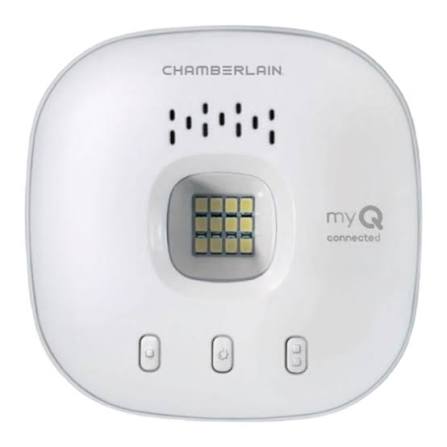
Have you ever rushed out the door only to realize you forgot to close the garage? Or perhaps you’ve wanted to let a delivery driver drop off a package safely inside your garage while you’re at work? If you are asking yourself, “How do I program my garage door opener to MyQ?” you are not alone. Thousands of homeowners make this switch every year to gain peace of mind and convenience through smart home technology.
Connecting your traditional garage door opener to the MyQ ecosystem transforms a mundane mechanical device into a smart, responsive part of your home. Whether you have a Chamberlain, LiftMaster, or Craftsman opener, the process is generally straightforward. In this guide, we will walk you through every step, troubleshoot common issues, and ensure your smart garage is up and running securely.
Why Connect Your Garage Door to MyQ?
Before we dive into the technical steps, it is essential to understand why this upgrade is worth your time. The MyQ app, developed by Chamberlain Group, allows you to monitor and control your garage door from anywhere using your smartphone.
According to recent smart home adoption studies, over 40% of US homeowners now use some form of smart security device. The garage door is often the largest entry point to a home, making it a critical security feature. By connecting to MyQ, you gain:
- Remote Access: Open or close your door from anywhere in the world.
- Real-Time Alerts: Receive notifications when the door opens or closes.
- Guest Access: Grant temporary access to dog walkers, cleaners, or family members without sharing physical remotes.
- Integration: Connect with Amazon Key, Google Assistant, and Apple HomeKit for a seamless smart home experience.
Prerequisites: What You Need Before Starting
To successfully answer the question “How do I program my garage door opener to MyQ,” you must ensure you have the right hardware and environment. Not all garage door openers are compatible with every MyQ device, so checking compatibility is step one.
1. Compatible Hardware
You need a MyQ-enabled device. The most common options are:
- MyQ Smart Garage Hub: A standalone device that works with most major brands of garage door openers manufactured after 1993.
- Built-in MyQ Opener: Newer Chamberlain or LiftMaster openers come with Wi-Fi built directly into the motor unit.
2. Stable Wi-Fi Connection
Your garage needs a strong Wi-Fi signal. Since garages are often detached or far from the main router, consider using a Wi-Fi extender if your signal strength is below two bars on your phone.
3. The MyQ App
Download the MyQ app from the Apple App Store or Google Play Store. Create an account before you begin the physical installation.
Step-by-Step: How Do I Program My Garage Door Opener To Myq?
The process varies slightly depending on whether you have a standalone hub or a built-in Wi-Fi opener. Below is the universal guide for the most common scenario: installing the MyQ Smart Garage Hub.
Step 1: Install the MyQ Hub
Locate a power outlet in your garage near the garage door opener motor. Plug in the MyQ Hub. The LED light on the hub should start blinking blue, indicating it is in pairing mode.
- Tip: Ensure the hub is within 6 feet of the motor unit for optimal signal reception.
Step 2: Install the Door Sensor
The MyQ system uses a sensor to detect whether the door is open or closed.
- Clean the surface of your garage door where you plan to place the sensor (usually the top left corner).
- Peel off the adhesive backing and stick the sensor firmly.
- Place the magnet component on the door frame directly adjacent to the sensor when the door is closed.
- Critical Detail: The gap between the sensor and the magnet must be no more than 1/2 inch when the door is closed. If the gap is too wide, the system will not register the “closed” status accurately.
Step 3: Connect to Wi-Fi via the App
- Open the MyQ app on your smartphone.
- Tap “Add Device” and select “Garage Door Opener.”
- Follow the on-screen prompts to connect the Hub to your home Wi-Fi network. You will need to enter your Wi-Fi password.
- Wait for the hub’s LED light to turn solid blue, indicating a successful connection.
Step 4: Pair the Hub with the Garage Door Opener
This is the core step where users often ask, “How do I program my garage door opener to MyQ physically?”
- Locate the “Learn” button on your garage door opener motor unit. It is usually colored yellow, purple, orange, or red, depending on the brand.
- Press and release the Learn button. The indicator light on the motor unit will blink.
- Within 30 seconds, press the button on the MyQ Hub (or follow the app’s prompt to send the signal).
- The motor unit’s light will flash or click, confirming it has accepted the new smart controller.
For more detailed technical specifications on different opener models, you can refer to the general standards outlined on Wikipedia’s page on Garage Door Openers.
Step 5: Test the System
Stand clear of the door and use the app to close and open the garage door. Verify that the app updates the status in real-time. If the door moves but the app says it’s still open, check the alignment of your door sensor.
Troubleshooting Common Connection Issues
Even with careful installation, you might encounter hurdles. Here are solutions to the most frequent problems.
| Issue | Possible Cause | Solution |
|---|---|---|
| Hub Won’t Connect to Wi-Fi | Weak signal or wrong password | Move router closer or use a Wi-Fi extender. Double-check case-sensitive passwords. |
| Door Moves But Status Doesn’t Update | Sensor misalignment | Adjust the magnet and sensor so they are perfectly aligned when closed. |
| “Learn” Button Not Responding | Wrong button pressed | Ensure you are pressing the correct color-coded Learn button on the motor unit, not the antenna wire. |
| App Shows Offline | Power outage or internet down | Check if the hub has power. Restart your router if the internet is down. |
Security Best Practices for MyQ Users
When you connect your garage to the internet, security becomes paramount. Hackers target IoT (Internet of Things) devices, so you must take precautions.
- Enable Two-Factor Authentication (2FA): Go into your MyQ account settings and enable 2FA. This adds an extra layer of security beyond just a password.
- Update Firmware Regularly: The MyQ app will notify you of firmware updates. These often contain security patches. Always install them promptly.
- Use Strong Passwords: Avoid using “123456” or “password.” Use a unique, complex password for your MyQ account.
- Monitor Activity Logs: Check the app’s activity log periodically to ensure no unauthorized access attempts have occurred.
FAQ: Frequently Asked Questions
1. Can I program MyQ without the hub?
If your garage door opener has built-in Wi-Fi (common in newer LiftMaster and Chamberlain models), you do not need a separate hub. You can connect directly via the app. However, for older models, the MyQ Smart Garage Hub is required.
2. Does MyQ work with Alexa and Google Home?
Yes, MyQ integrates with both Amazon Alexa and Google Assistant. You can link your accounts in the respective apps to use voice commands like, “Alexa, close the garage door.” Note that Apple HomeKit support may require a specific MyQ HomeBridge accessory.
3. What if my garage door opener doesn’t have a Learn button?
If your opener was manufactured before 1993, it likely lacks a Learn button and is not compatible with MyQ. In this case, you would need to replace the entire garage door opener unit with a modern, compatible model.
4. How far can the MyQ Hub be from the router?
The MyQ Hub uses Wi-Fi, so its range depends on your router’s strength. Ideally, it should be within 30–50 feet of the router with minimal walls in between. If your garage is detached, a Wi-Fi extender is highly recommended.
5. Is there a monthly fee for MyQ?
Basic features like remote control and alerts are free. However, advanced features like video recording (if you have a MyQ Camera) or extended history logs may require a subscription plan. Always check the current pricing in the app.
6. Can I give access to other people?
Yes. Through the MyQ app, you can invite family members or service providers by entering their email addresses. You can control their level of access, such as allowing them to open the door but not change settings.
Conclusion
Learning how do I program my garage door opener to MyQ is a small investment of time that yields significant long-term benefits. You gain convenience, enhanced security, and the ability to manage your home from anywhere in the world. By following the steps above—installing the hub, aligning the sensor, and pairing via the Learn button—you can transform your garage into a smart entryway in under 30 minutes.
Don’t let an outdated garage door hold your smart home back. Take control today, secure your property, and enjoy the peace of mind that comes with knowing exactly what’s happening at home, even when you’re miles away.
Found this guide helpful? Share it with your friends on Facebook or Twitter who might be struggling with their smart garage setup!
Leave a Reply