If your remote isn’t working or you’ve just bought a new one, you’re probably wondering: how do I program my Craftsman garage door opener? The process might sound technical, but it’s actually quick and beginner-friendly. With just a few simple steps, you can connect your remote and regain full control of your garage door.
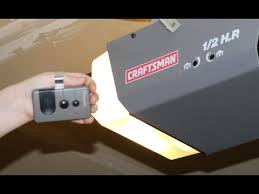
How Do I Program My Craftsman Garage Door Opener? (Quick Answer)
To program your Craftsman opener, you’ll typically use the “Learn” button on the motor unit. Press it, then press your remote button within 30 seconds to sync them.
Read too: Tc1 Tricode Garage Door Opener Remote W/ Clip Chamberlain: Complete Guide
👉 This method works for most Craftsman models manufactured after 1993.
For a deeper understanding of how garage door systems operate, visit:
https://en.wikipedia.org/wiki/Garage_door
What You Need Before Programming
Preparation makes the process smoother.
Checklist:
- Craftsman garage door opener unit
- Compatible remote control
- Ladder (to reach the opener)
- Fresh batteries (CR2032 or 9V)
💡 Most programming failures are caused by weak batteries or incompatible remotes.
Step-by-Step: How To Program a Craftsman Garage Door Opener Remote
Follow these steps carefully.
Step 1: Locate the Learn Button
The Learn button is usually on the back or side of the opener motor.
Common colors:
- Yellow
- Purple
- Red/Orange
- Green
👉 The color indicates frequency and compatibility.
Step 2: Press the Learn Button
Steps:
- Press and release the Learn button
- A small LED light will turn on
- You now have 30 seconds to complete the next step
Step 3: Press the Remote Button
Steps:
- Press and hold the button on your remote
- Hold for 2–3 seconds, then release
- Repeat once if needed
Step 4: Test the Remote
Press the remote again.
✅ If the door opens or closes, programming was successful.
How To Program Multiple Remotes
You can connect more than one remote easily.
Steps:
- Press the Learn button again
- Repeat the programming steps for each remote
- Test each remote individually
👉 Most systems support 5–10 remotes.
How To Program a Craftsman Keypad
If you’re using a wireless keypad:
Steps:
- Press the Learn button on the opener
- Enter your desired 4-digit PIN on the keypad
- Press and hold the Enter button
- Release when the opener light blinks
Craftsman Learn Button Color Guide
Understanding the Learn button helps with compatibility.
| Color | Frequency | Year Range | Compatibility |
|---|---|---|---|
| Yellow | 310 MHz | 2011–Present | High |
| Purple | 315 MHz | 2005–2011 | Medium |
| Red/Orange | 390 MHz | 1997–2005 | Limited |
| Green | 390 MHz | 1993–1996 | Low |
Common Problems and Fixes
Sometimes programming doesn’t work on the first try.
1. Remote Not Working
Causes:
- Dead battery
- Out of range
- Wrong remote
Fix:
- Replace battery
- Stand within 1–2 meters
- Check compatibility
2. Learn Button Not Responding
Causes:
- Power issue
- Faulty opener
Fix:
- Unplug for 30 seconds
- Plug back in and retry
3. Remote Works Intermittently
Causes:
- Signal interference
- Weak battery
Fix:
- Replace battery
- Reprogram remote
How To Reset Your Craftsman Garage Door Opener
Resetting can fix persistent issues.
Steps:
- Press and hold the Learn button
- Hold for 6–10 seconds
- Release when LED turns off
⚠️ This erases all programmed remotes.
DIY vs Professional Programming
DIY Programming
Pros:
- Free
- Quick (under 5 minutes)
- Easy for beginners
Cons:
- Requires basic understanding
- May need troubleshooting
Professional Help
Pros:
- Guaranteed setup
- Handles complex issues
Cons:
- Costs $50–$150
- Requires scheduling
Tips for Successful Programming
- Always use fresh batteries
- Stand close to the opener
- Follow timing carefully (within 30 seconds)
- Ensure compatibility of remote
- Avoid signal interference during setup
Real-Life Example
A homeowner replaced their remote but couldn’t get it to work.
Problem:
- Used incompatible remote
Solution:
- Checked Learn button color
- Purchased correct remote
- Reprogrammed successfully
✅ Result: Garage door worked instantly.
FAQ: How Do I Program My Craftsman Garage Door Opener
1. How long does it take to program a Craftsman opener?
It usually takes under 5 minutes if done correctly.
2. Can I program a universal remote?
Yes, but it must be compatible with your opener’s frequency.
3. Why won’t my remote connect?
Common reasons include dead batteries, incorrect timing, or incompatibility.
4. How many remotes can I program?
Most Craftsman openers support 5–10 remotes.
5. Do I need a technician to program it?
No. Most homeowners can do it themselves easily.
6. What happens if I reset the opener?
All remotes and keypads will be erased and need reprogramming.
Conclusion
Learning how do I program my Craftsman garage door opener is easier than it sounds. With just a few simple steps, you can sync your remote, improve convenience, and maintain secure access to your garage.
Start by locating the Learn button, follow the timing carefully, and test your remote. If issues arise, troubleshooting or resetting usually solves the problem.
If this guide helped you, share it with others who might need help programming their Craftsman garage door opener!
Leave a Reply