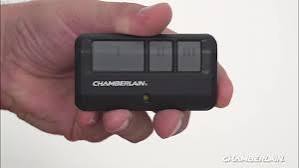
Is your garage door remote acting up? You’re not alone. Thousands of homeowners struggle with this common issue every day. If you’ve been wondering “how do I program my Chamberlain garage door opener remote,“ you’ve come to the right place. This comprehensive guide will walk you through the entire process, whether you have a brand-new remote or need to reprogram an existing one. Let’s get your garage door working smoothly again.
Why Programming Your Chamberlain Remote Matters
Before diving into the technical steps, it’s important to understand why proper programming is crucial. A correctly programmed remote ensures:
- Security: Prevents unauthorized access to your garage
- Convenience: One-touch operation saves time daily
- Reliability: Reduces malfunctions and service calls
According to the International Door Association, properly maintained garage door systems last 15-20 years on average. Regular programming checks are part of this maintenance routine.
Identifying Your Chamberlain Model
Different Chamberlain models require slightly different programming procedures. Here’s how to identify yours:
Common Chamberlain Models
| Model Series | Key Features | Programming Method |
|---|---|---|
| Security+ 2.0 | Rolling code technology | Learn button method |
| MyQ Enabled | Smart connectivity | App + manual programming |
| Classic Series | Basic functionality | DIP switches or learn button |
| Professional Grade | Heavy-duty use | Advanced programming options |
Pro Tip: Look for the model number on the motor unit inside your garage. It’s usually located on a label near the light cover.
Step-by-Step Programming Guide
Method 1: Using the Learn Button (Most Common)
This method works for most modern Chamberlain openers manufactured after 1993.
Step 1: Locate the Learn Button
- Find the motor unit hanging from your garage ceiling
- Look for a colored button (usually yellow, purple, orange, or red)
- The button is typically near the antenna wire
Step 2: Clear Old Codes (If Needed)
- Press and hold the learn button for 6-10 seconds
- Wait until the indicator light turns off
- This erases all previously programmed remotes
Step 3: Program Your Remote
- Press the learn button once briefly
- The indicator light will turn on or blink
- Within 30 seconds, press and hold the desired button on your remote
- Hold until the garage door moves or the light blinks rapidly
- Test the remote by pressing the button again
Important: You have exactly 30 seconds to complete step 3 after pressing the learn button.
Method 2: Programming Multiple Remotes
If you have multiple remotes, follow these steps:
- Complete the initial programming for the first remote
- Repeat step 3 for each additional remote
- Test each remote individually
- Label remotes if needed for family members
Method 3: Reprogramming After Battery Replacement
Sometimes remotes lose their programming after battery changes:
- Replace batteries with fresh ones (use recommended type)
- Follow the standard programming procedure above
- Ensure batteries are inserted correctly (+/- orientation)
Troubleshooting Common Issues
Even with careful following of instructions, problems can occur. Here are solutions to frequent issues:
Remote Not Responding
Possible Causes:
- Dead batteries
- Out of range
- Interference from other devices
- Incorrect programming
Solutions:
- Replace batteries with new alkaline ones
- Stand within 20 feet of the opener
- Remove potential interference sources (LED bulbs, wireless routers)
- Reprogram using the steps above
Light Blinking But No Response
This usually indicates:
- Wrong button pressed during programming
- Timing issue (exceeded 30-second window)
- Faulty remote
Fix: Start over with the programming process, ensuring precise timing.
Multiple Remotes Not Working Together
If some remotes work while others don’t:
- Clear all codes and reprogram everything
- Check that all remotes are compatible with your model
- Verify battery strength in non-working remotes
Advanced Programming Tips
Security+ 2.0 Technology
Modern Chamberlain openers use rolling code technology for enhanced security. This means:
- Each transmission uses a unique code
- Codes change with every use
- Nearly impossible to duplicate or hack
When programming Security+ 2.0 remotes:
- Ensure your remote supports this technology
- Follow the exact timing requirements
- Never share your remote with untrusted individuals
MyQ Smart Integration
For MyQ-enabled openers:
- Download the MyQ app on your smartphone
- Create an account and connect your opener
- Use the app to manage remote access
- Program physical remotes through the app interface
This provides additional convenience and monitoring capabilities.
When to Call a Professional
While most programming tasks are DIY-friendly, consider professional help when:
- Multiple attempts fail despite following instructions correctly
- The opener itself seems malfunctioning
- You suspect electrical issues
- Your model requires specialized tools or knowledge
Professional technicians can diagnose underlying issues and ensure proper programming.
Maintenance Tips for Long-Term Success
To keep your programmed remote working reliably:
Regular Checks
- Test remote monthly
- Replace batteries annually
- Clean remote contacts occasionally
Environmental Considerations
- Keep remote away from extreme temperatures
- Avoid moisture exposure
- Store spare remotes in dry locations
Security Best Practices
- Change codes periodically
- Don’t leave remotes in visible car locations
- Report lost remotes immediately
FAQ Section
Q: How long does it take to program a Chamberlain garage door remote?
A: The actual programming process takes less than 2 minutes. However, allow 10-15 minutes total for preparation, troubleshooting, and testing. Most people complete it successfully on the first attempt.
Q: Can I program a universal remote to work with my Chamberlain opener?
A: Yes, many universal remotes are compatible with Chamberlain openers. Ensure the universal remote specifically lists Chamberlain compatibility. Follow the universal remote’s programming instructions, which typically involve entering a code sequence before using the learn button method.
Q: What should I do if I lose my Chamberlain garage door remote?
A: First, clear all existing codes from your opener for security. Then purchase a replacement remote compatible with your model. Program the new remote following the standard procedure. Consider getting multiple remotes as backups.
Q: Why does my Chamberlain remote work intermittently?
A: Intermittent operation usually indicates weak batteries, signal interference, or partial programming failure. Try replacing batteries first, then reprogram the remote. If problems persist, check for nearby electronic devices causing interference.
Q: Is it safe to program my own Chamberlain garage door opener?
A: Yes, programming your own remote is completely safe when following manufacturer instructions. The process involves simple button presses and doesn’t require electrical work. Always disconnect power if you need to access internal components, but basic programming doesn’t require this.
Q: How many remotes can I program to one Chamberlain opener?
A: Most Chamberlain openers can accommodate 8-12 remotes simultaneously. Check your specific model’s manual for exact capacity. Programming additional remotes beyond the limit will overwrite the oldest programmed remote.
Conclusion
Learning how do I program my Chamberlain garage door opener remote doesn’t have to be complicated. With this comprehensive guide, you now have all the information needed to successfully program your remote, troubleshoot common issues, and maintain long-term reliability.
Remember these key points:
- Identify your specific Chamberlain model first
- Follow timing requirements precisely during programming
- Keep spare batteries and remotes handy
- Perform regular maintenance checks
Your garage door system is an essential part of your home’s security and convenience. Taking a few minutes to properly program and maintain your remote pays dividends in reliability and peace of mind.
Did this guide help you successfully program your Chamberlain remote? Share your experience with friends and family who might be facing similar challenges. Bookmark this page for future reference, and don’t hesitate to return if you need additional troubleshooting assistance.
Your perfectly programmed garage door remote is just a few simple steps away!
Leave a Reply