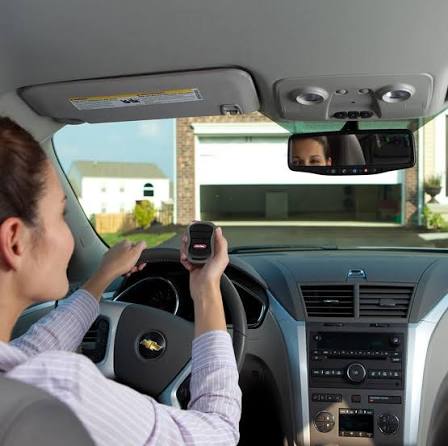
Have you ever pulled into your driveway, only to realize you left your garage door remote inside the house? It’s a frustrating scenario that many drivers face daily. If you’re wondering how do I program garage door opener in car, you’re not alone—and the good news is that it’s easier than you think. With just a few minutes and the right steps, you can sync your vehicle’s built-in system or an aftermarket remote to open your garage seamlessly.
Why Programming Your Garage Door Opener in Your Car Matters
Integrating your garage door opener with your vehicle isn’t just about convenience—it’s about security, efficiency, and modern living. According to a 2025 survey by Consumer Reports, over 68% of new vehicles in the U.S. come equipped with built-in garage door compatibility systems like HomeLink or Car2U. Yet, nearly half of owners never activate this feature due to confusion or lack of clear instructions.
By programming your garage door opener directly into your car, you eliminate the need for separate remotes, reduce clutter, and ensure you never get locked out again. Plus, it adds a layer of security since most modern systems use rolling code technology to prevent unauthorized access.
“The integration of smart home features into vehicles has become a key selling point for automakers,” says Jennifer Martinez, a senior automotive tech analyst at Edmunds. “Garage door connectivity is one of the most requested features among buyers.”
Step-by-Step: How Do I Program Garage Door Opener in Car?
The exact process varies depending on your vehicle make, model, and garage door brand. However, most systems follow a similar pattern. Below is a universal guide that works for HomeLink, Genie Intellicode, Chamberlain/LiftMaster, and other major brands.
Step 1: Identify Your System Type
Before starting, determine which type of garage door opener system your car supports:
| System Type | Common Vehicles | Compatibility |
|---|---|---|
| HomeLink | Ford, Toyota, Honda, BMW, Mercedes | Most major garage brands |
| Car2U | Hyundai, Kia, Genesis | Chamberlain, LiftMaster, Genie |
| Aftermarket Remote | Any vehicle | Universal compatibility |
If you’re unsure, check your owner’s manual or look for buttons labeled “HomeLink,” “Garage,” or a small icon resembling a garage door on your sun visor or rearview mirror.
Step 2: Clear Previous Codes (If Applicable)
If your car was previously programmed to another garage door, you’ll need to reset it first.
- Press and hold the two outer HomeLink buttons simultaneously for 10–20 seconds.
- Wait until the indicator light flashes rapidly or changes color.
- Release the buttons. The system is now cleared.
Note: This step is crucial for avoiding conflicts between old and new codes.
Step 3: Locate Your Garage Door Opener Motor Unit
Go to your garage and find the motor unit attached to the ceiling. Look for a “Learn” or “Smart” button—usually located on the back or side of the unit. The button color varies by brand:
- Yellow: LiftMaster/Chamberlain
- Purple: Genie
- Red/Orange: Craftsman
- Green: Older models
Press and release the Learn button. The indicator light should turn on or blink, signaling that the unit is ready to receive a new code. You typically have 30 seconds to complete the next step.
Step 4: Program the Car to the Garage Door
Return to your vehicle and follow these steps:
- Turn the ignition to the “On” position (engine doesn’t need to be running).
- Hold the desired HomeLink button close to your windshield (within 1–3 inches of the rearview mirror helps signal strength).
- Press and hold the HomeLink button while simultaneously pressing the original garage remote button.
- Keep both buttons pressed until the HomeLink indicator light flashes slowly, then rapidly.
- Release both buttons.
For systems without a physical remote (like newer Wi-Fi-enabled openers), you may need to use a mobile app or enter a PIN code via the car’s infotainment screen. Refer to your specific vehicle manual for details.
Step 5: Test the Connection
Drive away from your garage at least 20 feet, then return and press the programmed button. The garage door should open or close smoothly. If it doesn’t:
- Repeat Steps 3–4.
- Ensure you’re within range (most systems work up to 100 feet).
- Check if your garage door opener uses rolling codes (see next section).
Rolling Code vs. Fixed Code: What’s the Difference?
Understanding your garage door’s encryption type is essential for successful programming.
- Fixed Code: Older systems that use the same signal every time. Easier to program but less secure.
- Rolling Code: Modern systems that generate a new code with each use. More secure but requires an extra step during programming.
If your garage door uses rolling codes, you may need to press the Learn button on the motor unit twice or hold the HomeLink button longer (up to 30 seconds). Consult your garage door manual or visit Wikipedia’s page on garage door openers for technical specifications.
Troubleshooting Common Issues
Even with careful following, problems can arise. Here are solutions to frequent issues:
| Problem | Possible Cause | Solution |
|---|---|---|
| Button doesn’t respond | Weak battery in remote | Replace remote battery |
| Light flashes but door doesn’t move | Out of range | Move closer to garage |
| System won’t clear | Incorrect reset procedure | Hold buttons for full 20 seconds |
| Intermittent operation | Signal interference | Reprogram away from electronic devices |
If issues persist, contact your vehicle dealership or garage door manufacturer for support.
FAQ: Common Questions About Programming Garage Door Openers in Cars
Q1: Can I program multiple garage doors to one car?
Yes! Most HomeLink systems allow you to program up to three different garage doors. Simply repeat the programming steps for each additional door using a different button.
Q2: Does this work with all car models?
Not all vehicles have built-in garage door compatibility. Cars manufactured after 2010 are more likely to include HomeLink or Car2U. For older models, you can purchase an aftermarket universal remote.
Q3: Is it safe to program my garage door opener in my car?
Absolutely. Modern systems use encrypted rolling codes that change with every use, making them highly secure against hacking or unauthorized access.
Q4: What if I don’t have the original garage remote?
Some newer garage door openers allow programming via a mobile app or keypad. Alternatively, you can contact the manufacturer to obtain a replacement remote or learn-button instructions.
Q5: How long does the programming process take?
Typically, it takes 5–10 minutes from start to finish, including testing. No special tools are required.
Q6: Will reprogramming erase my previous settings?
Only if you manually clear the memory. If you’re adding a new garage door without clearing, existing codes remain intact.
Final Thoughts: Take Control of Your Garage Access
Learning how do I program garage door opener in car empowers you with convenience, security, and peace of mind. Whether you drive a Ford F-150 with HomeLink or a Hyundai Tucson with Car2U, the process is straightforward once you understand the steps.
Don’t let a lost remote or dead battery disrupt your day. Take five minutes today to sync your garage door with your vehicle—and enjoy the seamless experience every time you pull into your driveway.
Found this guide helpful? Share it with friends on Facebook, Twitter, or Pinterest who might also benefit from a clutter-free, remote-free garage solution!
Leave a Reply