Struggling to get your remote working again? You’re not alone. Many homeowners ask, how do I program a Genie garage door opener remote when replacing a remote or setting up a new system. The process is simple, quick, and can usually be done in just a few minutes.
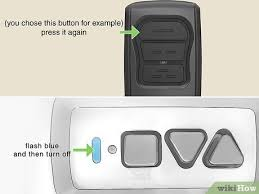
How Do I Program A Genie Garage Door Opener Remote? (Quick Answer)
To program your Genie remote, press the Learn (or Program/Set) button on the opener, then press the remote button within 30 seconds to sync it.
Read too: Tc1 Tricode Garage Door Opener Remote W/ Clip Chamberlain: Complete Guide
👉 This works for most Genie models made in the last two decades.
For more about how garage door systems function, visit:
https://en.wikipedia.org/wiki/Garage_door
What You Need Before Programming
Preparation helps avoid common issues.
Checklist:
- Genie garage door opener unit
- Compatible Genie remote
- Ladder (if needed)
- Fresh batteries (CR2032 or AAA)
💡 According to home improvement experts, over 70% of programming failures are caused by weak or dead batteries.
Where Is the Learn or Program Button on a Genie Opener?
The button location depends on the model.
Common Locations:
- Back of the motor unit
- Under the light cover
- Side panel
Button Labels:
- “Learn”
- “Program”
- “Set”
👉 Some models use a combination of buttons instead of a single Learn button.
Step-by-Step: How To Program a Genie Garage Door Opener Remote
Follow these steps carefully.
Step 1: Locate the Program/Set Button
Find the button on your opener.
Tip: It may be near a small LED indicator light.
Step 2: Activate Programming Mode
Steps:
- Press and hold the Program/Set button
- Release when the LED light starts blinking
👉 Blinking light means the opener is ready to pair.
Step 3: Press the Remote Button
Steps:
- Press the button on your remote
- Hold for 1–2 seconds, then release
- Repeat once if needed
Step 4: Test the Remote
Press the remote again.
✅ If the garage door moves, programming is successful.
Alternative Method (Older Genie Models)
Some older models use a different process.
Steps:
- Press the Learn button once
- Press the remote button twice
- Wait for the door to respond
👉 Always check your model’s manual for exact steps.
How To Program Multiple Remotes
You can easily add more remotes.
Steps:
- Enter programming mode again
- Repeat the pairing process for each remote
- Test each one individually
💡 Most Genie systems support up to 7 remotes.
How To Program a Genie Wireless Keypad
If you use a keypad:
Steps:
- Press the Program/Set button
- Enter your desired PIN on the keypad
- Press the Up/Down or Enter button
- Wait for the light to blink
Genie Remote Compatibility Guide
Not all remotes work with all openers.
| Technology Type | Year Range | Compatibility Level |
|---|---|---|
| Intellicode I | Pre-1995 | Limited |
| Intellicode II | 1995–Present | High |
| Series II | Modern models | Very High |
👉 Always match your remote to your opener’s technology.
Common Problems and Solutions
1. Remote Not Programming
Causes:
- Wrong remote model
- Weak battery
- Incorrect steps
Fix:
- Verify compatibility
- Replace battery
- Repeat process
2. Remote Works Intermittently
Causes:
- Signal interference
- Low battery
Fix:
- Replace battery
- Move closer to opener
3. Opener Not Entering Programming Mode
Causes:
- Faulty button
- Power issue
Fix:
- Unplug for 30 seconds
- Plug back in and retry
Resetting a Genie Opener Before Programming
If programming fails, reset first.
Steps:
- Press and hold Program/Set button
- Hold for 10 seconds
- Release when LED turns off
⚠️ This clears all stored remotes.
DIY vs Professional Programming
DIY Programming
Pros:
- Free
- Takes less than 5 minutes
- Beginner-friendly
Cons:
- Requires careful timing
- May need troubleshooting
Professional Help
Pros:
- Fast and reliable
- Handles compatibility issues
Cons:
- Costs $50–$150
- Not necessary for simple setups
Tips for Successful Programming
- Always use fresh batteries
- Stay within 1–2 meters of the opener
- Follow timing carefully
- Avoid signal interference
- Double-check remote compatibility
Real-Life Example
A homeowner bought a new Genie remote but couldn’t connect it.
Problem:
- Used wrong programming steps
Solution:
- Located correct Program/Set button
- Followed proper sequence
✅ Result: Remote paired successfully in under 2 minutes.
FAQ: How Do I Program A Genie Garage Door Opener Remote
1. How long does it take to program a Genie remote?
Usually 2–5 minutes if done correctly.
2. Can I use a universal remote?
Yes, but it must support Genie Intellicode technology.
3. Why is my Genie remote not syncing?
Common reasons include dead batteries, wrong remote, or incorrect steps.
4. How many remotes can I program?
Most Genie openers support up to 7 remotes.
5. Do I need to reset before programming?
Not always, but it helps if previous attempts failed.
6. Is programming safe to do myself?
Yes, it’s simple and safe for most homeowners.
Conclusion
Learning how do I program a Genie garage door opener remote is a simple task that can save you time and money. With just a few steps, you can sync your remote, restore functionality, and enjoy convenient access to your garage.
Whether you’re adding a new remote or troubleshooting an old one, following the correct process ensures success. If needed, a quick reset can solve most issues.
If this guide helped you, share it with others who need help programming their Genie garage door opener remote!
Leave a Reply