Introduction
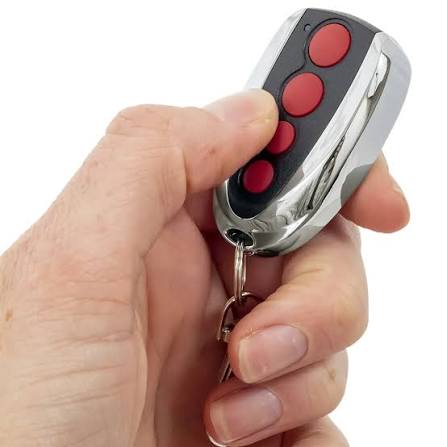
Losing your garage door remote is frustrating, and buying the wrong replacement is even worse. If you are wondering, “How do I know what garage door remote is compatible?” you are not alone. This guide will walk you through simple, foolproof steps to find the exact match for your opener, saving you time, money, and unnecessary trips to the hardware store.
How Do I Know What Garage Door Remote Is Compatible?
To determine compatibility, you must evaluate three critical factors: the brand and model number of your garage door opener, the color of the “Learn” button, and the radio frequency (e.g., 315 MHz or 390 MHz). Modern openers are not universally interchangeable due to advanced security protocols. According to the International Door Association (IDA), over 30% of residential garage door service calls are related to remote or keypad programming mismatches. By verifying these three elements, you eliminate guesswork and ensure a seamless pairing process.
Step-by-Step Guide to Identifying Your Garage Door Opener
Finding the right remote starts with gathering accurate data about your existing system. Follow these concrete steps to identify your opener’s specifications:
- Prepare Your Tools: Use a sturdy step ladder and a flashlight emitting at least 200–300 lumens to clearly see the motor unit mounted on your garage ceiling.
- Locate the Model Number: Look at the back or side of the motor housing. You are looking for a sticker with a format similar to “139.53990D” or “Chamberlain B970”. Write this down exactly as it appears.
- Check the Old Remote: If you still have the old remote, open the battery compartment (usually requiring a small Phillips head screwdriver). Look for a printed frequency (like 315 MHz) or a model number on the circuit board.
- Identify the Learn Button: Remove the light lens cover on the motor unit. The “Learn” or “Smart” button is typically located near the antenna wire. Note its color and whether it has a small LED indicator next to it.
Pro Tip: If the sticker is faded, take a clear photo with your smartphone and use a photo-enhancing app to increase the contrast and reveal the hidden text.
The “Learn Button” Color Code Explained
The color of the Learn button is the fastest way to determine compatibility, especially for Chamberlain, LiftMaster, and Craftsman openers. Use this quick-reference table to decode your system:
| Learn Button Color | Technology Type | Compatible Remote Types | Year Range (Approx.) |
|---|---|---|---|
| Yellow | Security+ 1.0 | Universal remotes supporting Security+ 1.0 | 1997 – 2005 |
| Purple | Security+ 2.0 | Remotes explicitly labeled “Security+ 2.0” | 2011 – Present |
| Red | Security+ 1.0 | Universal remotes supporting Security+ 1.0 | 2001 – 2010 |
| Orange | Security+ 2.0 | Remotes explicitly labeled “Security+ 2.0” | 2006 – Present |
| Green | Legacy (Dip Switch) | Universal remotes with adjustable dip switches | 1980s – 1990s |
Note: If your Learn button is green, your system uses outdated, fixed-code technology. For security reasons, experts highly recommend upgrading the entire motor unit rather than just the remote.
Dip Switch vs. Rolling Code: Which One Do You Have?
Understanding the underlying technology of your opener is crucial for security and compatibility. Older systems use Dip Switches, which are tiny physical switches inside the remote and motor that must be matched in identical positions (e.g., up-up-down-up). This fixed-code system is highly vulnerable to code-grabbing theft.
Modern systems use Rolling Code technology. As detailed on Wikipedia, rolling code systems change the access code every single time the remote is used, generating billions of possible combinations to prevent unauthorized access. If your opener was manufactured after 1993, it is legally required in the US to use rolling code technology. Always ensure your replacement remote explicitly states “Rolling Code” or “Security+” compatibility to maintain your home’s security.
Top 3 Universal Remotes That Work With Most Openers
If you cannot find an exact OEM (Original Equipment Manufacturer) replacement, these universal remotes offer broad compatibility:
- Chamberlain B0203 Universal Remote
- Best for: Chamberlain, LiftMaster, Craftsman (Security+ 1.0 & 2.0).
- Pros: Compact design, easy 3-step programming, works with 95% of modern openers.
- Cons: Not compatible with older green-learn-button models.
- Genie Universal Remote (Model 3062)
- Best for: Genie Intellicode and Intellicode 2 systems.
- Pros: Features a built-in LED light, dual-frequency support (315/390 MHz).
- Cons: Programming can be slightly complex for first-time users.
- Multi-Code 1090 Universal Transmitter
- Best for: Commercial and residential openers with dip switches or multi-code receivers.
- Pros: Highly versatile, allows cloning of existing remotes.
- Cons: Bulkier design, requires manual dip-switch alignment.
Frequently Asked Questions (FAQ)
Q1: Can I use any universal remote for my garage door?
No, you cannot use any universal remote. Compatibility depends on the brand, frequency, and security technology (rolling code vs. dip switch) of your specific opener. Always cross-reference the universal remote’s packaging with your opener’s learn button color or model number.
Q2: How do I program a new remote to my old garage door opener?
Generally, the process takes under 60 seconds:
- Press and release the “Learn” button on the motor unit (the LED will turn on or blink).
- Within 30 seconds, press and hold the button on your new remote for 3–5 seconds.
- Release the button when the motor unit’s lights flash or you hear two clicks, indicating success.
Q3: What if my garage door opener model number is faded or missing?
If the model number is unreadable, rely on the Learn button color and the frequency printed on the circuit board of your old remote. You can also search online using the brand name and the approximate year of installation.
Q4: Are smart garage door remotes compatible with old openers?
Yes, but with caveats. Smart hubs (like MyQ or Tailwind) can be wired into older openers that have standard push-button terminals. However, if your opener is a pre-1993 dip-switch model, a smart hub may not integrate safely without a professional relay installation.
Q5: Does the voltage of the remote battery affect compatibility?
No, battery voltage (typically 3V CR2032 or two 1.5V AA batteries) does not affect compatibility with the opener. However, using low-quality or expired batteries can cause weak signal transmission, making it seem like the remote is incompatible when it is simply underpowered.
Conclusion
Finding the right replacement does not have to be a guessing game. By answering the question, “How do I know what garage door remote is compatible?” through checking your model number, learn button color, and security technology, you can confidently purchase the correct device. This ensures not only convenience but also the continued security of your home.
Did this guide save you from buying the wrong remote? Share this article on Facebook, Twitter, or Pinterest to help your friends and neighbors avoid the same hassle! If you have any questions, drop them in the comments below.
Leave a Reply