Have you ever found yourself locked out of your garage because the only remote was inside the house? Or perhaps a family member needs their own access without sharing a single device. If you are asking, “How do I get a second garage door opener,” you are not alone. Many homeowners face this common inconvenience, but the solution is often simpler and more affordable than you might think.
Adding a secondary opener enhances convenience, improves security by allowing individual access control, and ensures that everyone in your household can enter and exit smoothly. In this guide, we will walk you through the various options available, from simple universal remotes to advanced smart home integrations, ensuring you choose the right fit for your specific garage door system.
Understanding Your Current Garage Door System
Before purchasing a new device, it is crucial to identify what type of opener you currently have. Not all remotes are compatible with every garage door motor. The compatibility depends largely on the brand, model, and the frequency technology used by your existing unit.
Most modern garage door openers operate on one of two main technologies:
- Fixed Code: Older systems that use a static code. These are less secure but easier to program with universal remotes.
- Rolling Code (Security+): Newer systems that change the code every time the button is pressed. This prevents hackers from intercepting the signal but requires specific programming steps.
To find your model number, look at the motor unit hanging from your garage ceiling. There is usually a label with the manufacturer’s name (e.g., Chamberlain, LiftMaster, Genie, Craftsman) and a model number. Write this down before shopping.
Pro Tip: If your opener is more than 15 years old, consider checking its safety features. Modern standards require auto-reverse mechanisms to prevent accidents. You can learn more about garage door safety standards on Wikipedia.
Option 1: Purchasing a Brand-Specific Replacement Remote
The most straightforward answer to “how do I get a second garage door opener” is to buy an official replacement remote from the same manufacturer as your current unit. This ensures 100% compatibility and often requires minimal setup.
Steps to Buy and Program a Brand-Specific Remote:
- Identify the Model: As mentioned earlier, locate the brand and model number on your motor unit.
- Purchase the Remote: Visit the manufacturer’s website or a local hardware store. Ensure the packaging lists your specific model number as compatible.
- Locate the “Learn” Button: On your garage door motor unit, find the “Learn” or “Smart” button. It is usually colored yellow, purple, orange, or red.
- Program the Remote:
- Press and release the “Learn” button on the motor unit. The indicator light will turn on or blink.
- Within 30 seconds, press and hold the button on your new remote that you wish to use.
- Release the button when the motor unit’s light blinks or you hear a click.
- Test the Opener: Stand clear of the door and press the remote button. The door should activate.
Pros:
- Guaranteed compatibility.
- Easy to program.
- Often includes battery and visor clip.
Cons:
- Can be more expensive than universal options.
- Limited to one brand.
Option 2: Using a Universal Garage Door Remote
If you cannot find an exact match for your brand, or if you want a cost-effective solution, a universal remote is an excellent choice. These devices are designed to work with most major brands, including LiftMaster, Chamberlain, Genie, and Craftsman.
How to Choose a Universal Remote:
- Check Compatibility List: Look at the back of the package or the product description online. Ensure your opener’s brand and frequency (usually 315 MHz or 390 MHz) are listed.
- Dip Switches vs. Smart Learn: Older universals use tiny switches (dip switches) that must match the pattern on your motor. Newer ones use a “smart learn” feature similar to brand-specific remotes.
Programming a Universal Remote:
- Clear Previous Codes: If the remote has been used before, clear its memory by holding down the specific reset buttons (refer to the manual).
- Set the Frequency: Some universals require you to select the frequency via a switch. Match this to your opener.
- Enter Programming Mode: Press the “Learn” button on your garage door motor.
- Sync the Remote: Press and hold the desired button on the universal remote until the motor light flashes.
Comparison: Brand-Specific vs. Universal Remotes
| Feature | Brand-Specific Remote | Universal Remote |
|---|---|---|
| Compatibility | 100% for specific models | Works with most major brands |
| Price | $25 – $45 | $15 – $30 |
| Ease of Setup | Very Easy | Moderate (may require dip switches) |
| Availability | Online or specialized dealers | Widely available in hardware stores |
Option 3: Installing a Wireless Keypad
For families who prefer not to carry remotes, a wireless keypad is a fantastic alternative. This allows you to enter a PIN code to open the door, which is particularly useful for children, guests, or service providers.
Benefits of a Wireless Keypad:
- No Batteries to Replace in Hand: You don’t need to worry about losing a small remote.
- Multiple User Codes: Many keypads allow you to set unique codes for different people, enhancing security.
- Weather Resistant: Designed to withstand outdoor conditions.
Installation Steps:
- Mount the Keypad: Choose a location near the garage door entry, typically on the door frame or wall. Use the provided screws and anchors.
- Power the Unit: Insert batteries into the keypad.
- Program the Code: Follow the manufacturer’s instructions to set your primary PIN.
- Sync with Opener: Press the “Learn” button on your garage motor, then enter your chosen PIN on the keypad within the time limit.
Option 4: Smart Garage Door Openers and Wi-Fi Modules
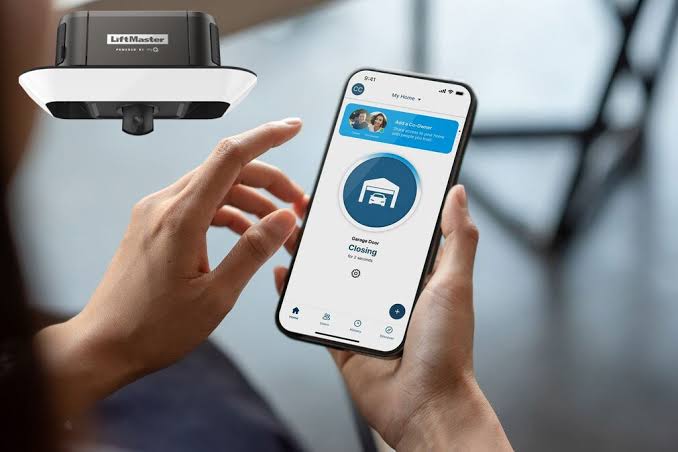
In the age of smart homes, converting your existing opener into a smart device is increasingly popular. This method answers “how do I get a second garage door opener” by turning your smartphone into the remote.
How It Works:
You install a small Wi-Fi module (such as MyQ, Tailwind, or RatGDO) that connects to your garage door motor and your home Wi-Fi network. You then download an app to control the door from anywhere.
Advantages:
- Remote Access: Open or close your garage from anywhere in the world.
- Notifications: Receive alerts when the door is opened or closed.
- Voice Control: Integrate with Alexa, Google Assistant, or Apple HomeKit.
- Unlimited “Remotes”: Every family member can download the app, effectively giving everyone their own opener.
Considerations:
- Wi-Fi Strength: Ensure your garage has a strong Wi-Fi signal. You may need a Wi-Fi extender.
- Subscription Fees: Some smart hubs require a monthly fee for advanced features, though many basic functions are free.
Troubleshooting Common Issues
Even with the right device, you might encounter issues during setup. Here are quick fixes for common problems:
- Remote Not Responding: Check the battery. Even new batteries can be defective. Try replacing them with fresh alkaline batteries.
- Interference: LED light bulbs in the garage can sometimes interfere with radio signals. Try turning off the garage light and testing the remote. If it works, switch to incandescent bulbs or shielded LEDs.
- Range Issues: If the remote only works close to the door, the antenna wire on the motor unit might be damaged or obstructed. Ensure the antenna hangs down freely.
FAQ Section
1. Can I program a second remote without the original one?
Yes, you do not need the original remote to program a new one. You only need access to the “Learn” button on the garage door motor unit. However, if you want to erase all previous remotes for security reasons, you can hold down the “Learn” button for 10 seconds to clear the memory, then reprogram all devices.
2. How much does a second garage door opener cost?
The cost varies depending on the type. A basic universal remote costs between $15 and $30. Brand-specific remotes range from $25 to $45. Wireless keypads are typically $30 to $60, while smart Wi-Fi modules can cost between $30 and $100, depending on features.
3. Are universal garage door remotes safe?
Modern universal remotes use rolling code technology, which is highly secure. Each time you press the button, a new code is generated, making it nearly impossible for thieves to intercept and replicate the signal. Always ensure you purchase from reputable brands to guarantee these security features.
4. Can I use my smartphone as a garage door opener?
Yes, by installing a smart garage door controller or Wi-Fi module, you can use your smartphone as a remote. Apps like MyQ, Amazon Key, or generic Tuya-based apps allow you to open, close, and monitor your garage door from anywhere with an internet connection.
5. What if my garage door opener is very old?
If your opener is older than 15–20 years, it may use fixed-code technology, which is less secure. While you can still find universal remotes that work with these systems, it is highly recommended to consider upgrading the entire opener unit to a modern, secure model with rolling code technology and safety sensors.
Conclusion
Finding out how do I get a second garage door opener is a simple process that can significantly improve your daily routine. Whether you choose a brand-specific remote for ease of use, a universal remote for affordability, a keypad for convenience, or a smart module for modern connectivity, there is a solution for every home.
By understanding your current system and following the programming steps outlined above, you can have your second opener up and running in minutes. Don’t let a single remote bottleneck your household’s efficiency. Take control of your garage access today!
Did you find this guide helpful? Share it with your friends and family on social media to help them solve their garage door woes!
Leave a Reply