Introduction
Lost or broken your remote? It is incredibly frustrating when you are stuck outside your home, especially in bad weather. If you are asking yourself, “How do I get a new garage door opener remote?“, you are in the right place. This comprehensive guide will walk you through finding, purchasing, and programming the perfect replacement quickly, safely, and without unnecessary stress.
How Do I Get A New Garage Door Opener Remote: 4 Easy Steps
Getting a replacement remote does not have to be complicated. By following these four concrete steps, you can restore your garage’s functionality in under an hour.
Step 1: Identify Your Garage Door Opener Model
Before buying anything, you must know what you own. Grab a sturdy ladder and locate the motor unit mounted on your garage ceiling. Look for a sticker or label on the back or side of the unit. You need to write down three critical pieces of information:
- The Brand Name (e.g., Chamberlain, LiftMaster, Genie, Craftsman).
- The Model Number (usually a combination of letters and numbers).
- The Frequency (commonly 315 MHz, 390 MHz, or 433 MHz).
Pro Tip: Also note the color of the “Learn” or “Smart” button on the motor unit. It is typically yellow, purple, red, or green. This color dictates which remotes are compatible.
Step 2: Choose the Right Replacement Remote
You generally have two options: a brand-specific (OEM) remote or a universal remote. Brand-specific remotes are guaranteed to work and often include advanced features like battery indicators. Universal remotes are more affordable and can be programmed to work with multiple brands, making them ideal if you have two different garage doors.
Step 3: Purchase Your Remote
Once you know your model and preferred type, you can buy your remote. Reliable sources include:
- Local Hardware Stores: Home Depot, Lowe’s, or Ace Hardware (great for immediate pickup).
- Online Retailers: Amazon or the manufacturer’s official website (best for variety and reviews).
- Specialized Garage Door Dealers: Ideal for older or discontinued models.
Step 4: Program the New Remote
Programming is simpler than most people think. Follow these exact steps:
- Position a sturdy ladder under the garage door motor unit.
- Press and release the “Learn” button on the motor unit. An indicator light will turn on or start blinking.
- Within 30 seconds, walk to your new remote.
- Press and hold the desired button on the remote for 3 to 5 seconds.
- Release the button when you see the motor unit’s lights blink or hear a click.
- Test the remote by pressing the button again to ensure the door operates smoothly.
Universal vs. Brand-Specific Remotes: A Quick Comparison
Not sure which type to buy? Use this quick comparison to make an informed decision based on your specific needs.
| Feature | Brand-Specific (OEM) Remote | Universal Remote |
|---|---|---|
| Compatibility | Guaranteed for the specific brand. | Works with most major brands (check packaging). |
| Cost | Higher ($30 – $50+). | More affordable ($15 – $30). |
| Ease of Programming | Very easy, often with auto-sync features. | May require dip-switch matching or specific codes. |
| Advanced Features | Often includes battery alerts and timer-to-close. | Basic open/close functionality. |
| Best For | Users wanting seamless, guaranteed integration. | Budget-conscious users or multi-brand households. |
Expert Insight: Why Compatibility and Security Matter
Upgrading or replacing your remote is not just about convenience; it is about security. Modern garage door openers use rolling code technology, which changes the access code every time you press the button. This prevents thieves from intercepting and replaying your signal.
According to the International Door Association (IDA), the average American household operates their garage door more than 1,500 times per year, making it the largest moving object in most homes. Ensuring your remote is fully compatible with your opener’s security protocol is non-negotiable.
For a deeper technical understanding of how these mechanisms protect your home, you can explore the general mechanics of a Garage door opener on Wikipedia. Always prioritize remotes that explicitly state they support “Security+” or rolling code technology.
Troubleshooting: What If the New Remote Does Not Work?
Even with careful planning, hiccups can occur. If your new remote fails to operate the door, do not panic. Try these concrete troubleshooting steps:
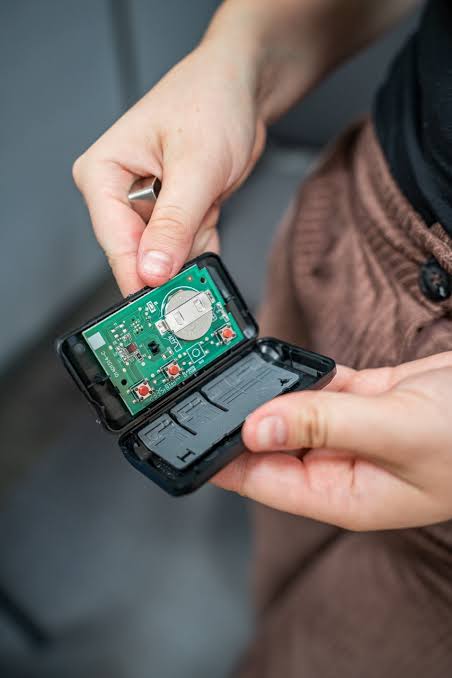
- Check the Batteries: Ensure you inserted fresh, high-quality alkaline batteries (e.g., 2x CR2032 or 1x 3V A23, depending on the model). Verify the positive (+) and negative (-) ends are aligned correctly.
- Clear Old Codes: If the opener’s memory is full, it may reject new remotes. Hold down the “Learn” button for about 10 seconds until the indicator light turns off, then reprogram all your remotes.
- Check the Antenna: Ensure the hanging wire antenna on the motor unit is pointing straight down and is not wrapped in metal or obstructed by storage boxes.
- Verify the Learn Button Color: A purple Learn button requires a specific type of remote, while a yellow one is more forgiving. Double-check your opener’s manual.
Frequently Asked Questions (FAQ)
Q1: Can I use any remote for my garage door?
A: No, you cannot use just any remote. The remote must match the brand and frequency of your garage door opener. While universal remotes offer broad compatibility, they still must explicitly list your opener’s brand and model on their packaging to function correctly.
Q2: How much does a replacement garage door remote cost?
A: A standard universal remote typically costs between $15 and $30. Brand-specific (OEM) remotes usually range from $30 to $50. Advanced models with built-in Wi-Fi or battery indicators may cost up to $60.
Q3: Do I need a professional to program a new garage remote?
A: Absolutely not. Programming a new remote is a straightforward DIY task that takes less than five minutes. As long as you can safely reach the motor unit and follow the manufacturer’s steps, you do not need to pay for a professional service call.
Q4: How do I know if my garage door remote is broken or just has a dead battery?
A: First, replace the battery with a brand-new one. If it still fails, check the remote’s LED light. If the light does not illuminate when you press the button, the remote’s internal circuitry is likely dead. If the light blinks but the door does not move, the remote may have lost its programming or the opener’s receiver is faulty.
Q5: Can I get a new remote if I lost the old one?
A: Yes, you can absolutely buy a new remote even if the old one is lost. However, for security reasons, it is highly recommended to clear the opener’s memory (by holding the “Learn” button for 10 seconds) and reprogram any remaining remotes you own. This ensures the lost remote can no longer open your garage.
Conclusion
Knowing how do I get a new garage door opener remote empowers you to solve a common household problem quickly and affordably. By identifying your model, choosing the right remote, and following a simple programming routine, you can restore your daily convenience and maintain your home’s security.
Remember, a functioning garage door remote is a small investment that pays off in daily peace of mind. If you found this guide helpful, please share it on your favorite social media platforms to help friends and family who might be stuck outside their garage today!
Have questions or a unique garage door setup? Drop a comment below, and our community of experts will be happy to assist you.
Leave a Reply