Introduction
We have all been there: you pull into your driveway after a long day, press the button on your car’s visor, and… nothing happens. The garage door stays shut, leaving you stuck in the rain or cold. It is a frustrating experience that disrupts the convenience modern technology promises. If you are asking yourself, “How do I connect my garage door to my Homelink?” you are not alone. This guide will walk you through the process clearly, safely, and efficiently, so you can get back to enjoying the seamless integration of your vehicle and home.
Understanding Homelink and Your Garage Door Opener
Before diving into the buttons, it helps to understand what is happening behind the scenes. Homelink is a universal transceiver built into many vehicles (including Ford, Honda, Toyota, BMW, and Tesla) that mimics the signal of your handheld garage door remote.
However, not all garage door openers speak the same language. Older units use fixed codes, while newer models use rolling codes for security. Knowing which type you have is the first step to a successful connection.
Fixed Code vs. Rolling Code Systems
| Feature | Fixed Code (Older) | Rolling Code (Newer/Secure) |
|---|---|---|
| Security Level | Lower (easier to clone) | High (changes every use) |
| Programming Method | Simple dip switches or basic learn button | Requires “Learn” button interaction |
| Compatibility | Most pre-2000 openers | Most post-2000 openers (LiftMaster, Genie, etc.) |
| Complexity | Easy | Moderate (requires timing) |
Note: If your opener was manufactured after 1993, it likely uses a rolling code system, which requires a specific pairing process with your Homelink module.
Step-by-Step: How Do I Connect My Garage Door To My Homelink?
This is the core of your query. While every car manufacturer has slight variations, the general process follows a standard protocol. Always refer to your vehicle’s owner manual for model-specific nuances, but these steps work for 90% of vehicles.
Step 1: Clear Existing Homelink Memory
If you have previously programmed a button, you must clear it to avoid conflicts.
- Turn your ignition to the “On” or “Accessory” position.
- Press and hold the two outer Homelink buttons simultaneously.
- Keep holding until the indicator light begins to flash rapidly (usually takes about 10–20 seconds).
- Release the buttons. The memory is now cleared.
Step 2: Program the Homelink Button
Now, you will teach your car the signal from your existing handheld remote.
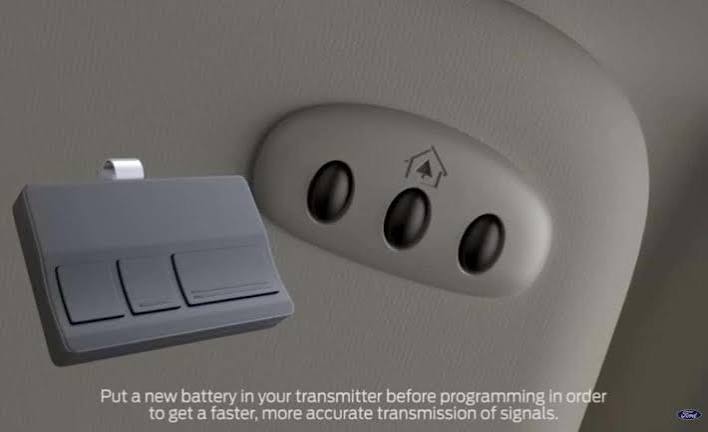
- Hold your handheld garage remote 1–3 inches away from the Homelink buttons in your car.
- Press and hold the desired Homelink button in your car and the button on your handheld remote at the same time.
- Keep both pressed until the Homelink indicator light changes from a slow blink to a rapid flash.
- Tip: This may take up to 30 seconds. Do not let go prematurely.
- Once the light flashes rapidly, release both buttons. Your car has now learned the signal.
Step 3: Sync with the Garage Door Opener Motor
This is the critical step often missed. For rolling code systems, the opener unit itself must recognize the new signal.
- Locate the “Learn” or “Smart” button on your garage door opener motor unit (hanging from the ceiling). It is usually colored yellow, purple, orange, or red.
- Press and release the “Learn” button. The indicator light on the motor will turn on or blink.
- You have approximately 30 seconds to complete the next action.
- Return to your car and press the programmed Homelink button firmly three times.
- Watch the garage door. It should move up or down, confirming the sync is complete.
If the door does not move, repeat Step 3. Ensure you are pressing the Homelink button firmly and that you are within range of the garage.
Troubleshooting Common Connection Issues
Even with careful following of instructions, things can go wrong. Here are the most common hurdles and how to overcome them.
The Light Flashes But the Door Doesn’t Move
This usually indicates a compatibility issue with older “dip switch” remotes.
- Solution: You may need to match the dip switches on your handheld remote to the settings in your car’s Homelink menu (if available). Consult your vehicle manual for “Dip Switch Programming Mode.”
The “Learn” Button Times Out
If you wait too long between pressing the motor’s Learn button and pressing the car button, the window closes.
- Solution: Have a helper stand by the garage door motor to press the Learn button while you sit in the car ready to press the Homelink button. Coordination is key.
Interference from LED Bulbs
Surprisingly, modern LED light bulbs in your garage door opener can emit radio frequency interference that blocks the Homelink signal.
- Solution: Try removing the LED bulbs temporarily during programming. If it works, replace them with RF-shielded LED bulbs designed for garage openers.
Safety First: Critical Precautions
When learning how do I connect my garage door to my Homelink, safety must be your priority. A malfunctioning garage door can cause serious injury or property damage.
- Keep Clear: Ensure no people, pets, or objects are in the path of the door during testing.
- Photo-Eye Sensors: Never bypass or block the safety sensors at the bottom of the door tracks. If these are misaligned, the door will not close, regardless of your Homelink setup.
- Manual Release: Know where your manual release cord is. If the door gets stuck mid-cycle, you can disengage the motor and operate it manually.
For more detailed safety standards regarding residential garage door operators, you can refer to the guidelines provided by Wikipedia’s entry on Garage Door Openers, which outlines historical safety improvements and regulatory standards in the US.
Why Use Homelink Over a Handheld Remote?
You might wonder if the effort is worth it. Here are the key benefits:
- Convenience: No more digging through bags or pockets for a small remote. It is always in your car.
- Security: Homelink signals are encrypted. Unlike old handheld remotes that can be cloned easily, Homelink rolling codes are much harder to intercept.
- Aesthetics: It reduces clutter on your keychain and keeps your car interior streamlined.
- Integration: Many newer Homelink systems integrate with smartphone apps, allowing you to control your garage door even when you are not in the car.
FAQ Section
Q1: Can I program Homelink without the original handheld remote?
A: It is difficult but sometimes possible. Some newer garage door openers allow you to program directly from the motor unit using a keypad or specific button sequences. However, having the original remote makes the process significantly easier and more reliable. If you lost your remote, consider buying a universal replacement compatible with your opener brand first.
Q2: Why does my Homelink work sometimes but not others?
A: This is often a range or battery issue. Check the battery in your handheld remote; if it is weak, the signal it sends to the car during programming may be inconsistent. Also, ensure there are no large metal objects blocking the line of sight between your car and the garage motor during initial setup.
Q3: Is Homelink compatible with all garage door brands?
A: Homelink is compatible with the vast majority of North American garage door openers, including LiftMaster, Chamberlain, Genie, Craftsman, and Stanley. However, some proprietary European or very old industrial systems may require an external compatibility bridge (a small device installed near the motor).
Q4: How do I reset Homelink if I sell my car?
A: For security, always clear the memory before selling or trading in your vehicle. Follow Step 1 in this guide: hold the two outer buttons until the light flashes rapidly. This ensures the new owner cannot access your garage.
Q5: Can I program multiple garage doors to one Homelink system?
A: Yes. Most Homelink systems have 3 to 5 programmable buttons. You can assign one button to your home garage, another to a vacation home, and a third to a gate or second garage. Each button is programmed independently using the steps above.
Conclusion
Learning how do I connect my garage door to my Homelink is a straightforward process that pays off in daily convenience. By clearing the memory, syncing the handheld remote, and engaging the motor’s Learn button, you can establish a secure and reliable connection in under 15 minutes. Remember to prioritize safety, check for LED interference if issues arise, and enjoy the luxury of hands-free entry.
Did this guide help you get your garage door working? Share this article with friends who are still struggling with their remotes, or pin it to your Pinterest board for future reference!
Leave a Reply