Have you ever pulled into your driveway, rain pouring down, only to realize you can’t get your garage door to open? It is a frustrating experience that many homeowners face when technology fails to communicate. If you are wondering how do I connect my garage door to my car, you are not alone, and the solution is often simpler than you think.
Modern vehicles come equipped with built-in transmitters, often branded as HomeLink, Car2U, or Genie Intellicode, designed to replace those bulky plastic remotes cluttering your visor. However, the pairing process varies significantly depending on the age of your garage door opener and the make of your vehicle. This guide will walk you through the exact steps to sync your devices, troubleshoot common issues, and ensure your system is secure.
Understanding Your Garage Door Opener System
Before attempting to pair your car, you must identify the type of garage door opener you have. The method for connecting your car depends entirely on the frequency and security protocol of your opener unit.
Most residential garage door openers operate on one of three main technologies:
- Fixed Code: Older systems (pre-1993) use a static code. These are less secure but easier to program.
- Rolling Code: Most modern openers (post-1993) use a changing code for every press to prevent hacking. This requires a specific “learn” button procedure.
- Smart/Internet-Enabled: Newer Wi-Fi-enabled openers may require app-based integration rather than simple radio frequency pairing.
To find your model number, look at the motor unit hanging from your garage ceiling. The label usually contains the brand (e.g., LiftMaster, Chamberlain, Genie) and the model number. You can also check the Wikipedia page on garage door openers for a broader historical context on how these security standards have evolved over the decades.
Step-by-Step Guide: How to Program HomeLink in Your Car
HomeLink is the most common built-in garage door system in vehicles from brands like Ford, Honda, Toyota, and BMW. While menus vary, the core logic remains consistent.
Step 1: Clear Previous Settings
If your car’s buttons were previously programmed, you must clear them first.
- Turn your ignition to the “On” position (do not start the engine).
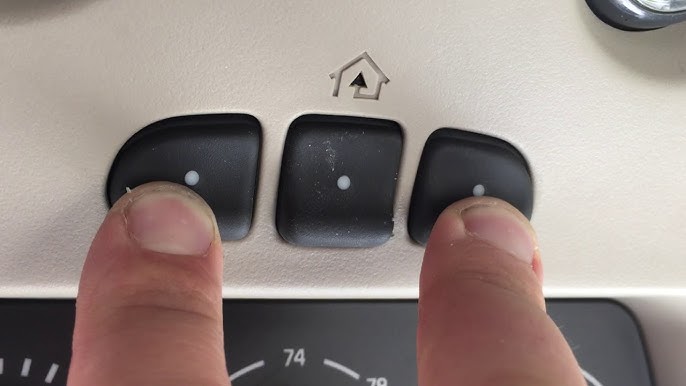
- Press and hold the two outer HomeLink buttons simultaneously.
- Hold them for about 10–20 seconds until the indicator light flashes rapidly.
- Release the buttons. The memory is now cleared.
Step 2: Position Your Vehicle
Park your car outside the garage, ensuring the garage door is closed. You need a clear line of sight between your car’s rearview mirror (where the buttons are usually located) and the garage door opener motor unit. Keep the original handheld remote handy.
Step 3: Enter Programming Mode
- Press and hold the desired HomeLink button in your car.
- Simultaneously, press and hold the button on your original handheld remote.
- Keep both buttons pressed. The HomeLink indicator light will slowly flash, then change to a rapid flash.
- Once it flashes rapidly, release both buttons. This indicates the signal has been captured.
Step 4: Test the Connection
Press the programmed HomeLink button in your car. The garage door should activate. If it does not, proceed to the “Rolling Code” section below, as this is the most common reason for failure in modern systems.
Handling Rolling Code Openers
If your garage door opener was manufactured after 1993, it likely uses rolling code technology. Simply capturing the signal (as done above) is not enough; you must tell the garage motor to accept the new car transmitter.
Locating the Learn Button
Go to your garage door motor unit. Look for a small button, usually colored yellow, purple, orange, or red. It is often labeled “Learn,” “Smart,” or “Program.” There may also be an LED light next to it.
The Syncing Process
- Press the “Learn” button on the motor unit briefly. The LED light will turn on or blink. You typically have 30 seconds to complete the next step.
- Return to your car immediately.
- Press and hold the programmed HomeLink button for two seconds, release it, and repeat this cycle (press-hold-release) up to three times.
- Watch the garage door. If it moves, the pairing is successful. If the light on the motor unit blinks twice, the process is complete.
Pro Tip: If you have a Chamberlain or LiftMaster opener with a yellow learn button, you may need to press the HomeLink button in your car four times instead of three. Always refer to your specific opener’s manual for color-coded instructions.
Alternative Methods for Non-HomeLink Systems
Not all cars use HomeLink. Some manufacturers use proprietary systems or universal remotes.
Car2U System (Chrysler/Dodge/Jeep)
The Car2U system works similarly to HomeLink but often requires a different timing sequence.
- Hold the Car2U button and the original remote button together.
- Wait for the light to flash slowly, then rapidly.
- For rolling codes, press the “Learn” button on the garage motor, then press the Car2U button firmly three times.
Using a Universal Remote Clip-On
If your car lacks a built-in system, or if programming fails repeatedly, consider a clip-on universal remote. Brands like Genie and LiftMaster sell visor clips that house a standard remote. While less sleek, they are 100% reliable and require no complex programming—just standard dip-switch or smart-code setup.
Troubleshooting Common Connection Issues
Even with careful following of instructions, things can go wrong. Here is a comparison of common problems and their solutions.
| Issue | Possible Cause | Solution |
|---|---|---|
| Door doesn’t move | Weak battery in handheld remote | Replace the battery in your original remote before trying again. |
| Light flashes but door stays shut | Rolling code not synced | Repeat the “Learn” button process on the motor unit carefully. |
| Interference | LED bulbs in garage | Old LED bulbs can emit radio interference. Try turning them off during programming. |
| Distance too far | Signal weakness | Move your car closer to the garage door during the initial programming phase. |
The LED Bulb Interference Factor
A lesser-known issue involves LED lighting. Many modern garage door openers struggle with the radio frequency noise generated by cheap LED bulbs. If you recently changed your garage lights to LED, try switching back to incandescent bulbs temporarily to see if the connection improves. If confirmed, purchase high-quality, shielded LED bulbs designed for garage door openers.
Security Considerations When Connecting Your Car
Connecting your garage door to your car adds convenience, but it also introduces potential security risks. Since your car is a high-value target for thieves, ensuring your garage door signal is secure is vital.
- Disable When Selling: Always clear your HomeLink memory before selling or trading in your vehicle.
- Update Firmware: If you have a Wi-Fi-enabled opener (like MyQ), keep its firmware updated to patch security vulnerabilities.
- Monitor Activity: Use smart garage hubs to receive notifications if your door opens unexpectedly.
By following these protocols, you ensure that your convenience does not come at the cost of your home’s security.
FAQ Section
How long does it take to program a garage door to my car?
Typically, the process takes between 5 to 15 minutes. If you encounter rolling code issues or interference, it may take slightly longer, but it rarely requires more than 30 minutes of troubleshooting.
Can I program multiple garage doors to one car button?
No, each button on your HomeLink or Car2U system can only store one frequency. However, most cars have three separate buttons, allowing you to program up to three different garage doors or gates.
Why won’t my HomeLink program to my garage door?
The most common reasons are dead batteries in the handheld remote, incorrect timing during the rolling code sync, or radio interference from LED lights. Ensure you are following the specific steps for your opener’s brand.
Is it safe to leave my garage door connected to my car?
Yes, it is generally safe. Modern rolling code technology makes it extremely difficult for thieves to intercept and replicate your signal. However, always park in well-lit areas and keep your car locked.
Do I need a professional to connect my garage door to my car?
In most cases, no. This is a DIY-friendly task that requires no tools. However, if you have an older fixed-code system or a complex smart home integration, consulting a professional technician might save time.
Conclusion
Learning how do I connect my garage door to my car transforms a daily chore into a seamless experience. Whether you are using HomeLink, Car2U, or a universal remote, the key lies in identifying your opener type and following the rolling code synchronization steps carefully. By clearing old memories, positioning your vehicle correctly, and addressing potential interference, you can enjoy the luxury of hands-free entry.
Don’t let a disconnected remote ruin your day. Take a few minutes this weekend to sync your system, and enjoy the peace of mind that comes with modern convenience. If you found this guide helpful, please share it with friends and family who might be struggling with their own garage door setups!
Leave a Reply