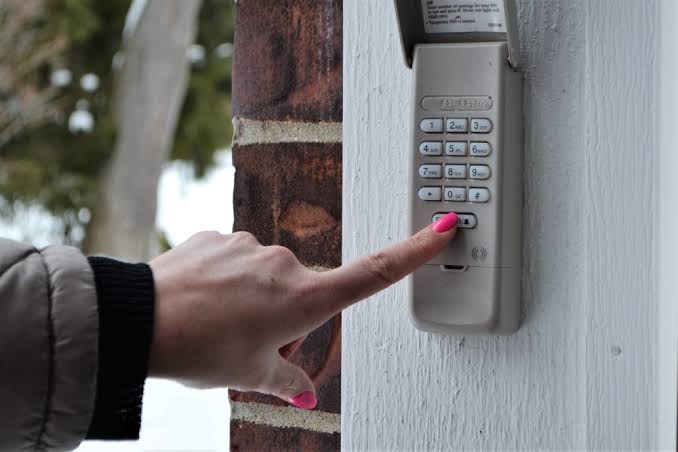
Have you ever worried that someone might have access to your old garage door code? Whether you’ve just moved into a new home, lost a remote, or simply want to upgrade your home security, knowing how can I change the code on my garage door is an essential skill for every homeowner. It’s easier than you think, and it takes just a few minutes to complete.
In this guide, we’ll walk you through everything you need to know to reset your garage door opener code safely and effectively. No technical expertise required—just follow our simple steps.
Why Should You Change Your Garage Door Code?
Before diving into the “how,” let’s address the “why.” Many homeowners underestimate the importance of updating their garage door codes regularly. Here are some compelling reasons:
- Security Risks: If you’ve recently moved into a new house, the previous owners or tenants might still have access.
- Lost Remotes: Misplaced remotes can fall into the wrong hands.
- Outdated Technology: Older fixed-code systems are vulnerable to hacking. Modern rolling-code technology offers better protection.
According to the Federal Bureau of Investigation (FBI), property crimes involving unauthorized access remain a significant concern in residential areas. Updating your garage door code is one of the simplest yet most effective ways to protect your home.
Understanding Your Garage Door Opener Type
Not all garage door openers work the same way. Before proceeding, identify which type you have:
- Fixed-Code Openers: These use a static code that doesn’t change. They’re older and less secure.
- Rolling-Code Openers: These generate a new code each time the remote is used, making them much harder to hack.
- Smart Openers: Connected to Wi-Fi, these allow control via smartphone apps and often include additional security features.
Check your owner’s manual or look up your model online if you’re unsure. Most manufacturers provide detailed guides tailored to specific models.
Pro Tip: If you don’t have the manual, visit the manufacturer’s website. Brands like Chamberlain, LiftMaster, and Genie offer downloadable PDFs for free.
Step-by-Step Guide: How to Change Your Garage Door Code
Now, let’s get into the nitty-gritty. Below are universal steps that apply to most garage door openers. Always refer to your specific model’s instructions for any variations.
Step 1: Locate the Learn Button
The “Learn” button is usually found on the back or side of the motor unit hanging from your garage ceiling. It may be labeled as “Learn,” “Program,” or have a small LED light next to it.
Step 2: Clear Existing Codes
To ensure no old remotes can still operate your door:
- Press and hold the Learn button for about 6–10 seconds until the indicator light turns off.
- Release the button. This action erases all previously programmed remotes and keypads.
Note: After clearing codes, you’ll need to reprogram all devices you wish to use.
Step 3: Program Your New Remote or Keypad
- Press the Learn button again briefly. The LED light should blink or stay solid, indicating it’s ready to receive a new signal.
- Within 30 seconds, press the button on your remote or enter your desired PIN on the keypad.
- Wait for confirmation (usually a click sound or flashing lights).
Step 4: Test the New Code
Try opening and closing your garage door using the newly programmed device. If it works, congratulations—you’ve successfully changed your code!
Step 5: Reprogram Additional Devices
Repeat Step 3 for any other remotes, keypads, or smart devices you want to connect.
| Device Type | Programming Method | Time Required |
|---|---|---|
| Standard Remote | Press Learn + Remote Button | 1–2 minutes |
| Wireless Keypad | Enter PIN after pressing Learn | 2–3 minutes |
| Smart App | Follow app-specific instructions | 5–10 minutes |
Common Challenges and Solutions
Even with straightforward instructions, issues can arise. Here’s how to troubleshoot common problems:
- Remote Not Responding: Ensure batteries are fresh and correctly installed. Also, check that you’re within range (typically 20–30 feet).
- LED Light Doesn’t Blink: Double-check that you pressed the Learn button properly. Some models require a firm press.
- Code Won’t Save: Make sure you’re following the timing guidelines strictly. Delays beyond 30 seconds can cause failures.
If problems persist, consult your manufacturer’s support team or consider hiring a professional technician.
Enhancing Security Beyond Changing the Code
Changing your code is just the first step. Consider these additional measures to bolster your garage’s security:
- Upgrade to Rolling-Code Technology: If you’re using an older fixed-code system, upgrading to a modern opener can significantly reduce vulnerability.
- Install Motion Sensors: These alert you to unusual activity around your garage.
- Use Smart Features: Many newer openers integrate with home automation systems, allowing real-time monitoring and alerts.
For more information on home security best practices, check out this comprehensive resource on Wikipedia.
FAQ Section
Q1: How often should I change my garage door code?
A: Experts recommend changing your code at least once a year or whenever there’s a potential security breach, such as losing a remote.
Q2: Can I change the code without the original remote?
A: Yes, but you’ll need access to the motor unit’s Learn button. Without it, professional assistance may be necessary.
Q3: What happens if I forget my new code?
A: You’ll need to reset the system entirely by clearing all codes and reprogramming your devices. Keep a record of your new code in a safe place.
Q4: Is it possible to hack a garage door opener?
A: While rare, older fixed-code systems are susceptible to hacking. Upgrading to rolling-code technology minimizes this risk.
Q5: Do I need special tools to change the code?
A: No special tools are required. Just a ladder to reach the motor unit and possibly fresh batteries for your remote.
Q6: Will changing the code affect my smart home integration?
A: It might. After resetting, you’ll need to reconnect your smart devices following the manufacturer’s instructions.
Conclusion
Knowing how can I change the code on my garage door empowers you to take control of your home’s security. By following the steps outlined above, you can easily update your code and peace of mind. Remember, regular updates and adopting modern technology go a long way in safeguarding your property.
Don’t wait until it’s too late—take action today! Share this guide with friends and family who might benefit from learning how to secure their garages. Together, we can create safer communities.
Got questions or tips to share? Leave a comment below or spread the word on social media. Stay safe!
Leave a Reply