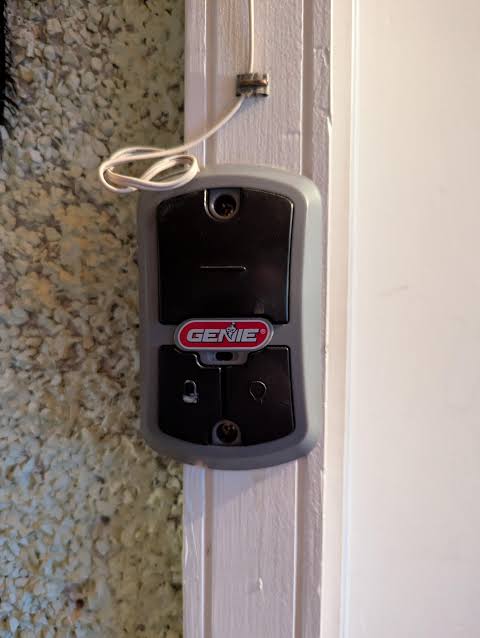
Have you ever returned home after a storm only to find your car trapped inside because the Genie garage door opener not working after power outage? It is a frustrating scenario that thousands of homeowners face every year. Sudden electrical disruptions can confuse the sophisticated electronics in modern openers, leaving you stuck until you know the right reset procedure.
In this guide, we will walk you through the exact steps to diagnose and fix your Genie opener. Whether you have a simple chain-drive model or a advanced smart-enabled unit, these solutions are designed to get your door moving again safely and efficiently.
Why Does My Genie Garage Door Stop Working After a Power Cut?
Before diving into the fixes, it helps to understand why this happens. Modern garage door openers are essentially small computers. They rely on consistent power to maintain their memory settings, including travel limits and safety sensor alignments.
When a power outage occurs, two main issues typically arise:
- Memory Loss: The opener’s internal board may lose its programmed settings. This means it no longer knows where the “up” and “down” positions are.
- Safety Mode Activation: Many Genie models have built-in surge protection. If the power returns with a spike (a sudden jump in voltage), the opener may lock itself into a safety mode to prevent damage to the motor or circuit board.
According to general electrical safety standards, sensitive electronic devices require a proper reset cycle to clear residual charge from capacitors. You can read more about how power surges affect household electronics on Wikipedia’s page on power surges.
Step 1: Perform a Hard Reset on Your Genie Opener
The most common solution for a Genie garage door opener not working after power outage is a hard reset. This clears any temporary glitches in the system.
Follow these precise steps:
- Unplug the Unit: Locate the power cord of your Genie opener. Unplug it from the wall outlet. If it is hardwired, turn off the circuit breaker that controls the garage.
- Wait for 30 Seconds: This is crucial. You must wait at least 30 seconds to allow all residual electricity to drain from the capacitor.
- Restore Power: Plug the unit back in or flip the circuit breaker on.
- Listen for the Click: You should hear a click from the motor head, indicating it has rebooted.
- Test the Wall Button: Press the wall-mounted control button. If the door moves, the issue was a temporary glitch.
If the door still does not respond, do not panic. We need to check the physical connections next.
Step 2: Check the Safety Sensors
One of the most frequent culprits is misaligned safety sensors. During a power outage, vibrations from thunder or the sudden stop/start of the motor can shift these sensors slightly.
How to Inspect and Align Sensors
- Locate the Sensors: Look near the floor on both sides of the garage door opening. You will see two small plastic units with lenses.
- Check the Lights:
- One sensor should have a steady green light (sending unit).
- The other should have a steady amber/red light (receiving unit).
- If the light is blinking or off: The sensors are misaligned or blocked.
- Clean the Lenses: Use a soft, dry cloth to wipe away any dust, spiderwebs, or dirt.
- Realign the Brackets: Loosen the wing nuts on the sensor brackets. Adjust the sensors until they are pointing directly at each other. Tighten the nuts once the lights are steady.
Pro Tip: Even if the lights look steady, try blocking the beam with your hand. If the opener doesn’t react, the sensors may still be faulty.
Step 3: Reprogram the Travel Limits
If the motor runs but the door doesn’t move correctly (e.g., it stops halfway or reverses immediately), the travel limits have likely been erased. Genie openers use specific codes to remember how far to open and close.
For Genie Models with Set-Up Buttons (Most Modern Units)
- Enter Programming Mode: Press and hold the Up and Down arrows on the wall console simultaneously for 5–10 seconds until the LED flashes.
- Set the Down Limit:
- Press the Down arrow. The door will move down.
- When the door touches the floor, press the Stop button.
- Set the Up Limit:
- Press the Up arrow. The door will move up.
- When the door reaches the desired height, press the Stop button.
- Save Settings: Wait for the LED to stop flashing. Test the door using the remote.
For Older Genie Models (Dial-Based)
Older models may have physical dials labeled “Open Limit” and “Close Limit.”
- Use a screwdriver to adjust these dials slightly.
- Turn clockwise to decrease travel distance and counter-clockwise to increase it.
- Make small adjustments (1/8th of a turn) and test frequently.
Step 4: Re-sync Your Remotes and Keypads
After a power outage, your handheld remotes and wireless keypads may lose their connection to the main unit. This is because the rolling code security feature requires re-handshaking.
| Device Type | Re-sync Procedure |
|---|---|
| Handheld Remote | Press the “Learn” button on the motor head (usually purple or red). Within 30 seconds, press the button on your remote 3 times. |
| Wireless Keypad | Enter your PIN, then press and hold the “Learn” button on the motor. Enter your PIN again on the keypad. |
| Smart Home App | Open your Genie app, go to device settings, and select “Reconnect” or “Reset Connection.” |
If you have multiple remotes, repeat the process for each one. Ensure you are standing within 10 feet of the motor during this process for optimal signal strength.
Step 5: Inspect the Backup Battery (If Equipped)
Many newer Genie models come with a backup battery system designed to operate during outages. However, if the power was out for an extended period, the battery may be completely drained.
- Check the Indicator: Look for a battery icon on the motor head. A solid green light means it’s charged. A red or blinking light indicates a low or failed battery.
- Charge Time: It can take up to 24 hours for a fully depleted battery to recharge.
- Replacement: If the battery is older than 3–5 years, it may no longer hold a charge. Consider replacing it with a genuine Genie replacement battery.
Common Mistakes to Avoid
When trying to fix your Genie garage door opener not working after power outage, avoid these common errors:
- Forcing the Door: Never manually force the door up or down if the motor is engaged. This can strip the gears.
- Ignoring Safety Sensors: Bypassing sensors is dangerous and illegal in many jurisdictions. Always ensure they are functional.
- Skipping the Wait Time: Unplugging for only 5 seconds is often insufficient. Stick to the 30-second rule.
FAQ Section
1. Why does my Genie garage door opener beep after a power outage?
Beeping usually indicates an error code. A continuous beep often means the safety sensors are misaligned or blocked. Intermittent beeps may indicate a low backup battery. Check your owner’s manual for specific beep patterns related to your model.
2. Can I operate my Genie garage door manually during a power outage?
Yes. Locate the emergency release cord (usually red) hanging from the trolley rail. Pull it down firmly to disengage the opener. You can then lift the door manually. Be careful, as the door will be heavy without the motor’s assistance.
3. How long does it take for a Genie opener to reset?
A hard reset takes about 30 seconds. However, reprogramming travel limits and re-syncing remotes can take 5–10 minutes. If you need to recharge a backup battery, it may take up to 24 hours.
4. What if my Genie opener still doesn’t work after resetting?
If you have performed a hard reset, checked the sensors, and reprogrammed the limits without success, the issue may be a blown fuse on the circuit board or a damaged motor capacitor. In this case, contact a certified Genie dealer or a professional garage door technician.
5. Will a power surge damage my Genie opener permanently?
While modern openers have surge protection, extreme spikes can damage the logic board. If your opener shows no signs of life (no lights, no sound) after a severe storm, the internal fuse may have blown to protect the unit. This often requires professional repair.
6. How can I prevent this issue in the future?
Invest in a whole-house surge protector or a dedicated surge protector for your garage opener. Additionally, consider installing a battery backup system if your model doesn’t have one. This ensures operation during outages and protects against voltage fluctuations.
Conclusion
Dealing with a Genie garage door opener not working after power outage is stressful, but it is rarely a permanent failure. In most cases, a simple hard reset, sensor realignment, or reprogramming of travel limits will restore functionality.
By following the steps outlined above, you can save time and money by avoiding unnecessary service calls. Remember, safety is paramount—always ensure your sensors are working before relying on the automatic function.
Did this guide help you get your garage door moving again? Share this article with your neighbors on Facebook or Twitter to help them prepare for the next storm!
Leave a Reply