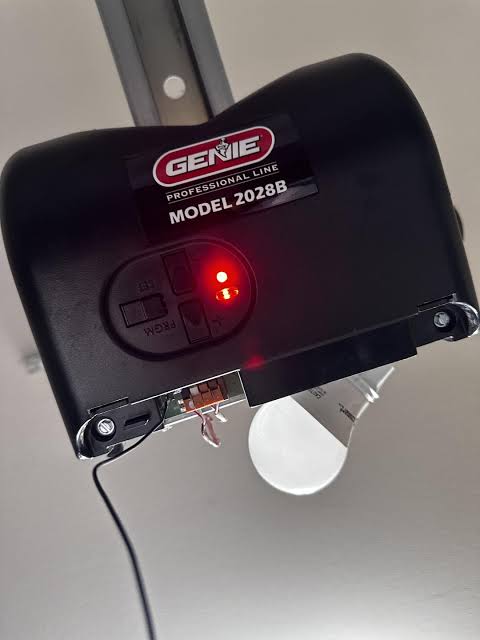
Have you ever rushed out the door in the morning, only to find your garage door refusing to budge? It is a frustrating start to the day, especially when you see that ominous Genie Garage Door Opener Model 2028 flashing red light. This indicator is not just a random glitch; it is a critical safety warning that something is blocking the door or misaligned.
In this guide, we will walk you through exactly why this happens and how to fix it quickly. We understand that dealing with mechanical issues can be intimidating, but most causes for this error are simple to resolve without calling a professional. Let’s get your garage door working smoothly again.
Why Is My Genie Model 2028 Flashing Red?
When you see a red light flashing on your Genie Model 2028, the opener is essentially telling you that it cannot safely close the door. This model, like many modern openers, relies heavily on safety protocols to prevent accidents. The flashing red light is almost exclusively tied to the safety eye sensors (also known as photo-eyes) located near the floor on either side of the garage door opening.
According to general safety standards for automatic doors, these sensors must have an unobstructed line of sight. If the beam between them is broken, dirty, or misaligned, the system defaults to a “stop” mode. This is a feature, not a bug. It prevents the heavy door from crushing objects, pets, or people underneath.
While power surges or internal board failures can occur, they are rare compared to sensor issues. By focusing on the sensors first, you solve the problem in about 90% of cases. Understanding this mechanism helps you approach the repair with confidence rather than confusion.
How to Check and Clean the Safety Sensors
The most common culprit behind the Genie Garage Door Opener Model 2028 flashing red light is dirt or debris. Garage floors are dusty environments. Over time, spider webs, dust bunnies, or mud splatters can cover the small lenses of the sensors.
Follow these simple steps to clean them:
- Locate the Sensors: Look at the bottom tracks of your garage door, about 6 inches off the ground. You will see two small plastic units facing each other. One usually has a green LED, and the other has a red or amber LED.
- Wipe the Lenses: Take a soft, dry microfiber cloth. Gently wipe the lens of both sensors. Avoid using harsh chemicals or water, which can leave streaks or damage the housing.
- Check the Indicator Lights: After cleaning, look at the LEDs.
- If the light stops flashing and becomes solid, you have solved the issue.
- If it continues to flash, move to the next step: alignment.
It is surprising how often a simple smudge causes such a significant operational halt. Regular maintenance, such as wiping these lenses once a month, can prevent this issue from recurring.
Aligning Misaligned Garage Door Sensors
If cleaning did not work, the sensors are likely misaligned. Even a slight bump from a lawnmower, a bicycle, or a stored box can knock them out of position. The sensors must be perfectly parallel to each other for the infrared beam to connect.
Here is how to realign them properly:
- Loosen the Wing Nut: Each sensor is held in place by a wing nut or a bracket screw. Loosen it just enough so you can move the sensor by hand. Do not remove it completely.
- Adjust the Angle: Gently twist the sensor until the LED light changes. On most Genie models, you want the receiving sensor (usually the one with the amber/red light) to show a solid light, not a blinking one.
- Tighten Securely: Once the light is solid, carefully tighten the wing nut while holding the sensor in place. Be careful not to shift it while tightening.
- Test the Door: Press the wall button to close the door. If it closes smoothly, the alignment is correct.
Pro Tip: Use a level if you have one. Ensuring both sensors are at the exact same height on their respective brackets can save you time during adjustment.
Inspecting Wiring and Power Connections
Sometimes the issue is not with the lens or angle, but with the connection itself. The wires running from the sensors to the motor head can become frayed, chewed by pests, or disconnected.
Inspect the wiring along the following path:
- Check where the wire enters the back of the sensor unit. Ensure it is snug and not pulled loose.
- Follow the wire up to the motor head. Look for any visible cuts, staples that may have pierced the insulation, or signs of rodent damage.
- Ensure the wires are securely attached to the terminal screws on the back of the Genie Model 2028 motor unit.
If you find damaged wiring, you may need to replace the low-voltage wire. This is a standard 2-conductor bell wire available at any hardware store. For more technical details on electrical safety standards in home automation, you can refer to resources on electrical wiring safety.
Resetting the Genie Model 2028 Opener
If the sensors are clean, aligned, and wired correctly, but the Genie Garage Door Opener Model 2028 flashing red light persists, a system reset might be necessary. Electronic glitches can sometimes cause the logic board to freeze in an error state.
To perform a hard reset:
- Unplug the Unit: Locate the power cord of the garage door opener and unplug it from the outlet. If it is hardwired, turn off the circuit breaker for the garage.
- Wait: Leave it disconnected for at least 30 seconds. This allows the capacitors on the circuit board to discharge fully.
- Reconnect Power: Plug the unit back in or turn the breaker on.
- Observe: The lights on the motor head will flash briefly as it boots up. Wait for the system to stabilize.
- Test: Try operating the door using the wall console.
This process clears temporary memory errors and re-initializes the sensor check sequence. It is a safe and effective first step for any electronic malfunction.
When to Call a Professional Technician
While most sensor issues are DIY-friendly, there are times when professional help is required. If you have tried all the steps above and the red light still flashes, the problem may lie within the internal circuit board or the motor itself.
Consider calling a technician if:
- The sensor LEDs are completely dark (indicating no power reachings the sensors).
- The wiring appears intact, but the signal is not being received.
- The motor makes unusual grinding noises when attempting to operate.
- You are uncomfortable working with ladders or electrical components.
Safety is paramount. A malfunctioning garage door is heavy and under high tension. If you are unsure, it is always better to consult a certified Genie dealer or a licensed garage door repair service.
FAQ: Common Questions About Genie 2028 Errors
1. What does a solid red light mean on my Genie opener?
A solid red light on the sensor usually indicates that the beam is aligned and the system is ready. However, if the motor unit has a solid red light, it may indicate a different error code, such as a lock mode or a limit setting issue. Always consult your specific manual for light codes.
2. Can sunlight interfere with the safety sensors?
Yes, intense direct sunlight hitting the receiver sensor can sometimes overwhelm the infrared beam, causing the Genie Garage Door Opener Model 2028 flashing red light. If this happens only at certain times of day, try shading the sensor with a small piece of cardboard or adjusting the angle slightly.
3. Why does the door reverse immediately after touching the floor?
If the door closes but then immediately goes back up, the “close limit” setting may be incorrect, or the safety beam is being interrupted at the last second. Check for obstructions near the floor and verify that the sensors are not vibrating out of alignment when the door moves.
4. How often should I maintain my garage door sensors?
It is recommended to check and clean your sensors every month. Additionally, test the safety reversal system monthly by placing a roll of paper towels in the door’s path. The door should reverse immediately upon contact.
5. Is it safe to bypass the sensors to close the door?
No. Bypassing safety sensors is extremely dangerous and violates federal safety regulations. The sensors are there to prevent injury or death. Never tape over the eyes or cut the wires to force the door closed.
6. What if only one sensor light is on?
If one sensor has a light and the other does not, the issue is likely a power failure to the non-lit sensor. Check the wiring connections at both the sensor and the motor head. The sensor without a light is not receiving voltage.
Conclusion
Dealing with a Genie Garage Door Opener Model 2028 flashing red light can be stressful, but it is rarely a catastrophic failure. In most cases, a quick clean, a minor alignment adjustment, or a simple power reset will get your door moving again. By understanding how these safety systems work, you empower yourself to handle minor household repairs with confidence.
Remember, regular maintenance is key to preventing these issues. Keep those lenses clean and ensure nothing blocks the path of your garage door. If you found this guide helpful, please share it with your neighbors or on social media to help others troubleshoot their garage door woes. Stay safe and keep your home secure!
Leave a Reply