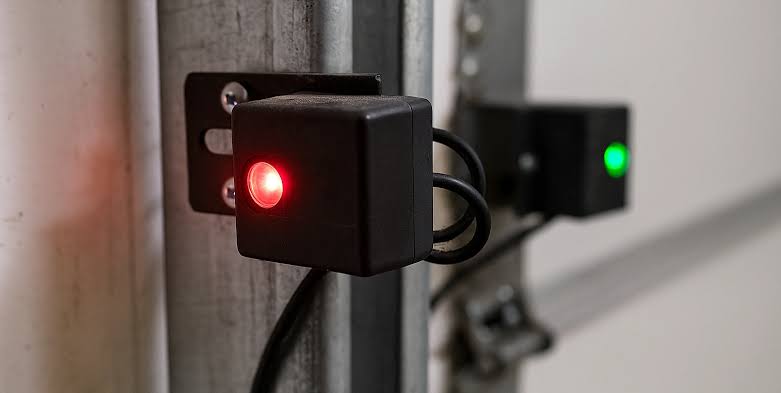
Have you ever stood in your driveway, pressed the remote, and watched your garage door refuse to budge while a mysterious light flashes at you? It is a frustrating scenario that many homeowners face, but understanding the signal is the first step to solving it. If your Genie garage door opener green light blinks 3 times, it is not broken; it is trying to tell you exactly what is wrong.
In this guide, we will decode this specific error code, walk you through simple DIY fixes, and help you get your garage back to normal operation without calling an expensive technician. Let’s dive into the mechanics of your Genie opener and solve this puzzle together.
Why Does the Genie Green Light Blink 3 Times?
Before we grab our tools, we need to understand the language of your garage door opener. The LED lights on your Genie unit are diagnostic tools. While a solid green light usually means the system is ready, a blinking pattern indicates a specific fault.
When the Genie garage door opener green light blinks 3 times, it almost always points to an issue with the safety reversal system. Specifically, it indicates that the safety eyes (photo-eyes) are misaligned, obstructed, or malfunctioning.
Modern garage doors are equipped with these sensors near the floor on both sides of the door entry. They shoot an invisible beam across the opening. If that beam is broken while the door is closing, the door must stop and reverse to prevent injury or damage. When the opener cannot verify that this beam is intact, it triggers the three-blink error code as a safety precaution.
According to general safety standards for automatic door operators, these sensors are non-negotiable components. You can read more about the history and regulation of these safety mechanisms on Wikipedia’s page on Garage Door Openers.
Step-by-Step Guide to Fixing the 3-Blink Error
Fixing this issue does not require advanced engineering skills. In most cases, it is a matter of cleaning, aligning, or checking connections. Follow these steps in order.
1. Check for Physical Obstructions
The simplest cause is often the most overlooked. Dirt, spider webs, leaves, or even direct sunlight can interfere with the sensor beam.
- Inspect the Lenses: Look at the small plastic lenses on both sensors (one sending, one receiving). Wipe them gently with a soft, dry cloth.
- Clear the Path: Ensure there are no boxes, bikes, or trash cans blocking the line of sight between the two sensors.
- Check for Sunlight: If the sun is shining directly into the receiving sensor, it can blind it. Try shading the sensor temporarily to see if the blinking stops.
2. Verify Sensor Alignment
If the path is clear, the sensors might be slightly out of alignment. Even a millimeter shift can break the connection.
- Look at the LED Indicators: Most Genie sensors have their own small LEDs. Typically, one will be solid amber or green (the sender), and the other should be solid green (the receiver). If the receiver light is off or blinking, they are misaligned.
- Adjust the Brackets: Loosen the wing nuts or screws holding the sensor brackets. Gently adjust the sensor until the indicator light turns solid.
- Tighten Securely: Once aligned, tighten the brackets carefully. Do not overtighten, as this can warp the bracket and shift the alignment again.
3. Inspect the Wiring
Loose or damaged wires are a common culprit, especially in older homes or after recent storms.
- Trace the Wires: Follow the thin wires from the sensors back to the motor head. Look for any cuts, chew marks (from pests), or pinches.
- Check Connections: Ensure the wires are securely plugged into the back of the motor unit. Sometimes, vibration from the door operating can loosen these terminals.
- Test Continuity: If you have a multimeter, you can test the wires for continuity. If a wire is broken internally, it will need to be replaced.
4. Reset the Garage Door Opener
Sometimes, the logic board in the opener gets stuck in an error state. A hard reset can clear this glitch.
- Unplug the Unit: Disconnect the power cord from the outlet.
- Wait: Leave it unplugged for at least 60 seconds. This allows the capacitors to discharge fully.
- Reconnect: Plug it back in. Wait for the lights to stabilize.
- Test: Try operating the door. If the Genie garage door opener green light blinks 3 times again, the issue is likely hardware-related rather than a software glitch.
Common Causes vs. Solutions Table
To help you troubleshoot faster, here is a quick reference table comparing common causes with their respective solutions.
| Cause | Symptom | Solution |
|---|---|---|
| Dirty Lenses | Beam blocked by debris | Clean lenses with a soft cloth |
| Misalignment | Receiver LED is off/blinking | Adjust brackets until LED is solid |
| Loose Wiring | Intermittent connection | Tighten terminals or replace wire |
| Sunlight Interference | Fails only at certain times of day | Shade the sensor or adjust angle |
| Faulty Sensor | No LED light on either sensor | Replace the sensor pair |
When to Call a Professional
While most three-blink errors are DIY-friendly, there are scenarios where professional help is safer and more efficient.
- Damaged Circuit Board: If you have checked all sensors and wiring, and the light still blinks, the issue may lie within the main logic board of the opener. Replacing this requires technical expertise.
- Persistent Electrical Issues: If you notice burning smells, sparks, or frequent breaker trips, disconnect power immediately and call an electrician or garage door specialist.
- Older Models: If your Genie opener is over 15 years old, parts may be obsolete. A professional can advise whether repair or replacement is more cost-effective.
FAQ: Genie Garage Door Opener Green Light Blinks 3 Times
Here are answers to the most common questions users ask about this specific error code.
1. Can I bypass the safety sensors to close the door?
Technically, some older models allow you to hold down the wall button to force the door closed, but this is highly discouraged. The sensors are there to prevent serious injury or death. Bypassing them removes a critical safety feature and may violate local building codes. Always fix the sensors instead of bypassing them.
2. Why does the light blink 3 times only when I use the remote?
If it works with the wall button but not the remote, the issue might not be the sensors. Check the batteries in your remote. However, if the green light on the motor unit is blinking 3 times, it is still primarily a sensor or safety edge issue, regardless of which control method you use.
3. What if the sensors are aligned but the light still blinks?
If alignment is perfect and the lenses are clean, check the wiring for breaks. If the wiring is intact, one of the sensors may have failed internally. Try swapping the sensors (if they are identical) or replacing the pair. Genie sensors are relatively inexpensive and easy to replace.
4. Does weather affect the green light blinking?
Yes. Extreme cold can make plastic brackets brittle and shift alignment. Heavy rain or humidity can cause corrosion on wire connections. In winter, ice buildup on the lens can also block the beam. Regular maintenance checks during seasonal changes can prevent this.
5. How do I know if my Genie opener is in “Lock Mode”?
Lock mode usually prevents the remote from working but does not typically cause the green light to blink 3 times. Lock mode is often indicated by a different LED pattern or a specific lock icon. The three-blink pattern is specific to the safety reversal system. Check your manual for lock mode indicators, but focus on the sensors for the 3-blink error.
6. Will resetting the opener void my warranty?
No, performing a standard power cycle (unplugging and replugging) does not void your warranty. However, opening the motor housing to repair internal components may void it. Stick to external troubleshooting like sensor alignment and cleaning to stay within warranty guidelines.
Conclusion
Dealing with a Genie garage door opener green light blinks 3 times can feel daunting, but it is essentially a safety feature doing its job. By systematically checking for obstructions, aligning your sensors, and inspecting your wiring, you can resolve the issue in most cases without professional help.
Remember, your garage door is the largest moving object in your home. Keeping its safety systems functional is crucial for protecting your family and property. Don’t ignore the blinking light—address it promptly.
If you found this guide helpful, please share it with your neighbors or on social media. You never know who else might be standing in their driveway, puzzled by a flashing green light!
Leave a Reply