Introduction
Is your garage door remote acting up? Maybe it stopped working suddenly, or you need a replacement for your Genie G3T-BX Intellicode 3 Button Garage Door Opener Remote. You’re not alone—thousands of homeowners face this frustrating issue every year. A malfunctioning garage door remote can disrupt your daily routine, leaving you stuck outside or unable to secure your home properly.
The good news? Understanding your Genie G3T-BX remote and knowing how to program or troubleshoot it can save you time, money, and unnecessary stress. In this comprehensive guide, we’ll walk you through everything you need to know about this popular garage door opener remote, from compatibility details to step-by-step programming instructions.
What Is the Genie G3T-BX Intellicode Remote?
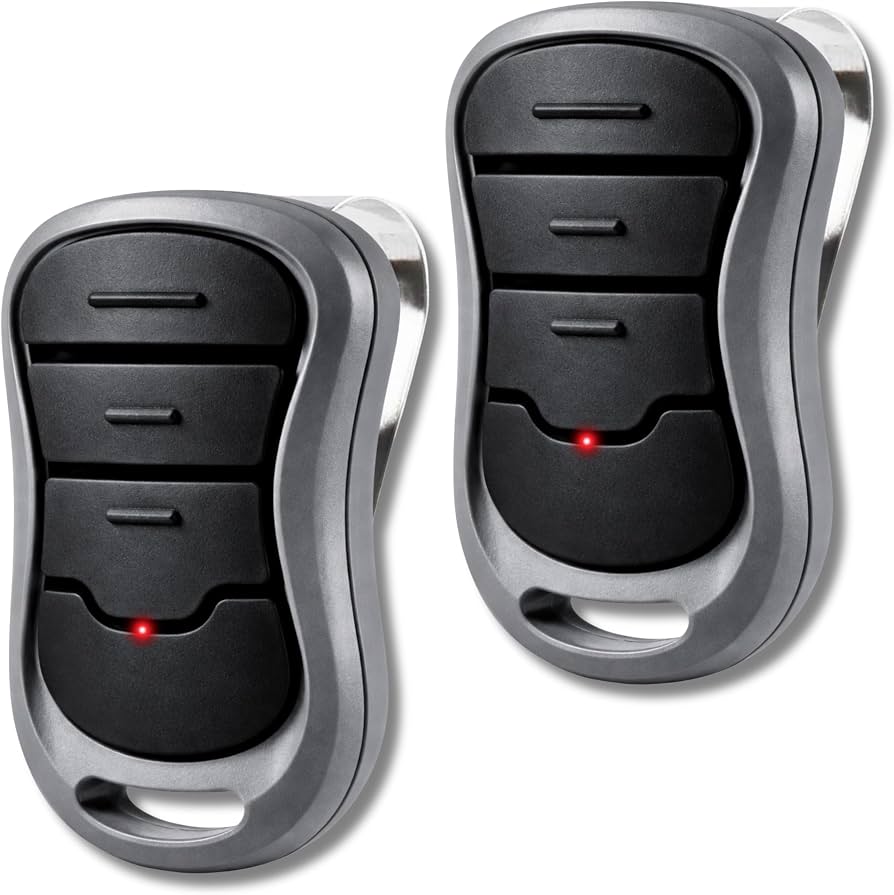
The Genie G3T-BX is a three-button garage door opener remote that uses Intellicode rolling code technology. This advanced security feature changes the access code each time you use the remote, making it nearly impossible for thieves to intercept and replicate your signal.
Key Features at a Glance
| Feature | Specification |
|---|---|
| Model Number | G3T-BX |
| Buttons | 3 programmable buttons |
| Technology | Intellicode rolling code |
| Frequency | 315 MHz or 390 MHz (varies by model) |
| Compatibility | Most Genie Intellicode openers manufactured after 1997 |
| Battery Type | CR2032 lithium battery |
| Range | Up to 100 feet (depending on conditions) |
This remote is designed to work seamlessly with Genie’s Intellicode garage door openers, which include popular models like the Genie Pro series, ChainLift, and ScrewDrive systems. If you own a Genie opener made in the last two decades, there’s a strong chance the G3T-BX will be compatible with your system.
How to Program Your Genie G3T-BX Remote
Programming your remote doesn’t have to be complicated. Follow these clear, step-by-step instructions to get your Genie G3T-BX Intellicode 3 Button Garage Door Opener Remote working in minutes.
Step-by-Step Programming Guide
Step 1: Locate the Learn Button Find the “Learn” or “Program” button on your garage door opener motor unit. This is typically located on the back or side of the unit and may be colored purple, red, orange, or green depending on your model.
Step 2: Clear Old Codes (If Necessary) Press and hold the Learn button for approximately 10 seconds until the indicator light blinks. This clears all previously programmed remotes from the system. Note: You’ll need to reprogram all your remotes after doing this.
Step 3: Initiate Programming Mode Press the Learn button once briefly. The indicator light should turn on or begin blinking, signaling that the opener is ready to receive a new remote code.
Step 4: Program the Remote Within 30 seconds, press and hold the button on your G3T-BX remote that you want to program. Hold it until the opener’s lights flash or you hear two clicks. This confirms successful programming.
Step 5: Test the Remote Stand within 10-15 feet of the garage door and press the programmed button. The door should respond immediately. If it doesn’t, repeat the process, ensuring you’re following each step carefully.
Important Programming Tips
- Work quickly: You only have 30 seconds to program the remote after pressing the Learn button
- Check the battery: A weak CR2032 battery can cause programming failures
- Stay close: Stand within 10 feet of the opener during programming
- One button at a time: Program each button separately if you’re setting up multiple doors
For more technical specifications about garage door opener systems, you can reference Wikipedia’s article on garage door openers.
Genie G3T-BX Compatibility: Will It Work With Your Opener?
One of the most common questions homeowners ask is whether the G3T-BX remote will work with their specific garage door opener model. Let’s break down the compatibility details.
Compatible Genie Models
The Genie G3T-BX Intellicode 3 Button Garage Door Opener Remote works with most Genie openers featuring Intellicode technology, including:
- Genie Pro Series (models ending in “H”)
- Genie ChainLift series
- Genie ScrewDrive series
- Genie SilentMax series
- Most Genie openers manufactured after 1997
How to Check Your Opener’s Compatibility
- Look for the Intellicode label: Check your opener motor unit for an “Intellicode” sticker or label
- Check the manufacture date: Openers made after 1997 typically use Intellicode technology
- Identify the frequency: Your G3T-BX remote must match your opener’s frequency (315 MHz or 390 MHz)
- Consult your manual: Your opener’s user manual will list compatible remote models
Common Compatibility Issues
| Issue | Solution |
|---|---|
| Wrong frequency | Verify your opener’s frequency and purchase the matching remote |
| Older non-Intellicode opener | The G3T-BX won’t work; you need a DIP switch remote instead |
| Interference from other devices | Reprogram the remote and ensure no other electronics are nearby |
Troubleshooting Common Genie G3T-BX Problems
Even the best remotes encounter issues occasionally. Here are solutions to the most common problems with the Genie G3T-BX Intellicode 3 Button Garage Door Opener Remote.
Remote Not Working At All
Possible Causes:
- Dead or weak battery
- Remote not properly programmed
- Signal interference
Solutions:
- Replace the CR2032 battery with a fresh one
- Reprogram the remote following the steps above
- Remove any potential sources of interference (LED bulbs, wireless routers) near the opener
Intermittent Operation
If your remote works sometimes but not others, try these fixes:
- Check battery contacts: Clean any corrosion from the battery compartment
- Reprogram the remote: Sometimes the code sync gets disrupted
- Inspect the antenna: Ensure the opener’s antenna wire is hanging down and not damaged
- Replace LED bulbs: Some LED bulbs in garage fixtures interfere with remote signals
Limited Range
A reduced operating range typically indicates:
- Weak battery (replace immediately)
- Obstructions between remote and opener
- Damaged antenna on the opener unit
- Electrical interference from nearby devices
Genie G3T-BX vs. Other Genie Remotes: Comparison
Choosing the right remote matters. Here’s how the G3T-BX stacks up against alternatives.
| Feature | G3T-BX | G3T-R | Universal Remotes |
|---|---|---|---|
| Buttons | 3 | 3 | Varies (1-4) |
| Technology | Intellicode | Intellicode | Varies |
| Compatibility | Genie Intellicode only | Genie Intellicode only | Multiple brands |
| Price Range | $15-$25 | $15-$25 | $10-$30 |
| Ease of Programming | Easy | Easy | Moderate to Difficult |
| Security | High (rolling code) | High (rolling code) | Varies |
Advantages of the G3T-BX:
- Specifically designed for Genie systems
- Reliable Intellicode security
- Simple three-button layout
- Affordable replacement cost
Potential Limitations:
- Only works with Genie Intellicode openers
- Not compatible with older DIP switch systems
- Limited to three programmable doors
Where to Buy the Genie G3T-BX Remote
You can purchase the Genie G3T-BX Intellicode 3 Button Garage Door Opener Remote from several reputable sources:
- Home improvement stores: Home Depot, Lowe’s, Ace Hardware
- Online retailers: Amazon, eBay, Walmart.com
- Genie authorized dealers: Check Genie’s official website for local dealers
- Garage door service companies: Many offer replacement remotes with professional installation
Pro tip: Always verify the seller’s reputation and check return policies before purchasing. Counterfeit remotes do exist, so buying from authorized dealers ensures you get a genuine product with proper warranty coverage.
Frequently Asked Questions (FAQ)
Q1: How long does the battery last in a Genie G3T-BX remote?
A: Under normal use, the CR2032 lithium battery in your Genie G3T-BX remote should last 2-3 years. Factors like frequent use, extreme temperatures, and storage conditions can affect battery life. If you notice decreased range or intermittent operation, it’s time to replace the battery.
Q2: Can I program multiple Genie G3T-BX remotes to one opener?
A: Yes! Most Genie Intellicode openers can store codes for multiple remotes—typically between 7 and 30, depending on the model. Simply repeat the programming process for each additional remote. Just remember that if you clear all codes, you’ll need to reprogram every remote.
Q3: My Genie G3T-BX remote stopped working after a power outage. What should I do?
A: Power outages can sometimes reset your opener’s memory. Try reprogramming the remote using the steps outlined earlier. If that doesn’t work, check if the opener itself has power and inspect the backup battery (if equipped). In rare cases, a power surge may have damaged the opener’s receiver, requiring professional service.
Q4: Is the Genie G3T-BX compatible with Chamberlain or LiftMaster openers?
A: No, the Genie G3T-BX is specifically designed for Genie Intellicode systems. Chamberlain and LiftMaster use different technologies and frequencies. For those brands, you’ll need brand-specific remotes or universal remotes explicitly listed as compatible with Chamberlain/LiftMaster systems.
Q5: How do I know if my remote uses 315 MHz or 390 MHz frequency?
A: Check the label on the back of your remote or inside the battery compartment. The frequency will be printed there. Alternatively, consult your opener’s manual or look for a label on the motor unit itself. Using the wrong frequency will prevent the remote from working entirely.
Q6: Can I use the Genie G3T-BX with a smart garage door controller?
A: The G3T-BX is a traditional RF remote and doesn’t have smart capabilities. However, you can add smart functionality to your Genie opener by installing a separate smart garage door controller (like Genie Aladdin Connect or MyQ). These devices work alongside your existing remotes without interfering with their operation.
Conclusion
The Genie G3T-BX Intellicode 3 Button Garage Door Opener Remote remains one of the most reliable and user-friendly options for Genie garage door owners. With its rolling code security, straightforward programming process, and broad compatibility with Genie Intellicode systems, it’s an excellent choice for replacements or additions to your existing setup.
Remember these key takeaways:
- Always verify compatibility before purchasing
- Keep spare CR2032 batteries on hand
- Follow programming instructions carefully
- Troubleshoot systematically when issues arise
- Buy from authorized dealers to avoid counterfeits
Has this guide helped you solve your garage door remote issues? Share this article with friends and family who might benefit from it! Don’t forget to bookmark this page for future reference, and feel free to leave a comment below if you have additional questions about your Genie G3T-BX remote.
Leave a Reply