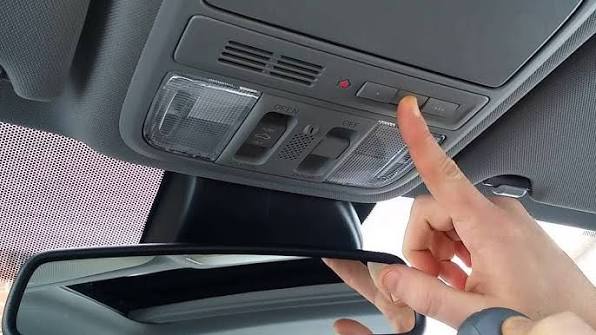
Have you ever pulled into your driveway, rain pouring down, and wished your car could open the garage door for you? You are not alone. Many drivers ask, “Does the Honda CR-V have a garage door opener?” The short answer is yes, but it depends on the specific trim level and model year. Understanding this feature can save you time, enhance convenience, and keep you dry during unexpected weather.
In this comprehensive guide, we will break down exactly which Honda CR-V models come equipped with this technology, how it works, and what to do if your vehicle does not have it built-in. Let’s dive into the details so you can drive with confidence and convenience.
Which Honda CR-V Trims Include a Garage Door Opener?
Not every Honda CR-V comes standard with a garage door opener system. Honda uses a proprietary system called HomeLink, which is integrated into the rearview mirror or the overhead console in newer models.
Generally, the availability of HomeLink follows this pattern:
- Base Models (LX): Typically do not include HomeLink as a standard feature.
- Mid-Range Trims (EX, EX-L): Often include HomeLink as a standard or optional feature, depending on the model year.
- Top Trims (Touring, Black Edition, Elite): Almost always include HomeLink as a standard feature.
For example, in the 2023–2025 Honda CR-V lineup, the EX-L and Touring trims come standard with HomeLink. If you are buying a used CR-V, it is essential to check the specific vehicle’s window sticker or owner’s manual to confirm its presence.
Pro Tip: If you are shopping for a used CR-V, look for three small buttons on the bottom edge of the rearview mirror. These are the HomeLink buttons. If they are absent, the vehicle likely does not have the built-in system.
How Does the Honda CR-V HomeLink System Work?
HomeLink is a universal transceiver that replaces your handheld garage door remote. It works by learning the radio frequency signal from your existing garage door opener. Once programmed, you can open or close your garage door directly from your car.
Key Benefits of HomeLink in the Honda CR-V
- Convenience: No more digging through bags or glove compartments for a separate remote.
- Security: HomeLink uses rolling code technology, which changes the access code every time you use it, preventing hackers from copying your signal.
- Versatility: It can control up to three different devices, such as garage doors, gate operators, or even home lighting systems.
According to HomeLink’s official documentation, the system is compatible with over 95% of garage door openers manufactured since 1982. This high compatibility rate makes it a reliable choice for most homeowners.
Step-by-Step: How to Program Your Honda CR-V Garage Door Opener
Programming your HomeLink system is straightforward, but it requires precision. Follow these steps carefully to ensure successful synchronization.
What You Will Need:
- Your Honda CR-V with HomeLink buttons.
- Your original garage door remote control.
- A ladder (if needed to reach the garage door motor unit).
Programming Instructions:
- Clear Existing Codes (If Necessary):
- Press and hold the two outer HomeLink buttons for about 10 seconds until the indicator light flashes rapidly. This clears any previous programming.
- Position Your Vehicle:
- Park your CR-V outside the garage, ensuring you have a clear line of sight to the garage door opener motor.
- Initiate Learning Mode:
- Hold your original garage remote 1–3 inches away from the HomeLink buttons.
- Simultaneously press and hold the desired HomeLink button and the button on your handheld remote.
- Keep holding both buttons until the HomeLink indicator light changes from a slow blink to a rapid flash. This may take up to 30 seconds.
- Test the Connection:
- Press the programmed HomeLink button three times. If the garage door operates, you are done!
- If it does not work, you may need to complete the “rolling code” step.
- Rolling Code Synchronization (For Modern Openers):
- Locate the “Learn” or “Smart” button on your garage door motor unit (usually hanging from the ceiling).
- Press and release the “Learn” button. You typically have 30 seconds to return to your car.
- Press and hold the programmed HomeLink button for two seconds, then release. Repeat this process three times.
- Test the door again. It should now operate smoothly.
Note: If you encounter difficulties, consult your garage door opener’s manual or visit the HomeLink support page for model-specific instructions.
What If My Honda CR-V Doesn’t Have HomeLink?
If your CR-V trim does not include HomeLink, you still have several viable options to achieve the same convenience.
Option 1: Aftermarket Universal Remotes
You can purchase a universal garage door remote from brands like LiftMaster or Chamberlain. These devices are affordable (typically $20–$40) and can be clipped to your visor or kept in the center console.
Option 2: Smart Garage Door Openers
Consider upgrading to a smart garage door opener, such as the MyQ Smart Garage Hub. These systems connect to your Wi-Fi and allow you to open your garage door via a smartphone app. This is an excellent solution if you want to monitor your garage status remotely, even when you are not in your car.
Option 3: Dealer Installation
In some cases, Honda dealerships can install a genuine HomeLink module as an accessory. However, this can be costly ($200–$400 including labor) and may not be available for all model years. Always inquire with your local dealer before proceeding.
Comparison: Built-In HomeLink vs. External Remotes
| Feature | Built-In HomeLink | External Universal Remote | Smart Garage Hub |
|---|---|---|---|
| Convenience | High (Integrated) | Medium (Separate Device) | High (App-Based) |
| Cost | Included in Trim | $20–$40 | $30–$100 + Installation |
| Security | Rolling Code | Varies by Model | Encrypted Wi-Fi |
| Remote Access | No | No | Yes (Via Smartphone) |
| Aesthetics | Clean, Seamless | Cluttered | N/A |
As shown in the table, HomeLink offers the best balance of convenience and aesthetics, while smart hubs provide superior remote access capabilities.
Frequently Asked Questions (FAQ)
1. Can I program HomeLink to open two different garage doors?
Yes, the Honda CR-V HomeLink system has three independent channels. You can program each button to control a different device, such as two garage doors and a gate, or a garage door and a home light.
2. Why is my HomeLink button not working after programming?
This is often due to incompatibility with rolling code openers. Ensure you completed the “rolling code synchronization” step at your garage door motor unit. If issues persist, try clearing the memory and reprogramming from scratch.
3. Does HomeLink work with all garage door brands?
HomeLink is compatible with most major brands, including LiftMaster, Chamberlain, Genie, and Craftsman. However, older or proprietary systems may require a compatibility bridge kit, which can be purchased from the HomeLink website.
4. Can I transfer my HomeLink settings to a new car?
No, HomeLink settings are stored in the vehicle’s hardware and cannot be transferred. You will need to reprogram the system in your new Honda CR-V using the steps outlined above.
5. Is HomeLink secure from hacking?
Yes, modern HomeLink systems use rolling code technology, which generates a new code with every use. This makes it extremely difficult for thieves to intercept and replicate your signal.
6. What should I do if I lose my original garage remote?
You can still program HomeLink if you have access to the “Learn” button on your garage door motor unit. Some openers allow you to put the motor into learning mode without a remote, but consult your garage opener’s manual for specific instructions.
Conclusion
So, does the Honda CR-V have a garage door opener? Yes, most mid-to-high-tier trims come equipped with the convenient and secure HomeLink system. Whether you are driving a brand-new Touring model or a pre-owned EX-L, understanding how to use and program this feature can significantly enhance your daily driving experience.
If your vehicle lacks HomeLink, do not worry. Affordable aftermarket remotes and smart garage hubs offer excellent alternatives that keep you connected and convenient.
Did you find this guide helpful? Share it with your fellow Honda owners on social media! Let them know they can stop fumbling for remotes and start enjoying the seamless integration of HomeLink. If you have any questions or experiences to share, leave a comment below—we love hearing from our community!
Leave a Reply