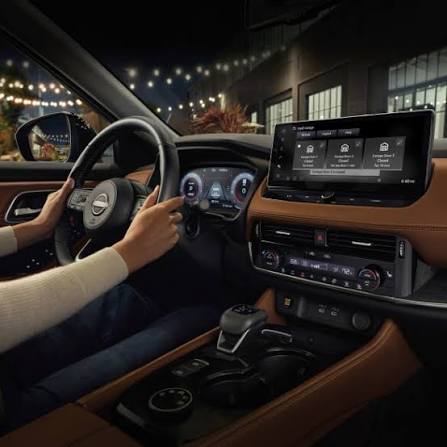
Have you ever pulled into your driveway, ready to relax after a long day, only to realize you need to dig through your bag or glove compartment to find your garage remote? It is a small inconvenience, but it breaks the seamless experience of modern driving. Many car buyers specifically look for integrated convenience features to avoid this hassle. If you are considering a used model or already own one, you might be asking: Does the 2021 Nissan Rogue have a garage door opener? The answer is yes, but with important caveats regarding which trim level you choose.
Understanding the HomeLink System in the 2021 Nissan Rogue
To understand whether your specific vehicle has this feature, we first need to clarify what “garage door opener” means in the automotive world. Most modern vehicles, including Nissan, do not build their own proprietary radio frequency systems for garages. Instead, they partner with a company called HomeLink.
HomeLink is a universal transceiver that allows your car to communicate with your garage door, gate, or even home lighting systems. For the 2021 Nissan Rogue, this system was not standard across the board. It was introduced as part of Nissan’s effort to enhance the premium feel of their higher-end trims while keeping the base price competitive.
Which Trim Levels Include HomeLink?
The 2021 Nissan Rogue was available in four primary trim levels: S, SV, SL, and Platinum. The availability of the garage door opener (HomeLink) depends entirely on which of these trims you are looking at.
- Nissan Rogue S: This is the base model. It focuses on essential transportation needs. It does not come with HomeLink.
- Nissan Rogue SV: The mid-range SV trim adds comfort features like dual-zone climate control and upgraded upholstery. However, HomeLink is not standard on the SV. You may find it in certain option packages, but it is rare.
- Nissan Rogue SL: Moving up to the SL trim, you enter the realm of premium features. HomeLink is standard on the SL trim. This includes the ability to program up to three different devices.
- Nissan Rogue Platinum: As the top-tier model, the Platinum includes every available feature. HomeLink is standard here, often integrated into the rearview mirror or the overhead console, depending on the specific production batch.
| Trim Level | HomeLink Standard? | Notes |
|---|---|---|
| S | No | Base model, no integrated opener. |
| SV | No (Rarely via Package) | Check specific window sticker for optional tech packages. |
| SL | Yes | Standard feature for enhanced convenience. |
| Platinum | Yes | Standard feature with full tech suite. |
If you are shopping for a used 2021 Rogue, always check the physical buttons. They are typically located on the rearview mirror or the overhead console near the map lights. Look for three square buttons, often labeled with icons of a garage door or simply numbered 1, 2, and 3.
How to Program Your 2021 Nissan Rogue HomeLink
Owning the hardware is only half the battle. Programming the system can sometimes be tricky if you do not have the right instructions. The process varies slightly depending on whether you have a newer “rolling code” garage door opener (most modern openers) or an older fixed-code system.
Here is a step-by-step guide to programming your HomeLink system in the 2021 Nissan Rogue.
Step 1: Clear Existing Codes (If Necessary)
If you bought the car used, the previous owner may have left their codes programmed. To clear them:
- Press and hold the two outer HomeLink buttons simultaneously.
- Hold them for about 20 seconds until the indicator light flashes rapidly.
- Release the buttons. The memory is now cleared.
Step 2: Position Your Vehicle
Park your Nissan Rogue outside your garage, ensuring the front of the car is within range of the garage door opener motor. Keep the engine running or in accessory mode to ensure consistent power.
Step 3: Initiate Learning Mode
- Choose the HomeLink button you wish to program (1, 2, or 3).
- Press and hold this button. Do not release it yet.
- While holding the HomeLink button, bring your original handheld garage remote close to the HomeLink buttons (within 1-3 inches).
- Press and hold the button on your handheld remote that operates the garage door.
- Keep both buttons held down. Watch the HomeLink indicator light. It will flash slowly at first, then rapidly.
- Once the light flashes rapidly, release both buttons. This usually takes 10–30 seconds.
Step 4: Test the Connection
Press the programmed HomeLink button in your Nissan Rogue. Your garage door should activate. If it does not, you may have a rolling code system that requires an additional step.
Step 5: Rolling Code Programming (If Step 4 Failed)
Most garage doors built after 1996 use rolling codes for security. If the door did not move in Step 4:
- Locate the “Learn” or “Smart” button on your garage door opener motor unit (inside the garage).
- Press and release the “Learn” button. You typically have 30 seconds to complete the next step.
- Return to your Nissan Rogue and press the programmed HomeLink button three times, holding it for two seconds each time.
- Test the door again. It should now operate correctly.
For more technical details on universal transceivers, you can refer to the general overview on Wikipedia.
Troubleshooting Common HomeLink Issues
Even with the correct procedure, technology can sometimes fail to cooperate. Here are common issues owners of the 2021 Nissan Rogue face and how to fix them.
The Indicator Light Does Not Flash
If the light does not flash when you hold the buttons, check your car’s battery. A weak battery can prevent the HomeLink module from entering programming mode. Ensure your Rogue is running or fully charged.
The Door Moves Partially Then Stops
This is a safety feature. Modern garage doors have sensors that detect obstructions. If the door reverses immediately, check the safety eyes at the bottom of your garage tracks. Ensure they are aligned and clean. Also, verify that you completed the “Rolling Code” step mentioned above.
Interference from Other Devices
LED light bulbs in your garage can sometimes emit radio frequency interference that blocks the HomeLink signal. If programming fails repeatedly, try temporarily replacing LED bulbs with incandescent ones during the setup process.
Why Integrated Garage Openers Matter for Security and Convenience
You might wonder if buying a separate clip-on remote is enough. While cheaper, integrated systems like HomeLink offer distinct advantages that align with the modern driver’s expectations.
Enhanced Security: Clip-on remotes can be stolen from your visor or seat. An integrated system is hidden within the vehicle’s structure. Furthermore, HomeLink uses encrypted signals for rolling codes, making it significantly harder for thieves to intercept and replicate your garage signal compared to older, standalone remotes.
Cleaner Aesthetic: The 2021 Nissan Rogue features a sleek, modern interior design. Clipping a bulky plastic remote to your sun visor disrupts this aesthetic. HomeLink keeps your cabin clutter-free.
Reliability: Integrated systems are hardwired into the vehicle’s power supply. You never have to worry about replacing batteries in your garage remote. As long as your car starts, your garage door will open.
Frequently Asked Questions (FAQ)
1. Can I add HomeLink to a 2021 Nissan Rogue S or SV if it doesn’t have it?
Unfortunately, no. HomeLink is a hardware component installed at the factory. It cannot be added as a simple software update or aftermarket plug-in easily. You would need to replace the entire rearview mirror assembly with one that includes HomeLink, which requires professional installation and coding. It is often more cost-effective to upgrade to an SL or Platinum trim.
2. Does the 2021 Nissan Rogue HomeLink work with all garage door brands?
HomeLink is compatible with approximately 95% of garage door openers on the market, including major brands like Chamberlain, LiftMaster, Genie, and Craftsman. However, some very old models or specialized commercial gates may require a compatibility bridge or repeater kit, which can be purchased from the HomeLink website.
3. Can I program more than one garage door?
Yes. The HomeLink system in the 2021 Nissan Rogue allows you to program up to three different devices. This is perfect if you have a garage door, a gate, and perhaps a secondary vacation home garage. Each button (1, 2, and 3) can be assigned to a different device.
4. What if I sell my car? Should I delete the codes?
Absolutely. For security reasons, you should clear the HomeLink memory before selling or trading in your 2021 Nissan Rogue. Follow the “Clear Existing Codes” steps outlined in the programming section above. This ensures the new owner cannot access your garage.
5. Is there a fuse for the HomeLink system?
Yes, like all electronic components, HomeLink is protected by a fuse. If the system completely stops working (no lights, no response), check your owner’s manual for the fuse box diagram. Look for the fuse labeled “Interior” or “Accessory.” If the fuse is blown, replacing it may restore functionality.
Conclusion
So, does the 2021 Nissan Rogue have a garage door opener? The answer is a definitive yes for the SL and Platinum trims, which come equipped with the convenient HomeLink system. For the S and SV trims, this feature is generally absent, requiring buyers to rely on traditional handheld remotes.
If you value seamless convenience, enhanced security, and a clutter-free interior, opting for an SL or Platinum model is worth the investment. The ability to open your garage with the push of a button on your rearview mirror transforms a daily chore into a effortless motion.
Did you find this guide helpful? If you own a 2021 Nissan Rogue, share your experience with HomeLink in the comments below. Don’t forget to share this article with fellow Nissan owners on social media who might be struggling with their garage door setup!
Leave a Reply