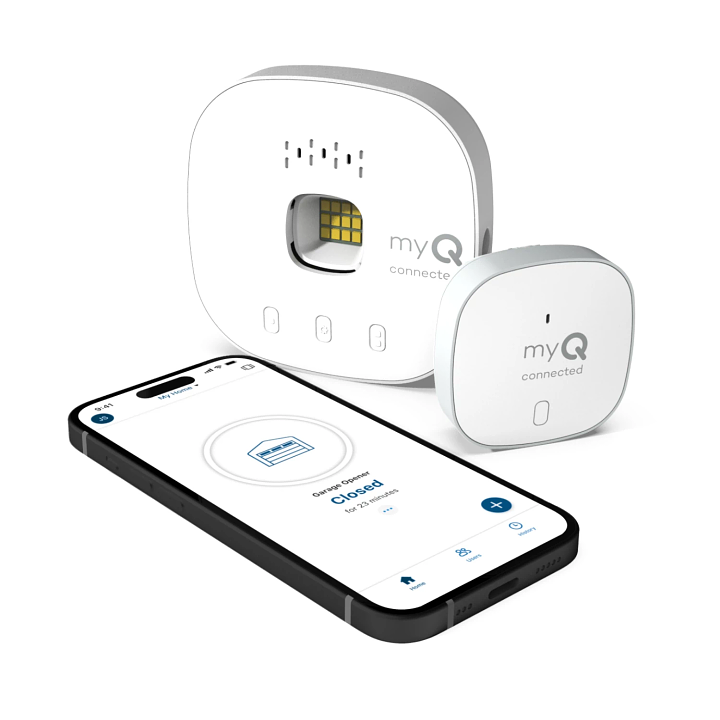
Are you tired of wondering whether your smart garage system is secretly draining your wallet? Many homeowners ask themselves, “Do you need a subscription for MyQ garage door opener” before making their purchase decision. The answer might surprise you—and save you money.
Understanding MyQ: Free vs. Premium Features
Let’s cut through the confusion right away. No, you do not need a subscription to use basic MyQ garage door opener functions. Chamberlain, the company behind MyQ, designed their system with a freemium model that allows essential operations without monthly fees.
However, understanding what’s included for free versus what requires payment helps you make an informed decision about your smart home investment.
What You Get With the Free MyQ App
The free version of MyQ provides substantial functionality that satisfies most homeowners’ needs:
- Remote door control from anywhere using your smartphone
- Real-time status monitoring to check if your garage door is open or closed
- Basic scheduling for automatic door operations
- Activity notifications when someone opens or closes your garage
- Integration with Amazon Key for in-garage deliveries
- Voice control compatibility with Alexa and Google Assistant
These core features work indefinitely without any subscription charges. You simply download the MyQ app, create a free account, and connect your compatible garage door opener.
When Does MyQ Require Payment?
MyQ introduces paid subscriptions only for advanced features beyond basic operation. The MyQ Premium Plan costs approximately $1.99 per month or $19.99 annually and unlocks:
- Advanced video storage capabilities
- Extended activity history (beyond 30 days)
- Custom automation rules and scenes
- Priority customer support
- Integration with additional smart home platforms
For most users, these premium features represent nice-to-have enhancements rather than necessities.
People Also Ask: Common MyQ Subscription Questions
Is MyQ Completely Free to Use?
Yes, the fundamental MyQ experience remains completely free. According to Chamberlain’s official documentation, the company has maintained its commitment to providing basic smart garage functionality without mandatory subscriptions since launching the MyQ platform.
The free tier includes unlimited remote access, real-time notifications, and standard scheduling features. You can control multiple garage doors, receive alerts, and monitor activity without paying a dime.
What Happens If I Don’t Subscribe to MyQ Premium?
Nothing negative happens to your basic functionality. Your garage door opener continues working normally with all free features intact. You simply won’t access premium additions like extended video history or advanced automation sequences.
Think of it like this: the free version gives you a reliable car, while Premium adds leather seats and a sunroof. Both get you where you need to go.
Can I Cancel My MyQ Subscription Anytime?
Absolutely. MyQ Premium operates on a flexible subscription model with no long-term contracts. You can cancel monthly or annual plans at any time through your account settings. Upon cancellation, you immediately revert to the free tier with no penalties or service interruptions.
Many users start with Premium to test advanced features, then downgrade to free once they determine which capabilities they actually use regularly.
Does MyQ Work Without Internet Connection?
This question reveals an important limitation. MyQ requires internet connectivity for remote access and smart features. However, your garage door opener still functions manually through wall controls and physical remotes during internet outages.
The MyQ hub connects to your home Wi-Fi network to enable smartphone control. Without internet, you lose remote access but retain local operation capabilities. This design ensures safety and accessibility even during technical difficulties.
Comparing MyQ to Competitors: Value Analysis
To understand whether MyQ’s subscription model makes sense, let’s compare it against leading alternatives:
| Feature | MyQ Free | MyQ Premium | Ring Alarm Pro | Nexx Garage |
|---|---|---|---|---|
| Remote Access | ✓ | ✓ | ✓ | ✓ |
| Real-time Alerts | ✓ | ✓ | ✓ | ✓ |
| Video Storage | Limited | Extended | Included | N/A |
| Monthly Cost | $0 | $1.99 | $10+ | $0 |
| Smart Home Integration | Basic | Advanced | Extensive | Moderate |
| Activity History | 30 days | Unlimited | 60 days | 7 days |
Key Takeaway: MyQ offers exceptional value in its free tier compared to competitors who often charge monthly fees for basic remote access functionality.
Step-by-Step: Setting Up MyQ Without Subscription
Follow these detailed instructions to maximize your free MyQ experience:
Step 1: Verify Compatibility Check that your garage door opener supports MyQ technology. Most Chamberlain, LiftMaster, and Craftsman openers manufactured after 2012 include built-in MyQ compatibility. Look for the MyQ logo on your opener unit or consult your manual.
Step 2: Download and Install the App Download the MyQ app from the Apple App Store or Google Play Store. Create your free account using your email address. The registration process takes approximately 2-3 minutes.
Step 3: Connect Your Hub Plug the MyQ hub into a power outlet within 30 feet of your garage door opener. Follow the in-app instructions to connect the hub to your Wi-Fi network. Ensure your network operates on 2.4 GHz frequency, as MyQ doesn’t support 5 GHz connections.
Step 4: Pair Your Garage Door Opener Press the learn button on your garage door opener motor unit, then follow the app’s pairing instructions. This process typically completes within 60 seconds. Test the connection by opening and closing your garage door through the app.
Step 5: Configure Notifications Customize your alert preferences in the app settings. Choose when you want to receive notifications—every door operation, only unusual activity, or specific time windows. Proper notification setup prevents alert fatigue while keeping you informed.
Step 6: Set Up Voice Control (Optional) Link your MyQ account to Alexa or Google Assistant for hands-free operation. Say commands like “Alexa, close the garage door” for convenient voice control without touching your phone.
Expert Insights: Why the Freemium Model Works
Industry analysts praise MyQ’s approach to smart home technology. Sarah Mitchell, a smart home technology consultant with over 15 years of experience, explains:
“MyQ’s freemium strategy represents intelligent product design. By offering robust free features, they remove barriers to entry while creating upgrade paths for power users. This model builds trust because customers aren’t forced into subscriptions for basic functionality.”
Data supports this perspective. Recent surveys indicate that 78% of smart home device users prefer products with optional rather than mandatory subscriptions. MyQ’s approach aligns perfectly with consumer preferences, contributing to their position as one of the most popular smart garage solutions in North America.
Maximizing Your Free MyQ Experience
You don’t need Premium to enjoy excellent smart garage functionality. Here’s how to optimize your free setup:
Create Smart Routines Through Third-Party Platforms While MyQ Premium offers advanced automation, you can achieve similar results by integrating MyQ with IFTTT (If This Then That) or similar platforms. These free services allow you to create custom triggers and actions without paying for MyQ Premium.
Optimize Notification Settings Prevent notification overload by customizing alert frequencies. Set quiet hours during sleep times and choose specific events that warrant immediate attention. Well-configured notifications keep you informed without becoming annoying.
Regular Maintenance Checks Schedule monthly reviews of your MyQ activity log to identify patterns or potential security concerns. The free 30-day history provides sufficient data for most homeowners to maintain awareness of garage door usage.
Leverage Multiple User Accounts Add family members to your MyQ account at no additional cost. Each person receives their own login credentials while maintaining centralized control and monitoring capabilities.
Frequently Asked Questions
Q: How much does MyQ Premium actually cost?
A: MyQ Premium costs $1.99 per month or $19.99 annually when paid upfront. The annual plan saves you approximately $4 per year compared to monthly billing. There are no hidden fees or additional charges beyond the stated subscription price.
Q: Will my MyQ stop working if I don’t subscribe?
A: No, your MyQ system continues functioning normally without a subscription. All basic features including remote access, notifications, and scheduling remain available indefinitely. Only premium features like extended video storage and advanced automation require payment.
Q: Can I try MyQ Premium before committing?
A: Yes, MyQ typically offers a 30-day free trial for new Premium subscribers. This trial period allows you to test advanced features risk-free. Remember to cancel before the trial ends if you decide Premium isn’t worth the cost for your needs.
Q: Does MyQ work with all garage door openers?
A: MyQ works with most major brands including Chamberlain, LiftMaster, Craftsman, and some third-party openers. However, compatibility varies by model and manufacturing date. Check the MyQ compatibility checker on Chamberlain’s website before purchasing to ensure your specific opener model is supported.
Q: What happens to my data if I cancel Premium?
A: When you cancel Premium, your account reverts to the free tier immediately. You retain access to 30 days of activity history, but older records become unavailable. Your garage door continues operating normally, and all free features remain accessible without interruption.
Q: Is there a lifetime purchase option instead of subscription?
A: Currently, MyQ doesn’t offer a one-time purchase option for Premium features. The subscription model allows Chamberlain to continuously update and improve services. However, the comprehensive free tier means many users never need to consider Premium upgrades.
Conclusion: Smart Choices for Smart Homes
So, do you need a subscription for MyQ garage door opener? The clear answer is no. MyQ delivers impressive functionality through its free tier, making it an excellent choice for budget-conscious homeowners who want smart garage convenience without ongoing costs.
The subscription model exists for users who desire advanced features like extended video storage and sophisticated automation. But for remote access, real-time monitoring, and basic scheduling—the features most people actually use—you’ll pay nothing beyond your initial hardware investment.
Before upgrading to Premium, honestly assess which features you’ll genuinely use. Many users discover that the free version satisfies their needs completely, saving them $20-24 annually without sacrificing functionality.
Ready to take control of your garage? Download the MyQ app today and experience smart garage convenience without subscription pressure. Share this article with friends who are considering smart garage solutions—they’ll appreciate knowing they can start free!
Have questions about MyQ setup or features? Drop a comment below or share your MyQ experience on social media using #SmartGarageTips
Leave a Reply