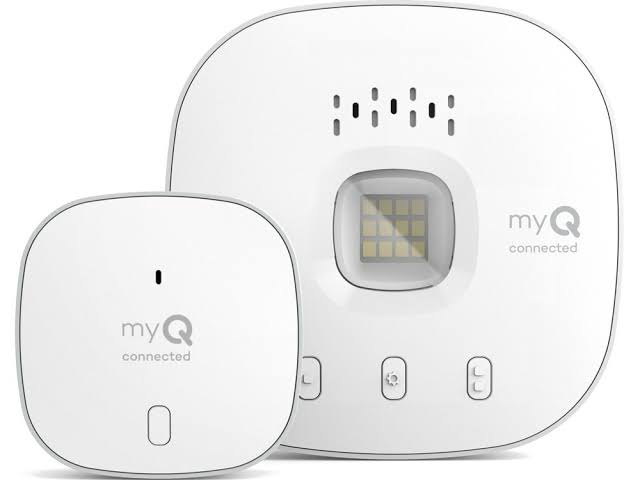
Struggling to figure out how do I connect MyQ to my garage door opener? You are not alone; many homeowners find the initial smart home setup a bit overwhelming at first glance. Fortunately, with this easy, step-by-step guide, you will have your garage door securely controlled from your smartphone in just a few minutes.
How Do I Connect MyQ to My Garage Door Opener? (Preparation Checklist)
Before diving into the technical setup, gathering the right tools ensures a smooth, frustration-free process. Proper preparation is the cornerstone of a successful smart home installation.
Here is exactly what you will need:
- A compatible garage door opener: Chamberlain, LiftMaster, or Craftsman models manufactured after 1993 are generally compatible.
- A MyQ Smart Garage Hub: Required only if your opener does not have built-in Wi-Fi capabilities.
- A smartphone or tablet: Ensure the MyQ app is downloaded from the Apple App Store or Google Play Store.
- Your home’s Wi-Fi credentials: You must know your network name and password. Crucial note: MyQ devices strictly require a 2.4 GHz Wi-Fi network. They will not connect to 5 GHz bands.
- A sturdy step ladder: This allows you to safely reach the motor unit mounted on your garage ceiling.
According to a 2023 smart home security report, over 45% of US homeowners now prioritize smart garage integration to prevent package theft and enhance overall property security. Setting this up correctly is an investment in your home’s safety.
Step-by-Step: How to Set Up Your MyQ Device
Follow these concrete, actionable steps to establish a flawless connection between your smartphone and your garage.
Step 1: Create Your MyQ Account
Open the MyQ app on your smartphone. Tap “Create Account” and enter your email address. Create a strong password and verify your email through the confirmation link sent to your inbox.
Step 2: Put the MyQ Hub into Pairing Mode
Plug the MyQ Smart Garage Hub into a ceiling outlet within 50 feet of your garage door opener. Locate the Wi-Fi button on the side of the hub. Press and hold this button for 2 to 3 seconds until the LED indicator begins blinking blue. This signals that the hub is ready to pair.
Step 3: Connect the Hub to Your Wi-Fi Network
In the MyQ app, tap the “+” icon to add a new device. Select “MyQ Smart Garage Hub.” The app will prompt you to enter your Wi-Fi network name and password. Ensure you select the 2.4 GHz network. Once submitted, the LED on the hub will turn solid blue, indicating a successful internet connection.
Step 4: Pair the Hub with the Garage Door Opener
Climb your step ladder and locate the “Learn” button on your garage door motor unit. It is usually colored yellow, purple, red, or green. Press and release the “Learn” button. The indicator light on the motor will illuminate. Within 30 seconds, press the button on your MyQ Hub. The motor unit’s light will blink, confirming the devices are paired.
Step 5: Test the Connection
Return to the MyQ app and tap “Open” or “Close.” Listen for the motor to engage. If the door moves accordingly, your setup is complete and fully operational.
MyQ Smart Hub vs. Built-in MyQ: Which Setup Do You Have?
Understanding your hardware prevents unnecessary purchases. Use this quick comparison to identify your setup:
| Feature | MyQ Smart Garage Hub (Standalone) | Built-in MyQ Garage Door Opener |
|---|---|---|
| Hardware Needed | Yes, requires a separate hub device. | No, Wi-Fi radio is inside the motor. |
| Compatibility | Works with most major brands (post-1993). | Exclusive to newer Chamberlain/LiftMaster models. |
| Setup Time | Approximately 10–15 minutes. | Approximately 5 minutes (app setup only). |
| Cost | Around $30–$40 for the hub. | Included in the price of the new opener. |
Pro Tip: If you have a newer LiftMaster model with a built-in Wi-Fi antenna, you can skip Step 2 and Step 4 entirely. Simply download the app and connect directly to the opener’s broadcasted network.
Troubleshooting: What If My MyQ Won’t Connect to Wi-Fi?
Even with careful preparation, hiccups can occur. Here are the most common issues and their proven solutions:
- The LED Blinks Green, Not Blue:
This means the hub cannot find your Wi-Fi network. Double-check that your smartphone is connected to the 2.4 GHz band, not the 5 GHz band. You may need to log into your router settings to temporarily disable the 5 GHz band during setup. - The Hub is Too Far from the Router:
Garage doors are often located at the edge of a home’s Wi-Fi coverage. If the signal is weak, the connection will drop. Consider installing a simple Wi-Fi extender halfway between your router and the garage to boost the signal strength. - The “Learn” Button Times Out:
Garage door opener memory clears after 30 seconds. If you take too long, press the “Learn” button on the motor unit again to reset the 30-second window, then immediately press the MyQ hub button.
For a deeper understanding of how these radio frequencies operate, you can read more about the underlying technology of a standard garage door opener on Wikipedia.
Frequently Asked Questions (FAQ)
1. Does MyQ work with all garage door openers?
MyQ is highly compatible with most major garage door opener brands manufactured after 1993, including Chamberlain, LiftMaster, Craftsman, and even some older Genie models. However, it is always best to check the official MyQ compatibility list before purchasing a hub.
2. Do I need a MyQ hub if my opener has built-in Wi-Fi?
No. If your garage door opener was manufactured recently and features built-in Wi-Fi (often indicated by a Wi-Fi logo on the motor unit), you do not need the standalone MyQ Smart Garage Hub. You can connect directly through the MyQ app.
3. Why does MyQ require a 2.4 GHz Wi-Fi network?
The 2.4 GHz frequency band provides better range and wall penetration compared to 5 GHz. Since garages are typically located at the periphery of a home, the 2.4 GHz band ensures a stable, reliable connection between your router and the garage door motor.
4. Is the MyQ app free to use?
Yes, the core features of the MyQ app, including opening, closing, and monitoring your garage door, are completely free. Chamberlain does offer a premium subscription called “myQ Premium” for advanced features like video recording and smart delivery integration, but it is entirely optional.
5. Can I connect MyQ to Alexa or Google Home?
Absolutely. MyQ seamlessly integrates with major smart home ecosystems. By enabling the MyQ skill in the Amazon Alexa app or linking your account in Google Home, you can use voice commands like, “Alexa, close the garage door.”
Conclusion
Learning how do I connect MyQ to my garage door opener is a straightforward process that unlocks immense convenience and peace of mind. By following this step-by-step guide, you have transformed a traditional garage into a smart, secure, and accessible entry point for your home. You can now grant access to family members, monitor your door from anywhere in the world, and integrate your garage into your broader smart home ecosystem.
Did you find this guide helpful? Share this article on Facebook, Twitter, or Pinterest to help your friends and family secure their homes with smart technology today! If you have any further questions, feel free to leave a comment below.
Leave a Reply