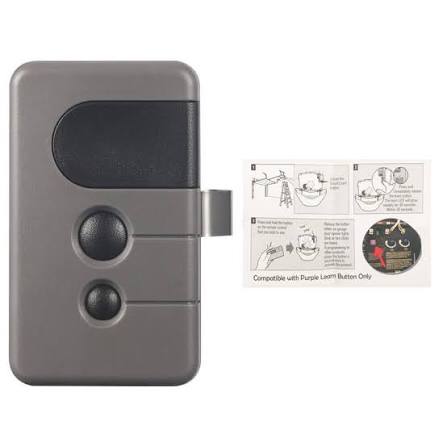
Is your garage door remote acting up? Maybe it stopped working entirely, or perhaps the range has become frustratingly short. You are not alone. Thousands of homeowners face this issue every year, especially with older models like the Craftsman 3/4 HP garage door opener remote replacement. The good news? Replacing and reprogramming your remote is simpler than you think. In this guide, we will walk you through everything you need to know to get your garage door working smoothly again.
Why Do Craftsman 3/4 HP Garage Door Remotes Fail?
Before diving into the solution, it helps to understand why remotes fail. This knowledge can save you time and money in the long run.
Common Causes of Remote Failure
- Dead Batteries: The most common culprit. Even if the LED light blinks, the battery may not have enough power to send a strong signal.
- Signal Interference: Nearby electronics, LED bulbs, or even Wi-Fi routers can interfere with the radio frequency.
- Worn-Out Buttons: After years of use, the internal contacts under the buttons can wear down.
- De-programming: Sometimes, the remote simply loses its connection to the opener due to power surges or accidental resets.
- Physical Damage: Drops, moisture, or extreme temperatures can damage internal components.
According to a study by the Consumer Product Safety Commission (CPSC), over 30% of garage door service calls are related to remote control issues rather than mechanical failures. This highlights how critical a functioning remote is to daily convenience.
How to Choose the Right Replacement Remote
Not all remotes are created equal. Choosing the wrong one can lead to compatibility issues. Here is what you need to look for:
Compatibility Checklist
- Model Number Match: Check your opener’s model number (usually found on the back panel). Craftsman 3/4 HP openers typically use frequencies of 315 MHz or 390 MHz.
- Frequency Type: Ensure the replacement remote matches your opener’s frequency. Using the wrong frequency means it will never pair.
- Rolling Code vs. Fixed Code: Newer Craftsman openers use rolling code technology for security. Make sure your replacement remote supports this if your opener requires it.
- Number of Buttons: Decide if you need a single-button remote or a multi-button one for controlling multiple doors.
Pro Tip: If you are unsure about your opener’s frequency, consult the owner’s manual or look for a label inside the battery compartment of your old remote.
For more detailed technical specifications on garage door opener standards, you can refer to Wikipedia’s article on garage door openers.
Step-by-Step Guide: Programming Your New Craftsman Remote
Once you have your replacement remote, the next step is programming it. Follow these steps carefully.
What You Will Need
- Your new Craftsman-compatible remote
- A ladder (if your opener is mounted high)
- Fresh batteries (if not included)
Programming Steps
- Locate the “Learn” Button: On your Craftsman 3/4 HP garage door opener motor unit, find the “Learn” button. It is usually colored yellow, red, or purple and located near the antenna wire.
- Clear Old Codes (Optional but Recommended): Press and hold the “Learn” button for 6–10 seconds until the indicator light turns off. This clears all previously programmed remotes. Note: You will need to reprogram all your remotes after this step.
- Press the “Learn” Button: Press and release the “Learn” button. The indicator light will turn on or blink, signaling that the opener is ready to receive a new code.
- Program the Remote: Within 30 seconds, press and hold the button on your new remote that you want to use. Hold it until the opener’s lights flash or you hear two clicks. This confirms successful programming.
- Test the Remote: Stand at least 10 feet away from the garage door and press the remote button. The door should activate. If it does not, repeat steps 3–4.
Troubleshooting Tips During Programming
- Light Does Not Blink: Ensure the opener is plugged in and receiving power.
- Remote Not Responding: Replace the batteries in the remote, even if they are new. Sometimes, fresh batteries from different brands perform better.
- Interference Issues: Turn off nearby LED bulbs or electronics temporarily to see if the signal improves.
Craftsman Remote Types: Which One Is Best for You?
Craftsman offers several types of remotes. Here is a quick comparison to help you decide.
| Feature | Standard 1-Button Remote | Multi-Button Remote | Keychain Remote |
|---|---|---|---|
| Best For | Single garage door | Multiple doors/gates | Portability |
| Range | Up to 100 feet | Up to 100 feet | Up to 50 feet |
| Battery Life | 1–2 years | 1–2 years | 6–12 months |
| Price Range | $15–$25 | $25–$40 | $10–$20 |
| Ease of Use | Very Easy | Moderate | Easy |
Verdict: If you only have one garage door, the standard 1-button remote is cost-effective and reliable. For households with multiple doors or gates, invest in a multi-button remote for convenience.
FAQ Section
Q1: Can I use a universal remote for my Craftsman 3/4 HP opener?
Yes, many universal remotes are compatible with Craftsman openers. However, ensure the universal remote supports the same frequency (315 MHz or 390 MHz) and rolling code technology as your opener. Always check the packaging for compatibility lists.
Q2: How often should I replace my garage door remote batteries?
It is recommended to replace batteries every 1–2 years, depending on usage. If you notice the remote’s range decreasing or the LED light dimming, it is time for new batteries. Use high-quality alkaline batteries for best performance.
Q3: What if my remote stops working after programming?
First, check the batteries. If they are fine, try reprogramming the remote. If it still does not work, there may be interference from nearby electronics. Try changing the location of the opener’s antenna or turning off potential sources of interference.
Q4: Can I program multiple remotes to one Craftsman opener?
Yes, most Craftsman 3/4 HP openers can store codes for multiple remotes (typically up to 8–10). Simply repeat the programming steps for each remote. Remember, if you clear the memory, you must reprogram all remotes.
Q5: Is it safe to buy third-party replacement remotes?
Yes, as long as they are from reputable brands and explicitly state compatibility with Craftsman openers. Avoid cheap, no-name remotes from unknown sellers, as they may lack security features like rolling codes.
Q6: How do I know if my opener uses rolling code technology?
Check the manufacturing date. Openers made after 1993 typically use rolling code technology. You can also look for a label on the motor unit that says “Security+” or “Rolling Code.” If unsure, consult the owner’s manual.
Conclusion
Replacing your Craftsman 3/4 HP garage door opener remote does not have to be a stressful experience. By understanding why remotes fail, choosing the right replacement, and following simple programming steps, you can restore convenience to your daily routine. Remember to keep spare batteries on hand and test your remote regularly to avoid unexpected issues.
If you found this guide helpful, please share it with friends or family who might be struggling with their garage door remotes. A quick share on social media can save someone hours of frustration!
Have questions or tips of your own? Leave a comment below—we love hearing from our readers!
Leave a Reply