Introduction
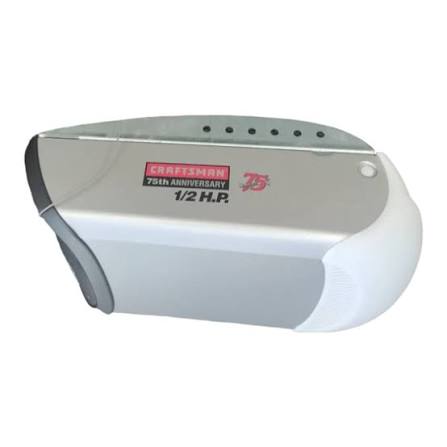
There is nothing quite as frustrating as standing in your driveway with a car full of groceries, pressing the remote button, and hearing… silence. Or worse, the motor hums, but the door doesn’t budge. For many homeowners in the US, the Craftsman 1 2 Hp Screw Drive Garage Door Opener Manual is the missing key to restoring peace of mind and functionality to their home entryway.
Whether you have just installed a new unit or are trying to revive an older model that has been acting up, understanding the mechanics of your screw drive system is crucial. Unlike chain drives, screw drives are known for their quiet operation and fewer moving parts, but they require specific maintenance and setup procedures. This guide will walk you through everything you need to know, from finding the right documentation to programming your remotes, ensuring your garage door operates smoothly for years to come.
Why You Need the Specific Manual for Your Model
Not all garage door openers are created equal. While they may look similar under the hood, the internal circuitry and safety features can vary significantly between model years. Using a generic manual might lead to incorrect wiring or improper limit settings, which can damage the motor or create safety hazards.
The Craftsman 1 2 Hp Screw Drive Garage Door Opener Manual provides model-specific diagrams that are essential for accurate repairs. For instance, the location of the “Learn” button for programming remotes differs between the 139.536XX series and the newer Smart Control models. Without the correct manual, you might spend hours guessing which wire goes where, only to find the system still unresponsive.
According to industry standards, proper installation and maintenance reduce the risk of garage door-related injuries by over 40%. Having the correct manual ensures you adhere to these safety protocols, protecting both your family and your property.
How to Identify Your Craftsman Model Number
Before you can download or reference the correct manual, you must identify your specific model number. This is the most critical step in the troubleshooting process.
- Locate the Label: Look at the back or side of the motor unit (the box hanging from your ceiling). There should be a white or silver sticker.
- Read the Code: The model number usually starts with “139.” followed by a series of digits (e.g., 139.53641SR2).
- Check the Serial Number: Sometimes, the serial number is also required for warranty claims or specific firmware updates.
If the label is faded or missing, check the original purchase receipt or the packaging if you still have it. Alternatively, you can often find the model number printed on the light lens cover of some older Craftsman units.
Key Features of the 1/2 HP Screw Drive System
Understanding what makes your opener unique helps in maintaining it. The 1/2 horsepower motor is designed for standard single-car and double-car garage doors made of wood, steel, or aluminum.
Advantages of Screw Drive Technology
- Quiet Operation: With fewer moving parts than chain drives, screw drives produce less noise.
- Low Maintenance: There is no chain to tighten or lubricate frequently.
- Durability: The solid steel screw rod is robust and less prone to stretching over time.
Common Limitations
- Temperature Sensitivity: In extreme cold, the grease on the screw rod can thicken, causing the motor to work harder.
- Speed: They are generally slightly slower than belt-drive systems.
For more detailed technical specifications on garage door opener mechanics, you can refer to general engineering principles outlined on Wikipedia.
Step-by-Step: Programming Your Remote and Keypad
One of the most common reasons users search for the Craftsman 1 2 Hp Screw Drive Garage Door Opener Manual is to program a new remote or keypad. Here is a simplified guide based on standard Craftsman procedures.
Programming a Standard Remote
- Locate the Learn Button: On the back panel of the motor unit, find the small square button. It is usually purple, red, or orange.
- Clear Old Codes (Optional): If you are replacing lost remotes, hold the Learn button for 10 seconds until the indicator light blinks out. This erases all previous codes.
- Enter Programming Mode: Press and release the Learn button. The indicator light will turn on or blink.
- Sync the Remote: Within 30 seconds, press and hold the button on your remote that you wish to use. Hold it until the motor unit’s lights flash or you hear two clicks.
- Test: Press the remote button again to ensure the door activates.
Programming a Wireless Keypad
- Enter a 4-digit PIN of your choice on the keypad.
- Press and hold the “Enter” button.
- While holding “Enter,” press the Learn button on the motor unit.
- Release both buttons. The light on the motor will flash to confirm success.
Troubleshooting Common Issues
Even with a reliable screw drive system, issues can arise. Here are the most frequent problems and how to fix them using insights from the manual.
Issue 1: The Motor Runs, But the Door Doesn’t Move
- Cause: The carriage (the part that attaches to the door) may have disengaged.
- Fix: Check the emergency release cord. If it was pulled, the carriage is disconnected from the screw. Re-engage it by pulling the cord toward the door until it clicks back into place.
Issue 2: The Door Reverses Before Closing
- Cause: Misaligned safety sensors or dirty lenses.
- Fix: Check the small LED lights on the sensors near the floor. Both should be solid (usually green or amber). If one is blinking, realign the sensors so they face each other directly. Clean the lenses with a soft cloth.
Issue 3: Excessive Noise or Grinding
- Cause: Lack of lubrication on the screw rod.
- Fix: Apply a specialized garage door lubricant or lithium-based grease to the screw rod. Do not use WD-40 as it attracts dust and dries out quickly. Wipe off excess grease to prevent dripping.
| Problem | Possible Cause | Quick Fix |
|---|---|---|
| Door won’t close | Sensors blocked | Clean lenses & align beams |
| Remote not working | Dead batteries | Replace CR2032 batteries |
| Motor hums only | Capacitor failure | Contact professional service |
| Door stops halfway | Limit settings off | Adjust travel limits per manual |
Maintaining Your Screw Drive Opener
Preventative maintenance is far cheaper than repairs. To extend the life of your Craftsman 1/2 HP opener, follow these simple steps every six months:
- Inspect the Screw Rod: Look for signs of rust or wear. If rust is present, clean it with a wire brush and apply fresh grease.
- Check Hardware: Tighten any loose bolts on the mounting brackets and rail. Vibration from operation can loosen these over time.
- Test Safety Features: Place a 2×4 piece of wood on the floor under the door. Close the door. It should reverse immediately upon touching the wood. If it doesn’t, adjust the force settings carefully according to the manual.
FAQ Section
Q1: Where can I download the Craftsman 1 2 Hp Screw Drive Garage Door Opener Manual for free?
A: You can find official manuals on the Sears PartsDirect website or the Craftsman official support page. Simply enter your model number (found on the motor unit label) to access the PDF version.
Q2: Can I use any type of grease on the screw drive?
A: No. It is recommended to use a lithium-based grease or a specific garage door lubricant. Avoid automotive grease or oil, as they can attract dirt and gum up the mechanism, leading to premature wear.
Q3: Why does my garage door opener work intermittently?
A: Intermittent issues are often caused by radio frequency interference from nearby devices (like LED bulbs or baby monitors) or weak remote batteries. Try changing the batteries first. If the problem persists, try installing a shielded LED bulb in the opener’s light socket.
Q4: How do I reset the travel limits on my Craftsman opener?
A: Travel limits are adjusted using the up and down arrow buttons on the back panel of the motor unit. Press and hold the respective button to move the door to the desired position, then press the stop button to set it. Refer to your specific manual for the exact sequence, as it varies by model year.
Q5: Is a 1/2 HP motor strong enough for a heavy wooden door?
A: Yes, a 1/2 HP motor is generally sufficient for standard single and double-car wooden doors. However, if your door is exceptionally large or insulated with heavy materials, consider upgrading to a 3/4 HP model for smoother operation and longer motor life.
Conclusion
Owning a Craftsman 1 2 Hp Screw Drive Garage Door Opener Manual is more than just having a piece of paper; it’s about having control over your home’s security and convenience. By understanding your model number, knowing how to program your remotes, and performing regular maintenance, you can avoid costly service calls and ensure your garage door operates safely and quietly.
Remember, the key to longevity is consistency. A little bit of grease and a quick sensor check twice a year can save you hundreds of dollars in repairs. If you found this guide helpful, please share it with your neighbors or on social media to help others troubleshoot their garage door issues. Stay safe, and keep your garage running smoothly!
Leave a Reply