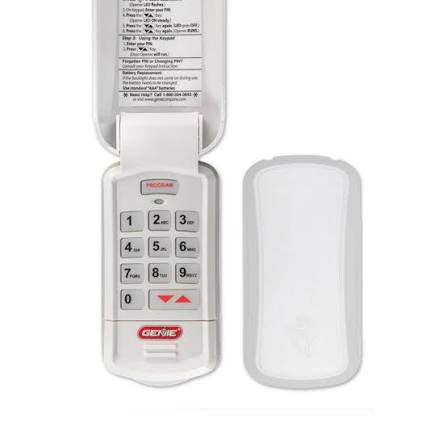
Have you ever worried that your old garage door code might be compromised? Or perhaps you just moved into a new home and want to ensure your privacy? Changing the pin on a Genie garage door keypad is a simple yet crucial step to maintain your home’s security. Whether you have an older model or the latest smart opener, this guide will walk you through the process safely and efficiently.
Why You Should Regularly Update Your Genie Keypad Code
Security experts recommend changing access codes every 6–12 months, especially if you’ve shared the code with contractors, neighbors, or previous homeowners. According to a study by the National Crime Prevention Council, over 30% of home burglaries occur through unlocked or easily accessible entry points like garages. By updating your PIN, you significantly reduce the risk of unauthorized access.
Moreover, if you suspect someone knows your current code—or if you’ve lost a remote control—it’s essential to act quickly. A fresh PIN ensures that only authorized users can open your garage door.
Tools and Preparation Before You Begin
Before diving into the steps, gather the following items:
- Your Genie garage door opener manual (if available)
- A ladder (if the keypad is mounted high)
- A pen and paper to note down your new PIN
- Access to the motor unit inside the garage
Pro Tip: Choose a PIN that is easy for you to remember but hard for others to guess. Avoid using birthdays, addresses, or sequential numbers like “1234.”
Step-by-Step Guide: Changing The Pin On A Genie Garage Door Keypad
The exact method may vary slightly depending on your Genie model (e.g., Intellicode, Aladdin Connect, or older fixed-code systems). However, most modern Genie keypads follow a similar programming logic. Below is a universal approach that works for the majority of Genie wireless keypads.
Step 1: Locate the “Learn” Button on Your Motor Unit
Inside your garage, find the main motor unit attached to the ceiling. Look for a small button labeled “Learn,” “Program,” or “Smart.” It is usually located near the antenna wire and may be colored yellow, red, or purple depending on the model.
Note: If you cannot find the button, consult your owner’s manual or visit Genie Company’s official support page for model-specific diagrams.
Step 2: Clear the Old Code (If Necessary)
For some models, you need to clear existing codes before adding a new one. To do this:
- Press and hold the “Learn” button for about 6–10 seconds until the indicator light turns off.
- Release the button. This action erases all previously programmed remotes and keypads.
⚠️ Warning: Clearing the memory will require you to reprogram all your remotes and keypads. Only do this if you’re setting up a completely new system or suspect a security breach.
Step 3: Enter Programming Mode on the Keypad
Now, move to your wireless keypad outside the garage:
- Wake up the keypad by pressing any button.
- Enter your current PIN followed by the “Prog” or “Program” button (if applicable).
- If you don’t know the current PIN, you may need to reset the keypad entirely (see FAQ section below).
Step 4: Input Your New PIN
Once the keypad is in programming mode:
- Enter your desired 4-digit PIN. For example, use 5-8-2-9.
- Press the “Enter” or “Send” button.
- The LED light on the keypad should blink or turn solid, confirming the code was accepted.
Step 5: Test the New Code
Walk back to your keypad and test the new PIN:
- Enter the new code.
- Press “Enter.”
- Your garage door should activate within 2–3 seconds.
If it doesn’t work, repeat Steps 3–4 carefully. Ensure you’re standing within 10–15 feet of the motor unit during programming.
Common Issues and Troubleshooting Tips
Even with careful execution, you might encounter hiccups. Here are solutions to common problems:
| Issue | Possible Cause | Solution |
|---|---|---|
| Keypad not responding | Dead batteries | Replace with fresh AAA batteries |
| Door doesn’t open | Wrong PIN entered | Double-check digits and re-enter |
| Light blinks rapidly | Not in programming mode | Restart from Step 1 |
| Interference from other devices | Wireless signal clash | Move away from Wi-Fi routers or cordless phones |
Expert Insight: John Martinez, a certified garage door technician with 15 years of experience, states, “Most programming failures happen because users rush the process. Take your time, ensure the motor unit is ready, and keep the keypad close during syncing.”
Differences Between Genie Models: Intellicode vs. Fixed Code
Understanding your Genie system type helps streamline the process:
- Intellicode (Rolling Code): Uses encrypted signals that change with each use. More secure and requires syncing via the “Learn” button.
- Fixed Code (Older Models): Uses a static DIP switch pattern. Less secure but easier to program manually.
If you have an older fixed-code model, you may need to match the DIP switches inside the keypad to those on the motor unit. Refer to your manual for specific switch positions.
Best Practices for Garage Door Security
Beyond changing your PIN, consider these additional security measures:
- Enable Vacation Mode: Some Genie openers allow you to disable remote access temporarily.
- Install a Camera: Monitor who accesses your garage.
- Use Smart Integration: Pair your Genie opener with Aladdin Connect for real-time alerts and app-based control.
- Regular Maintenance: Lubricate moving parts and check sensors monthly.
FAQ Section
Q1: Can I change the pin on a Genie garage door keypad without accessing the motor unit?
A: No. For security reasons, you must press the “Learn” button on the motor unit to sync the new code. This prevents unauthorized individuals from changing the code remotely.
Q2: What if I forgot my current PIN?
A: If you don’t know the current PIN, you’ll need to clear the memory by holding the “Learn” button on the motor unit. Then, reprogram the keypad with a new PIN from scratch.
Q3: How many PINs can I store on a Genie keypad?
A: Most Genie wireless keypads support only one user PIN. However, you can program multiple remotes and keypads to the same motor unit.
Q4: Is it safe to use simple PINs like “1234” or “0000”?
A: No. These are among the first codes hackers or intruders try. Always choose a random, non-sequential 4-digit number.
Q5: My keypad works intermittently. What should I do?
A: First, replace the batteries. If the issue persists, check for wireless interference or re-sync the keypad using the “Learn” button.
Q6: Can I program two different PINs for family members?
A: Standard Genie keypads do not support multiple unique PINs. However, you can purchase additional keypads and assign each family member their own device.
Conclusion
Changing the pin on a Genie garage door keypad is a straightforward task that boosts your home’s security in minutes. By following the steps above, you can ensure that only trusted individuals have access to your garage. Remember to choose a strong PIN, test it thoroughly, and consider integrating smart features for added peace of mind.
Did you find this guide helpful? Share it with your friends and neighbors on social media to help them secure their homes too! Stay safe, and enjoy the convenience of a well-protected garage.
Leave a Reply