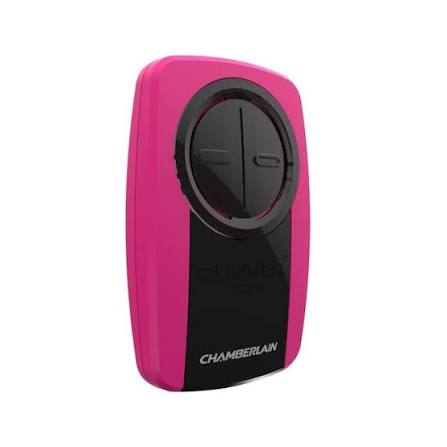
Your Complete Guide to the Chamberlain Universal 2 Button Visor Garage Door Opener Remote Manual
Have you just purchased a Chamberlain Universal 2 Button Visor Garage Door Opener Remote and feel stuck trying to program it? You’re not alone — thousands of homeowners struggle with remote setup every year, often because the original manual gets lost or isn’t clear enough. This comprehensive guide covers everything from the Chamberlain Universal 2 Button Visor Garage Door Opener Remote manual instructions to real-world troubleshooting tips, so you can get your garage door working smoothly in minutes.
Whether you’re replacing an old remote, adding a second one for a family member, or setting up a brand-new system, this article walks you through every step with clarity and confidence. Let’s dive in.
What Is the Chamberlain Universal 2 Button Visor Remote?
The Chamberlain Universal 2 Button Visor Remote is a compact, clip-on garage door opener remote designed to attach to your car’s sun visor. It allows you to control up to two separate garage doors or gates from a single device. Chamberlain, one of the most trusted names in garage door technology (learn more about Chamberlain Group on Wikipedia), has engineered this remote to work with a wide range of garage door opener brands.
Key Features at a Glance
| Feature | Details |
|---|---|
| Number of Buttons | 2 programmable buttons |
| Compatibility | Works with most major garage door opener brands |
| Mounting Style | Visor clip (fits standard car sun visors) |
| Battery Type | 3V CR2032 coin cell battery |
| Frequency Range | 310 MHz, 315 MHz, 390 MHz, and rolling code |
| Security | Rolling code technology (Security+ 2.0® compatible) |
This remote is especially popular among households that have multiple garage doors or who want a backup remote for guests and family members.
Why Do You Need the Chamberlain Universal 2 Button Visor Garage Door Opener Remote Manual?
Even though the remote is designed for simplicity, having access to the proper manual ensures:
- Correct programming — Avoid accidentally erasing existing codes or pairing with the wrong opener.
- Optimal battery life — Learn when and how to replace the battery without damaging internal components.
- Troubleshooting confidence — Quickly diagnose issues like signal interference or unresponsive buttons.
- Safety compliance — Ensure your system meets current safety standards for automatic garage doors.
Without the right instructions, you risk wasting time, draining batteries unnecessarily, or even locking yourself out of your own garage.
Step-by-Step: How to Program Your Chamberlain Universal 2 Button Visor Remote
Follow these detailed steps carefully. The entire process typically takes 5–10 minutes.
Step 1: Gather What You Need
Before starting, make sure you have:
- Your Chamberlain Universal 2 Button Visor Remote
- Access to your garage door opener motor unit (usually mounted on the ceiling)
- A small Phillips-head screwdriver (for some models)
- A fresh CR2032 3V battery (if the remote doesn’t already have one)
- A stepladder if the motor unit is high up
Step 2: Locate the “Learn” Button on Your Garage Door Opener
- Find the motor unit mounted on your garage ceiling.
- Look for a button labeled “Learn,” “Smart,” or “Program.” It is usually located on the back or side panel.
- The button color varies by brand: yellow, purple, orange, red, or green. Note the color — it helps determine compatibility.
Pro Tip: If you cannot find the Learn button, check the model number on your opener and search for its specific manual online.
Step 3: Clear Existing Codes (Optional but Recommended)
If this is a used remote or you’re reprogramming:
- Press and hold the button on the remote you want to reprogram for 10 seconds until the LED blinks rapidly.
- Release the button. The old code is now erased.
Step 4: Program Button 1
- Press and release the Learn button on your garage door opener motor unit. An indicator light will turn on or begin blinking.
- Within 30 seconds, press and hold Button 1 on your visor remote.
- Hold until the motor unit’s light blinks or clicks (usually 2–5 seconds).
- Release the button. Programming for Button 1 is complete.
Step 5: Program Button 2 (For a Second Door or Gate)
- Repeat Step 2 to activate the Learn mode again on the second garage door opener.
- Within 30 seconds, press and hold Button 2 on the remote.
- Wait for the confirmation blink or click.
- Release the button.
Step 6: Test Both Buttons
- Sit in your car, clip the remote to your visor, and test each button from a distance of at least 15 feet.
- Each button should open/close its assigned door reliably.
Advantages vs. Disadvantages of the Chamberlain Universal 2 Button Visor Remote
Understanding the pros and cons helps you decide if this remote fits your needs.
Advantages:
- ✅ Universal compatibility — Works with Chamberlain, LiftMaster, Craftsman, Genie, and more
- ✅ Compact visor design — Stays within easy reach while driving
- ✅ Rolling code security — Prevents code grabbing and unauthorized access
- ✅ Easy DIY programming — No technician required
- ✅ Affordable replacement — Typically priced between $20–$40
Disadvantages:
- ❌ Limited to only 2 devices (not ideal for homes with 3+ doors)
- ❌ Battery replacement requires opening the housing
- ❌ May experience interference near strong radio signals
- ❌ Not compatible with very old openers (pre-1993 models without safety sensors)
Common Troubleshooting Issues and Solutions
Even with the best Chamberlain Universal 2 Button Visor Garage Door Opener Remote manual, problems can arise. Here are the most frequent issues and how to fix them:
1. Remote Doesn’t Respond at All
- Check the battery: Replace the CR2032 battery. Make sure the positive (+) side faces up.
- Check the range: Stand within 15–25 feet of the garage door.
- Reprogram the remote following Steps 4–5 above.
2. Remote Works Intermittently
- Replace the battery — weak batteries cause inconsistent signals.
- Remove obstructions — metal objects or thick walls can block the signal.
- Check for interference from LED bulbs, Wi-Fi routers, or nearby radio towers.
3. Only One Button Works
- Reprogram the non-working button independently using the Learn button on the corresponding opener.
- Ensure you pressed the correct Learn button if you have multiple openers.
4. LED Light Flashes but Door Doesn’t Move
- The remote may be paired, but the opener’s safety sensors could be misaligned. Check that both sensor lights (usually near the floor on either side of the door) are solid and not blinking.
- Inspect the door tracks for debris or damage.
How to Replace the Battery in Your Chamberlain Visor Remote
A dead battery is the #1 reason remotes stop working. Here’s how to swap it:
- Use a small flathead screwdriver or coin to gently pry open the battery compartment on the back of the remote.
- Remove the old CR2032 3V lithium coin cell battery.
- Insert a new CR2032 battery with the positive (+) side facing up.
- Snap the cover back into place securely.
- Test the remote immediately.
Note: Battery life averages 12–24 months depending on usage frequency. Keep a spare CR2032 in your glove compartment for emergencies.
Frequently Asked Questions (FAQ)
Q1: Is the Chamberlain Universal 2 Button Visor Remote compatible with all garage door openers?
It works with most major brands manufactured after 1993, including Chamberlain, LiftMaster, Craftsman, Genie, Overhead Door, and Stanley. However, it is not compatible with openers that use DIP switches exclusively or very old models lacking rolling code technology. Always verify compatibility using your opener’s model number before purchasing.
Q2: Can I program both buttons to the same garage door?
Yes. You can assign both buttons to operate the same door if you prefer. Simply follow the programming steps twice, using the same Learn button on your opener for both Button 1 and Button 2. This is useful as a backup in case one button becomes worn over time.
Q3: How far away can I use the remote from my garage door?
Under normal conditions, the effective range is approximately 50–75 feet in an open area. In practice, walls, vehicles, and electronic interference may reduce this to 15–30 feet. For best results, point the remote directly at the garage door opener antenna (the hanging wire on the motor unit).
Q4: What should I do if my remote stops working after changing the battery?
First, confirm the battery is inserted correctly with the positive side up. If it still doesn’t work, try reprogramming the remote from scratch. Occasionally, removing the battery for more than a few minutes can reset the remote’s memory, requiring full reprogramming.
Q5: Is the Chamberlain Universal 2 Button Visor Remote secure against hacking?
Yes. Modern Chamberlain remotes use rolling code technology (also known as Security+ 2.0®), which generates a new code every time the button is pressed. This makes it virtually impossible for thieves to capture and replay your signal. According to industry data, rolling code systems have reduced garage break-ins via code grabbing by over 95% compared to older fixed-code systems.
Q6: Where can I find the official Chamberlain Universal 2 Button Visor Garage Door Opener Remote manual PDF?
You can download the official PDF manual from the Chamberlain website’s support section by entering your remote’s model number. Alternatively, many retailers like Amazon and Home Depot include digital copies in their product listings. Keeping a digital copy on your phone ensures you always have access, even if the paper manual is lost.
Conclusion
Having a reliable Chamberlain Universal 2 Button Visor Garage Door Opener Remote manual at your fingertips transforms what could be a frustrating experience into a quick, empowering DIY project. From initial programming to battery replacement and troubleshooting, this guide has covered every essential step you need to keep your garage door system running smoothly.
Remember these key takeaways:
- Always use the Learn button method for accurate programming.
- Replace your CR2032 battery every 12–24 months proactively.
- Leverage rolling code security for peace of mind.
- Keep a digital copy of your manual accessible at all times.
Your garage door is one of the most-used entry points in your home — keeping its remote in perfect working order matters more than you think.
Found this guide helpful? Share it on Facebook, Twitter/X, or Pinterest to help fellow homeowners set up their Chamberlain remotes with ease! Have questions or tips of your own? Drop them in the comments below — we’d love to hear from you. 🏠🔧
Leave a Reply