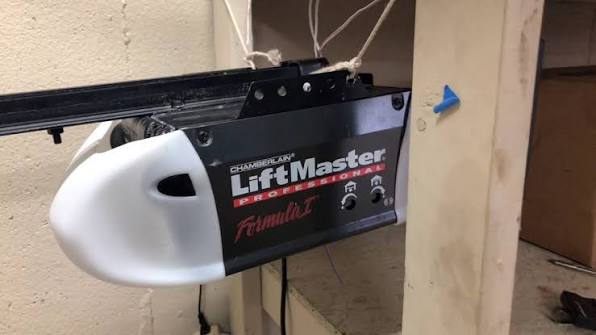
Introduction
Is your garage door refusing to open when you press the button? Or perhaps you’ve just moved into a new home and found an old remote that doesn’t seem to work? You are not alone. Millions of homeowners face connectivity issues with their garage access systems every year. Understanding how to properly manage your Chamberlain Liftmaster Professional Formula 1 Garage Door Opener Remote is essential for both convenience and home security.
In this guide, we will walk you through everything you need to know about this specific model. Whether you need to reprogram an existing remote, buy a replacement, or troubleshoot signal interference, we have covered the technical details in simple, actionable steps. Let’s get your garage door working smoothly again.
What Is the “Formula 1” Technology?
Before diving into programming, it is crucial to understand what makes the “Formula 1” designation unique. In the world of garage door openers, terminology can be confusing. Chamberlain and LiftMaster (which are part of the same corporate family) have used various coding technologies over the decades.
Formula 1 generally refers to the older, fixed-code technology used in units manufactured primarily before the mid-1990s. Unlike modern rolling-code systems that change the encryption code with every use, Formula 1 remotes use a static set of DIP switches or a fixed frequency signal.
Why Does This Matter?
- Security Risks: Fixed codes are easier for thieves to intercept or guess compared to modern Security+ 2.0 systems.
- Compatibility: You cannot simply buy any modern universal remote and expect it to work. You need a remote specifically compatible with the older frequency (usually 315 MHz or 390 MHz) and coding structure.
- Availability: Since these units are vintage, finding exact replacements requires knowing the specific model number of your opener motor unit, not just the remote.
According to industry standards, upgrading from fixed-code systems is often recommended for enhanced security. However, if you wish to maintain your current setup, proper maintenance of your Chamberlain Liftmaster Professional Formula 1 Garage Door Opener Remote is key.
How to Identify Your Compatible Remote
Not all Chamberlain or LiftMaster remotes are interchangeable. Using the wrong remote can lead to frustration and wasted money. Here is how to ensure you have the right match.
Step 1: Check the Motor Unit Color Band
Look at the main garage door opener motor hanging from your ceiling. Older LiftMaster/Chamberlain units often have a color-coded band on the back or side.
- Purple/Yellow: Often indicates older compatibility.
- Orange: Usually indicates Security+ (rolling code), which is not Formula 1.
- No Band/Gray: Very old units may require specific DIP switch remotes.
Step 2: Locate the Model Number
Find the sticker on the motor unit. It will list a model number (e.g., 1345, 2345, etc.). Write this down. You will need it when purchasing a replacement remote.
Step 3: Inspect the Existing Remote
If you have an old remote:
- Does it have small switches inside the battery compartment? These are DIP switches. If yes, it is definitely an older fixed-code model.
- Does it have a single “Learn” button on the motor? If the motor has a large square purple or yellow button, it might be compatible with newer universal remotes, but if it has tiny DIP switches on the motor board itself, you must match those switches exactly.
Pro Tip: If your remote uses DIP switches, count them. Common configurations are 8, 9, or 12 switches. Your new remote must have the same number of switches.
Step-by-Step: Programming Your Formula 1 Remote
Programming a Formula 1 remote differs significantly from modern “smart” openers. There is no wireless “learn” button process for the oldest models. Instead, it is a manual hardware configuration.
Method A: DIP Switch Configuration (Most Common for Formula 1)
- Open the Remote: Remove the battery cover and take out the batteries. Look for a row of small plastic switches.
- Open the Motor Unit: Safely disconnect power to the garage door opener. Remove the light lens or cover panel to access the circuit board.
- Locate Motor Switches: Find the corresponding DIP switches on the motor’s receiver board.
- Match the Pattern: Look at the position of the switches on the motor (Up or Down). Set the switches in your remote to the exact same pattern.
- Example: If switch 1 on the motor is UP, switch 1 on the remote must be UP.
- Reassemble and Test: Put the covers back on, restore power, and insert batteries into the remote. Press the button. The door should activate.
Method B: Frequency Matching (For Non-DIP Models)
Some Formula 1 remotes do not have switches but rely on frequency matching.
- Verify the frequency printed on the back of your old remote (e.g., 315 MHz).
- Purchase a replacement remote with the identical frequency.
- These often require no programming; they work immediately upon battery insertion if the frequency matches the receiver.
Troubleshooting Common Issues
Even with the correct remote, issues can arise. Here are the most common problems and solutions.
| Issue | Possible Cause | Solution |
|---|---|---|
| Remote doesn’t work at all | Dead batteries | Replace with fresh alkaline batteries. Check corrosion in contacts. |
| Intermittent signal | Interference | LED light bulbs in the garage can cause signal noise. Try switching to incandescent bulbs temporarily. |
| Works close, not far | Weak antenna | Ensure the antenna wire on the motor unit is hanging down and not wrapped around metal. |
| Door reverses immediately | Safety sensor misalignment | Check the photo-eye sensors near the floor. Ensure nothing is blocking the beam. |
The LED Light Bulb Problem
A surprisingly common issue with older openers like the Formula 1 series is interference from modern LED bulbs. The radio frequency emitted by cheap LED drivers can jam the 315 MHz or 390 MHz signal. If your remote only works when you are very close to the door, try turning off the garage lights and testing the remote. If it works, replace the bulbs with “garage door compatible” LEDs.
Should You Upgrade to a Modern System?
While keeping your Chamberlain Liftmaster Professional Formula 1 Garage Door Opener Remote functional is cost-effective, there are compelling reasons to consider an upgrade.
Pros of Keeping Formula 1
- Cost: No need to buy a new motor unit.
- Simplicity: No Wi-Fi setup or app configuration required.
- Reliability: Fewer electronic components mean fewer things can break digitally.
Cons of Keeping Formula 1
- Security: Fixed codes can be cloned easily with inexpensive devices available online.
- Convenience: No smartphone control or integration with Alexa/Google Home.
- Parts Scarcity: Finding exact replacement remotes becomes harder each year.
If security is a primary concern, experts recommend upgrading to a LiftMaster model with Security+ 2.0 encryption. This technology generates a new code every time you press the button, making it virtually impossible to hack. For more information on garage door security standards, you can refer to general safety guidelines on Wikipedia.
FAQ Section
Q1: Can I use a universal remote for my Chamberlain Liftmaster Professional Formula 1 Garage Door Opener Remote?
A: It depends. If your system uses DIP switches, you can use a universal remote that also features DIP switches. You must manually match the switch positions. If your system is frequency-only without switches, you need a universal remote that supports the specific MHz (315 or 390) of your unit. Always check the compatibility list on the universal remote’s packaging.
Q2: Why does my remote work sometimes but not others?
A: This is often due to battery weakness or signal interference. First, replace the batteries. If the problem persists, check for LED light bulb interference in the garage. Also, ensure the antenna on the motor unit is not obstructed by metal storage racks or boxes.
Q3: How do I reset my Formula 1 remote?
A: Older Formula 1 remotes do not have a digital “reset” function like modern smart devices. To “reset” the connection, you simply change the DIP switch pattern on both the remote and the motor unit to a new configuration. This effectively creates a new code pair.
Q4: Is it safe to leave my garage door opener on the visor of my car?
A: While convenient, it is a security risk, especially with older fixed-code systems like Formula 1. Thieves can use “code grabbers” to capture the signal. It is safer to keep the remote with you or use a keypad entry system installed outside the garage.
Q5: Where can I buy a replacement Chamberlain Liftmaster Professional Formula 1 Garage Door Opener Remote?
A: You can find replacements on major online retailers like Amazon, Home Depot, or specialized garage door parts websites. Be sure to search using your motor’s model number rather than just “Formula 1” to ensure compatibility.
Q6: Can I program two remotes to the same Formula 1 opener?
A: Yes. As long as both remotes have the exact same DIP switch configuration (or frequency), they will both operate the same door. There is no limit to the number of remotes you can use, provided they are configured correctly.
Conclusion
Managing your Chamberlain Liftmaster Professional Formula 1 Garage Door Opener Remote doesn’t have to be a headache. By understanding whether your system uses DIP switches or fixed frequencies, you can easily program replacements and troubleshoot common issues. While these older systems lack the smart features of modern openers, they remain reliable workhorses for many US homes.
Remember, regular maintenance—such as checking batteries and ensuring clear signal paths—can extend the life of your remote significantly. If you found this guide helpful, please share it with friends or neighbors who might be struggling with their garage doors. A functioning garage door is the first step to a secure and convenient home!
Did this article solve your problem? Let us know in the comments below!
Leave a Reply