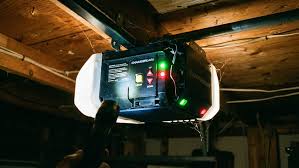
Is your garage door refusing to open or close while those Chamberlain garage door opener up and down arrows flashing relentlessly? It’s a frustrating scenario that leaves you stranded in your driveway, especially when you’re in a hurry. Don’t worry; this common issue is usually a simple safety feature activation rather than a major mechanical failure, and we’ll show you exactly how to resolve it quickly.
Why Are the Up and Down Arrows Flashing on My Chamberlain Opener?
When you see the up and down arrows flashing on your Chamberlain garage door opener, it is almost always an indicator of a safety sensor misalignment or an obstruction. Chamberlain designs these systems with strict safety protocols to prevent the door from closing on people, pets, or objects.
The flashing lights are the system’s way of saying, “I cannot verify that the path is clear.” According to general safety standards for automatic garage doors, the sensors must maintain an uninterrupted infrared beam. If this beam is broken or misaligned, the motor unit will refuse to operate and signal the error via the flashing arrows.
Common Causes at a Glance
| Cause | Symptom | Frequency |
|---|---|---|
| Misaligned Sensors | One or both sensor lights are off or flickering | Very High |
| Obstructed Beam | Solid light on sending eye, no light on receiving eye | High |
| Wiring Issues | Intermittent flashing, works occasionally | Medium |
| Sunlight Interference | Fails only during specific times of day | Low/Medium |
| Logic Board Failure | Flashing persists after all checks | Rare |
Understanding the root cause is the first step to a permanent fix. In most cases, the issue is environmental or physical rather than electronic.
How to Align Your Safety Sensors Correctly
The most frequent solution to the Chamberlain garage door opener up and down arrows flashing issue is realigning the safety eyes. These small units are mounted near the bottom of your garage door tracks, about 6 inches off the ground.
Step-by-Step Alignment Process
- Check the Indicator Lights: Look at both sensors. Typically, one has a green LED (sending) and the other has an amber or yellow LED (receiving). If the receiving eye’s light is off or blinking, alignment is needed.
- Loosen the Wing Nut: Gently loosen the wing nut on the bracket holding the misaligned sensor. Do not remove it completely; just enough to allow movement.
- Adjust the Sensor: Slowly move the sensor head left, right, up, or down until the amber/yellow light turns solid. You may need a helper to watch the light while you adjust.
- Tighten Securely: Once the light is solid, tighten the wing nut carefully. Ensure the sensor does not shift during tightening.
- Test the Door: Press the wall button to close the door. If the arrows stop flashing and the door operates normally, you’ve succeeded.
Pro Tip: Use a level to ensure both sensors are at the exact same height. Even a quarter-inch difference can break the infrared beam.
Cleaning and Clearing Sensor Obstructions
Sometimes, the sensors are perfectly aligned, but something is blocking the invisible infrared beam. Dust, spider webs, or even bright sunlight can interfere with the signal.
Maintenance Checklist
- Wipe the Lenses: Use a soft, dry cloth to clean the plastic lenses on both sensors. Avoid harsh chemicals that might cloud the plastic.
- Remove Debris: Check for leaves, boxes, or bicycles parked between the sensors. The beam path must be completely clear.
- Check for Sunlight Glare: In late afternoon, direct sunlight can overwhelm the receiver. If this happens only at certain times, consider installing a shade or adjusting the sensor angle slightly downward.
For more detailed information on garage door safety standards, you can refer to Wikipedia’s page on Garage Door Openers, which outlines the universal safety requirements mandated in the US.
Inspecting Wiring and Power Connections
If alignment and cleaning don’t stop the Chamberlain garage door opener up and down arrows flashing, the issue might be electrical. Damaged wires can interrupt the signal between the sensors and the motor unit.
What to Look For
- Frayed Wires: Check the wires running from the sensors to the motor head. Look for cuts, chew marks from pests, or pinches from staples.
- Loose Connections: Ensure the wires are securely connected to the back of the sensor units and the terminal screws on the motor unit.
- Power Supply: Verify that the opener is plugged in and receiving power. A weak power supply can cause erratic behavior in the logic board.
If you find damaged wiring, it is best to replace the entire sensor kit rather than attempting to splice wires, as splices can create resistance and future failures.
When to Reset Your Chamberlain Opener
A system reset can clear temporary glitches in the logic board that may cause false error signals. This is a safe and easy step to try before calling a technician.
Hard Reset Procedure
- Unplug the Opener: Disconnect the power cord from the outlet.
- Wait 30 Seconds: Allow any residual power in the capacitors to dissipate.
- Plug Back In: Reconnect the power.
- Reprogram Remotes: You may need to re-sync your remote controls and keypad entries following the manual’s instructions.
This process refreshes the system’s memory and can resolve software-related hiccups causing the flashing arrows.
FAQ Section
Q: Why do the arrows flash only when I try to close the door?
A: This confirms a safety sensor issue. The opener allows opening but prevents closing because it cannot verify the path is clear. Check sensor alignment and obstructions immediately.
Q: Can bad weather cause the arrows to flash?
A: Yes. Heavy rain, snow, or extreme temperatures can affect sensor performance. Moisture in the housing or ice on the lenses can block the beam. Dry them off and test again.
Q: What if one sensor light is completely off?
A: This indicates no power is reaching that sensor. Check the wiring for breaks or loose connections at the motor unit. If wiring is intact, the sensor unit itself may be faulty and need replacement.
Q: Is it safe to bypass the sensors to close the door?
A: No. Bypassing safety sensors is extremely dangerous and violates federal safety regulations. It removes the protection against crushing injuries. Always fix the underlying issue instead.
Q: How often should I check my garage door sensors?
A: Perform a visual check monthly. Clean the lenses and ensure they are secure. Test the safety reversal feature by placing a roll of paper towels in the door’s path; it should reverse upon contact.
Q: My arrows stopped flashing, but the door still won’t close. What now?
A: If the lights are solid but the door refuses to close, check the travel limits settings on the motor unit. They may need adjustment. Consult your owner’s manual for specific instructions on setting up and down limits.
Conclusion
Dealing with a Chamberlain garage door opener up and down arrows flashing can be stressful, but it is rarely a catastrophic failure. By systematically checking sensor alignment, clearing obstructions, inspecting wiring, and performing a reset, you can resolve the issue in most cases without professional help. Regular maintenance ensures your garage door remains safe and reliable for years to come.
Did this guide help you get your garage door working again? Share this article with friends or family who might be facing the same frustration!
Leave a Reply