ere is nothing quite as frustrating as standing in your driveway, rain pouring down, pressing the button on your remote, and watching your garage door refuse to come down. You know the motor works because it opens perfectly fine, yet it stubbornly stays up when you try to close it. If you are dealing with a situation where your Chamberlain garage door opener remote will open but not close, you are not alone. This is one of the most common issues homeowners face, and fortunately, it is rarely a sign that you need to buy a new opener.
In most cases, this problem stems from simple misalignments, dirty sensors, or minor setting adjustments rather than a catastrophic mechanical failure. Understanding why this happens can save you hundreds of dollars in unnecessary service calls. In this guide, we will walk you through the exact steps to diagnose and fix this issue, ensuring your garage operates safely and efficiently once again.
Why Does My Chamberlain Garage Door Open But Not Close?
Before we dive into the fixes, it is crucial to understand the “why.” Modern garage door openers, including Chamberlain models, are designed with strict safety protocols. The primary reason a door will reverse immediately after touching the floor, or refuse to go down at all, is the safety reversal system.
According to federal safety standards established in 1993, all residential garage door openers must have an automatic reversing mechanism. This feature prevents the door from crushing objects, pets, or people underneath it. When your Chamberlain opener detects any resistance or an interrupted signal during the closing cycle, it defaults to the “open” position to prevent injury. Therefore, if your remote opens the door but not closes it, the system believes there is an obstruction or a fault in the safety circuit.
Check and Clean the Safety Eye Sensors
The most frequent culprit behind a garage door that won’t close is the photo-eye sensor. These are the small plastic units located near the bottom of your garage door tracks, usually about six inches off the ground. One sensor sends an invisible beam of light to the other. If that beam is broken, the door will not close.
Step-by-Step Sensor Inspection
- Check the LED Lights: Look at the sensors. Typically, one will have a green light (power) and the other will have an amber or orange light (beam alignment). If the amber light is blinking or off, the sensors are misaligned or blocked.
- Clean the Lenses: Dust, spiderwebs, and dirt can obscure the lens. Use a soft, dry microfiber cloth to gently wipe both sensor lenses. Avoid using chemical cleaners that might leave a residue.
- Verify Alignment: The sensors must face each other directly. Even a slight tilt can break the beam. Loosen the wing nuts slightly, adjust the brackets until the lights are steady, and then tighten them back down.
- Remove Obstructions: Ensure that no boxes, bicycles, or trash cans are blocking the path between the two sensors.
If the lights are steady but the door still won’t close, proceed to the next step. For more detailed technical specifications on safety standards, you can refer to the Consumer Product Safety Commission guidelines regarding garage door operators.
Inspect the Travel Limit Settings
If your sensors are clean and aligned, the issue might lie in the travel limit settings. These settings tell the motor how far to move the door up and down. Over time, seasonal changes in temperature can cause the metal tracks to expand or contract, slightly altering the distance the door needs to travel.
How to Adjust Travel Limits on Chamberlain Models
Most modern Chamberlain openers use a dial or a set of buttons on the motor unit itself.
- Locate the Adjustment Screats/Buttons: Look for arrows labeled “Up” and “Down” or “Open” and “Close.”
- Test the Down Limit: If the door hits the floor and immediately reverses, the down limit may be set too far. Turn the down adjustment knob counter-clockwise (or press the down arrow) in small increments.
- Test the Force Setting: Sometimes, the door thinks it hit an obstacle because the force required to close it is too high. Locate the force adjustment dial. If it is set too high, the door may reverse upon detecting normal friction. Try reducing the force slightly.
Note: Always make small adjustments. A quarter-turn can make a significant difference. Test the door after each adjustment to ensure it closes completely and seals against the weather stripping without excessive force.
Examine the Remote Control Battery and Signal
While it seems counterintuitive that a remote would work for opening but not closing, signal interference can sometimes cause erratic behavior. However, this is less common than sensor issues.
- Replace the Battery: A weak battery may send a weak signal. While it might be strong enough to trigger the “open” command (which often has a different priority or sensitivity), it might fail to sustain the connection for the closing cycle. Replace the battery with a fresh CR2032 or similar type, depending on your model.
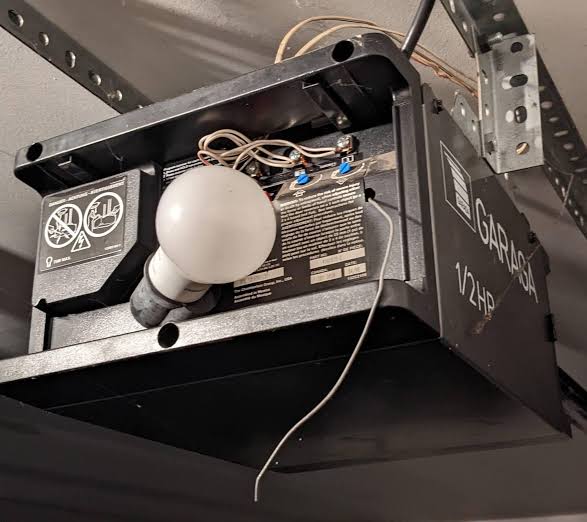
- Check for Interference: LED light bulbs in your garage can emit electromagnetic interference that disrupts the remote’s signal. If you recently switched to LED bulbs in your garage opener or nearby fixtures, try switching back to incandescent bulbs temporarily to see if the problem resolves.
Look for Physical Obstructions in the Tracks
Even if the sensors are clear, physical debris in the tracks can prevent the door from closing. The opener’s motor detects resistance and reverses the door to prevent damage.
Quick Track Maintenance Checklist
| Component | What to Check | Action Required |
|---|---|---|
| Tracks | Dents, bends, or rust | Straighten minor bends; lubricate rust spots |
| Rollers | Cracks, chips, or wear | Replace damaged rollers immediately |
| Hinges | Loose screws or broken parts | Tighten screws; replace broken hinges |
| Weather Stripping | Torn or displaced seal | Reattach or replace to reduce drag |
Use a silicone-based lubricant on the rollers and hinges. Avoid using WD-40 or oil-based lubricants, as they attract dust and grime, which can worsen the problem over time.
Reset the Garage Door Opener
If none of the above steps work, a factory reset might clear any internal software glitches. Chamberlain openers have a logic board that can sometimes become confused by power surges or inconsistent signals.
- Unplug the opener from the power source.
- Wait for at least 30 seconds to allow the capacitors to discharge.
- Plug the opener back in.
- Reprogram your remote controls and keypad entries according to the manual.
This process clears the memory and forces the system to relearn the current positions of the door.
When to Call a Professional
While most issues can be resolved DIY, some situations require professional assistance. If you notice:
- Loud grinding noises from the motor.
- The door falling rapidly when disconnected from the opener.
- Broken springs or cables.
Never attempt to repair garage door springs yourself. They are under extreme tension and can cause severe injury if handled incorrectly. In these cases, contact a certified Chamberlain technician or a local garage door repair service.
FAQ Section
Q: Why does my Chamberlain garage door close when I hold the wall button but not with the remote?
A: This usually indicates an issue with the remote’s signal or programming rather than the opener itself. Try reprogramming the remote. If it works with the wall button, the safety sensors and motor are functioning correctly.
Q: Can cold weather affect my garage door’s ability to close?
A: Yes. Cold temperatures can cause metal tracks to contract and lubricants to thicken, increasing friction. This added resistance may trigger the safety reversal mechanism. Lubricating the moving parts with a cold-weather appropriate silicone spray can help.
Q: How do I know if my safety sensors are bad?
A: If the LED light on the receiving sensor is off or blinking despite being clean and aligned, the sensor unit itself may be faulty. You can test this by swapping the wires at the back of the motor unit. If the problem persists, replacement sensors are inexpensive and easy to install.
Q: Is it safe to bypass the sensors to close the door?
A: No. Bypassing safety sensors is extremely dangerous and violates federal safety regulations. It removes the protection against crushing injuries. Always fix the underlying issue rather than disabling safety features.
Q: How often should I maintain my Chamberlain garage door opener?
A: Perform a basic inspection every six months. Check sensor alignment, lubricate moving parts, and test the auto-reverse feature by placing a 2×4 piece of wood on the floor in the door’s path. The door should reverse immediately upon contact.
Conclusion
Dealing with a Chamberlain garage door opener remote will open but not close scenario is stressful, but it is almost always solvable with a bit of patience and the right approach. By systematically checking your safety sensors, adjusting travel limits, and ensuring your tracks are clean, you can restore full functionality to your garage door.
Remember, safety is paramount. Never ignore a reversing door, as it is trying to protect you and your family. If you found this guide helpful, please share it with friends or neighbors who might be facing similar garage door woes. A well-maintained garage door is a safe garage door!
Leave a Reply