Introduction
Losing access to your garage can be a stressful experience, especially when you are in a rush or returning home late at night. Many homeowners panic when they forget their PIN, wondering if they will need to call an expensive technician just to get back inside. The good news is that can you reset a garage door keypad without the code is a question with a reassuring answer: yes, in most cases, you can regain control of your system without knowing the old password.
This guide will walk you through the exact steps to reset your keypad, troubleshoot common issues, and secure your home again. We will focus on practical, safe methods that work for major brands like LiftMaster, Chamberlain, and Genie. By the end of this article, you will have the confidence to handle this common household hurdle like a pro.
Understanding How Garage Door Keypads Work
Before diving into the reset process, it is helpful to understand the basic mechanism behind these devices. Most modern wireless keypads do not store the code internally in a way that is independent of the main garage door opener motor unit. Instead, they communicate via radio frequency (RF) signals.
When you enter a code, the keypad sends a signal to the opener. If the code matches what is stored in the opener’s memory, the door opens. This means that “resetting” the keypad usually involves two distinct actions:
- Clearing the old code from the keypad itself.
- Reprogramming the keypad to the main opener unit using a new code.
According to general technical standards for residential security systems, this two-way verification ensures that even if someone steals your keypad, they cannot open your door without re-syncing it to your specific motor unit Source: Wikipedia – Garage Door Opener.
Method 1: Using the “Learn” Button on the Opener Motor
The most reliable way to reset your system when you have lost the code is by accessing the main garage door opener unit. This method effectively wipes all previous remote and keypad codes, allowing you to start fresh.
Step-by-Step Guide
- Locate the Motor Unit: Use a sturdy ladder to safely reach the garage door opener motor mounted on your ceiling.
- Find the “Learn” Button: Look for a small button on the back or side of the motor unit. It is often colored yellow, purple, orange, or red, depending on the brand. It may also be labeled as “Smart” or “Program.”
- Press and Hold: Press and hold the “Learn” button for approximately 6–10 seconds. You will know it worked when the indicator light next to the button turns off or blinks rapidly. This action clears all previously programmed remotes and keypads.
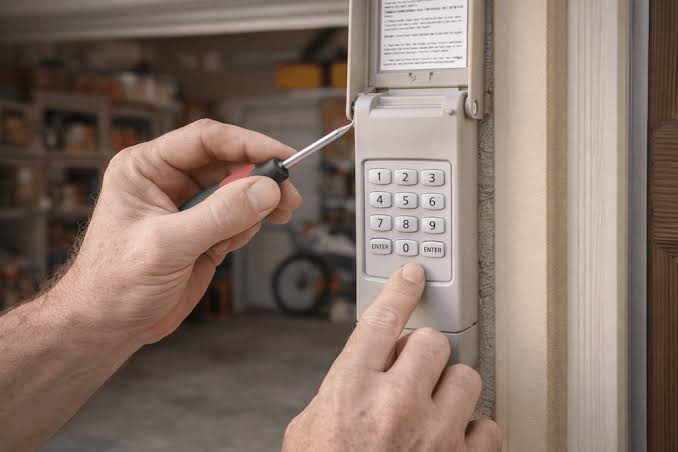
- Reset the Keypad: Go to your external keypad. Enter your desired new PIN (usually 4 digits). Immediately after entering the PIN, press and hold the “Enter” or “Send” button.
- Sync the Devices: While holding the button on the keypad, go back to the motor unit and press the “Learn” button once briefly. Release both buttons. The light on the motor should blink or stay solid, indicating the new code is accepted.
Pro Tip: If you have multiple remotes or car homelink systems, you will need to reprogram all of them after using this method, as the master clear function removes all devices.
Method 2: Factory Resetting the Keypad Only
If you do not want to erase all your other remotes, you might try resetting just the keypad. This method varies significantly by brand, but it is worth trying before doing a full system wipe.
Common Brand-Specific Instructions
| Brand | Typical Reset Procedure |
|---|---|
| LiftMaster / Chamberlain | Remove the battery cover. Look for a small “Program” or “Reset” button inside. Hold it for 10 seconds until the LED flashes. |
| Genie | Enter the default factory code (often 1-2-3-4 or 9-8-7-6). Then, press and hold the program button on the keypad for 5 seconds. |
| Craftsman | Similar to LiftMaster. Remove batteries, wait 30 seconds, reinsert, and follow the sync process with the motor unit. |
Note: Always consult your specific model’s manual if available, as firmware updates can change these procedures.
Troubleshooting: What If It Doesn’t Work?
Even with the correct steps, technology can sometimes be stubborn. Here are the most common reasons why a reset might fail and how to fix them.
1. Weak or Dead Batteries
This is the number one cause of keypad failure. If the batteries are low, the keypad may not send a strong enough signal to the motor unit.
- Solution: Replace the batteries with fresh alkaline ones. Avoid using rechargeable batteries as they often have lower voltage output which can cause intermittent connectivity issues.
2. Signal Interference
LED light bulbs in your garage can sometimes emit frequency interference that blocks the RF signal from your keypad.
- Solution: Try turning off any LED garage lights temporarily while programming. If the reset works, consider switching to incandescent bulbs or RF-shielded LEDs.
3. Distance and Obstacles
If your keypad is mounted far from the motor unit, or if there is significant metal insulation between them, the signal may be weak.
- Solution: Bring the keypad closer to the motor unit (within 5 feet) while programming. Once synced, you can remount it outside.
4. The “Lock” Feature is Activated
Many modern openers have a vacation lock or security lock feature that disables all remote controls, including keypads.
- Solution: Check the wall console inside your garage. If the lock icon is lit, press and hold the lock button for 2 seconds to disable it.
Security Best Practices After Resetting
Once you have successfully answered the question “can you reset a garage door keypad without the code” and regained access, it is crucial to secure your home properly.
- Choose a Strong PIN: Avoid obvious codes like 1234, 0000, or your birth year. Use a random four-digit combination that is easy for you to remember but hard for others to guess.
- Change Codes Regularly: If you have had house guests, contractors, or dog walkers who knew the old code, change it immediately.
- Inspect the Keypad Housing: Ensure the weatherproof cover is intact. Moisture damage can cause short circuits that might make the keypad behave erratically or stick to certain numbers.
Frequently Asked Questions (FAQ)
1. Will resetting the keypad delete my car’s Homelink system?
If you use the “Learn” button on the motor unit to clear all codes, yes, it will delete your Homelink system. You will need to reprogram your car to the garage door opener. However, if you only reset the keypad internally (Method 2), your car should remain connected.
2. Can I reset the keypad if I don’t have a ladder?
It is difficult but not impossible. Some newer smart garage door openers allow you to manage users and reset codes via a smartphone app (such as MyQ). If you have a smart opener, check the app settings first. Otherwise, borrowing a ladder is the safest and most effective option.
3. Why does my keypad work intermittently after resetting?
Intermittent issues are usually related to battery power or signal interference. Replace the batteries first. If the problem persists, check for nearby sources of interference, such as large metal objects or LED lighting fixtures.
4. Is it safe to leave the garage door opener unplugged during the reset?
No, the motor unit must be powered on to receive the new signal from the keypad. However, ensure the area is clear and no one is operating the door manually while you are on the ladder programming the unit.
5. What if I lost the manual for my specific keypad model?
Most manufacturers provide PDF manuals on their official websites. Search for the model number, which is usually found on the back of the keypad or inside the battery compartment. If you cannot find it, the generic “Learn” button method (Method 1) works for 90% of residential openers.
Conclusion
Dealing with a locked garage door is frustrating, but it is a solvable problem. As we have explored, can you reset a garage door keypad without the code is definitely possible. By using the “Learn” button on your motor unit or performing a factory reset on the keypad, you can regain access quickly and securely.
Remember to prioritize safety when using ladders, keep your batteries fresh, and choose a secure PIN to protect your home. If you found this guide helpful, please share it with friends or family who might be struggling with their own garage door issues. Staying informed is the best way to maintain a secure and functional home!
Leave a Reply