Have you ever fumbled with your keys in the rain, wishing you had a spare garage remote in your other car or bag? It is a common frustration for many homeowners who rely on a single point of access for their most used entryway. The good news is that can you program multiple remotes to a garage door opener is not just a possibility—it is a standard feature designed for your convenience and security.
Whether you have a growing family, multiple vehicles, or simply want a backup for emergencies, understanding how to sync additional transmitters is essential. This guide will walk you through everything you need to know, from checking compatibility to executing the pairing process like a pro.
Understanding Compatibility: Not All Remotes Are Created Equal
Before you rush to buy a new remote, it is crucial to understand that garage door openers are not universally compatible. The technology has evolved significantly over the last few decades, moving from simple fixed-code systems to advanced rolling-code encryption.
The Evolution of Garage Door Technology
Most modern garage door openers manufactured after 1993 use rolling code technology. This security feature changes the access code every time you press the button, preventing hackers from intercepting and replaying the signal. According to industry standards, this shift was mandated to enhance home security across the United States.
If you have an older unit, you might be dealing with dip switches—tiny physical switches inside the remote and the motor unit that must match exactly. While these are easier to “program” by simply flipping switches, they are less secure. For most US homeowners today, however, the focus is on smart, rolling-code systems.
Checking Your Opener’s Capacity
A common question is: How many remotes can one opener handle?
| Opener Type | Typical Remote Capacity | Keypad Capacity |
|---|---|---|
| Standard Residential | 5–8 Remotes | 2–3 Keypads |
| High-End Smart Models | 10+ Remotes | 4+ Keypads |
| Older Legacy Units | 3–5 Remotes | 1 Keypad |
Note: Always consult your specific manufacturer’s manual for exact limits, as these numbers can vary by brand such as LiftMaster, Chamberlain, or Genie.
Step-by-Step Guide: How to Program a New Remote
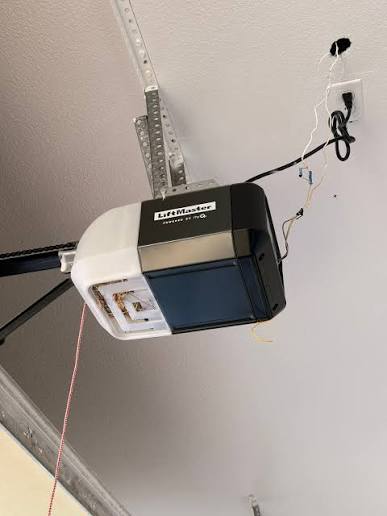
Programming a remote is generally a straightforward process, but it requires precision. Most modern openers use a “Learn Button” located on the motor unit hanging from your garage ceiling.
Step 1: Locate the Learn Button
Climb a sturdy ladder and look at the back or side of the garage door opener motor. You will see a small button, often colored yellow, purple, red, or green. It may be labeled “Learn,” “Smart,” or “Program.”
Step 2: Clear Old Codes (If Necessary)
If you are having trouble or suspect interference, hold down the Learn button for about 6–10 seconds until the indicator light blinks or goes out. Warning: This erases all previously programmed remotes and keypads, so you will need to reprogram every device you own.
Step 3: Initiate Programming Mode
Press and release the Learn button once. The indicator light will turn on or start blinking, signaling that the unit is ready to accept a new code. You typically have 30 seconds to complete the next step.
Step 4: Sync the Remote
Within those 30 seconds, press and hold the button on your new remote that you wish to use. Hold it for about 3–5 seconds. You should see the lights on the motor unit flash or hear a click, confirming the code has been accepted.
Step 5: Test the Connection
Step down from the ladder and test the remote. Press the button to ensure the door opens and closes smoothly. If it does not work, repeat the process, ensuring you are within range and the remote has fresh batteries.
For more detailed technical specifications on wireless security protocols, you can refer to Wikipedia’s entry on Rolling Codes.
Troubleshooting Common Programming Issues
Even with clear instructions, things can go wrong. Here are the most frequent hurdles homeowners face and how to overcome them.
Interference from LED Bulbs
Surprisingly, certain LED light bulbs in your garage door opener can emit radio frequency interference that blocks remote signals. If your remote works intermittently, try unscrewing the LED bulbs and testing with incandescent ones temporarily. If the issue resolves, purchase “garage door compatible” LED bulbs.
Dead Batteries
It sounds simple, but a weak battery is the number one cause of programming failure. Always install fresh, high-quality alkaline batteries before attempting to sync a new remote.
Distance and Obstacles
Ensure you are standing within 10–15 feet of the motor unit during programming. Metal objects, large appliances, or even thick concrete walls can dampen the signal strength during the initial handshake between the remote and the opener.
Alternatives to Traditional Remotes
While handheld remotes are convenient, they are not the only way to access your garage. Diversifying your entry methods can provide peace of mind if you lose a remote.
Wireless Keypads
Mounted outside your garage, these allow entry via a PIN code. They are excellent for guests, delivery drivers, or children who do not carry car remotes. Most openers support at least one external keypad.
Smartphone Control
Modern smart garage hubs connect your opener to Wi-Fi. This allows you to open and close your door from anywhere using an app. It also provides logs of when the door was accessed, adding a layer of security monitoring that traditional remotes lack.
Vehicle Homelink Systems
Many cars built in the last 15 years come with built-in garage door controls. Programming your car’s system eliminates the need for a separate clip-on remote, keeping your visor clutter-free.
Frequently Asked Questions
Can I program a universal remote to any garage door opener?
Not always. Universal remotes work with most major brands like Chamberlain, LiftMaster, Genie, and Craftsman, but they may not be compatible with proprietary or very old systems. Always check the packaging for a compatibility list before purchasing.
Will programming a new remote delete my existing ones?
No, not unless you intentionally clear the memory. Pressing the Learn button briefly adds a new code. Holding it down for several seconds clears the entire memory. Be careful not to hold it too long if you only want to add a device.
How do I know if my remote is successfully programmed?
The garage door opener’s light bulb will usually flash twice, or you will hear a distinct click sound from the motor unit. Additionally, the remote should immediately operate the door after the syncing process is complete.
Can neighbors accidentally open my garage door?
With rolling code technology, the odds are astronomically low. There are billions of possible code combinations. However, if you have an older fixed-code system, there is a slight risk. Upgrading to a modern opener or adding a smart hub is recommended for better security.
What should I do if I lose all my remotes?
If you have no working remotes, you can still program new ones using the Learn button on the motor unit. You will need a ladder to access the button. If you cannot access the unit, you may need to call a professional technician to reset the system safely.
Conclusion
So, can you program multiple remotes to a garage door opener? Absolutely. It is a simple, effective way to enhance your home’s accessibility and ensure that every family member has convenient access. By following the steps outlined above, you can sync new devices in minutes without needing professional help.
Remember to keep your opener’s manual handy, use fresh batteries, and consider upgrading to smart technology if you want greater control and monitoring. If you found this guide helpful, please share it with your friends and family on social media to help them simplify their garage access too!
Leave a Reply