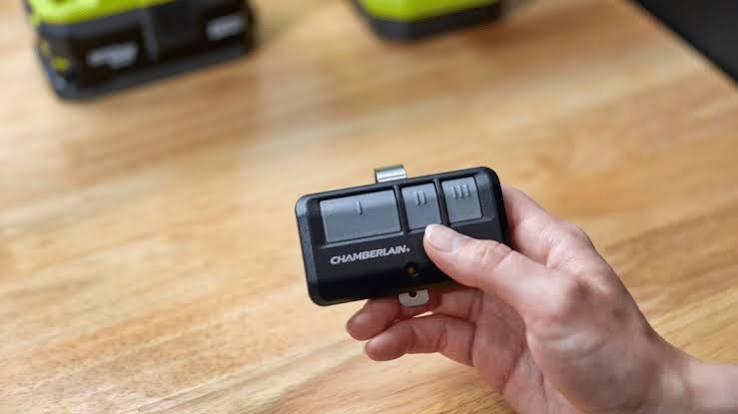
Have you ever fumbled with your keys in the rain, wishing you had a spare garage door remote in your second car or purse? You are not alone. Many homeowners ask, can you program more than one remote for garage door openers to simplify their daily routine? The short answer is yes, and it is often easier than you think.
Most modern garage door openers are designed with convenience in mind, allowing you to sync several transmitters to a single unit. Whether you need a remote for your spouse’s vehicle, a keypad for guests, or a wall-mounted control inside your home, understanding how to manage multiple devices can save you time and frustration. This guide will walk you through everything you need to know about programming additional remotes, ensuring your home remains secure while maximizing accessibility.
Understanding Your Garage Door Opener’s Capacity
Before diving into the programming process, it is crucial to understand that not all garage door openers are created equal. The ability to program multiple remotes depends largely on the manufacturer, the model year, and the technology used in your specific unit.
How Many Remotes Can One Opener Handle?
Most residential garage door openers manufactured in the last two decades can support between 3 to 8 remotes. However, high-end models from brands like LiftMaster, Chamberlain, and Genie often support up to 12 or more devices. This includes not just handheld remotes, but also wireless keypads, smartphone apps, and vehicle homelink systems.
| Brand | Typical Remote Capacity | Notes |
|---|---|---|
| LiftMaster | Up to 8–12 | Supports Security+ 2.0 technology |
| Chamberlain | Up to 8–12 | Often compatible with MyQ app |
| Genie | Up to 7–10 | Uses Intellicode rolling codes |
| Craftsman | Up to 6–8 | Varies by model year |
It is important to note that “capacity” refers to the number of unique codes the opener’s memory can store. If you exceed this limit, you may need to clear old codes before adding new ones. For detailed technical specifications on older models, you can refer to general industry standards documented on Wikipedia’s page on Garage Door Openers.
Rolling Code vs. Fixed Code Technology
Security has evolved significantly over the years. Older openers used fixed codes, where the signal sent by the remote was always the same. This made them vulnerable to code-grabbing thieves. Modern openers use rolling code technology (also known as hopping codes), where the code changes every time you press the button.
When you program a new remote to a rolling code system, the opener and the remote synchronize to generate the next valid code in the sequence. This means you cannot simply copy a signal from one remote to another; each remote must be individually paired with the opener unit.
Step-by-Step Guide: How to Program Additional Remotes
Programming a new remote is generally a straightforward process, but the exact steps can vary by brand. Below is a universal guide that works for most major manufacturers. Always consult your specific owner’s manual for model-specific instructions.
Step 1: Locate the “Learn” Button
The first step is to find the Learn button on your garage door opener motor unit. This unit is typically mounted on the ceiling of your garage. The Learn button is usually located on the back or side of the motor housing and is often colored yellow, purple, orange, or red.
- Tip: You may need a sturdy ladder to reach the motor unit safely. Ensure the ladder is stable before climbing.
Step 2: Clear Old Codes (If Necessary)
If your opener is not responding to new programming attempts, or if you suspect the memory is full, you may need to reset the system. Press and hold the Learn button for approximately 10 seconds until the indicator light blinks or turns off. This will erase all previously programmed remotes and keypads, so you will need to reprogram all devices you wish to use.
Step 3: Initiate Programming Mode
Press the Learn button once briefly. The indicator light will either turn on solid or begin to blink, signaling that the opener is in programming mode. You typically have 30 seconds to complete the next step before the mode times out.
Step 4: Sync the New Remote
While the indicator light is active, take your new remote and press the button you wish to program. Hold it down for 1–2 seconds and then release. You should see the opener’s lights flash or hear a click, confirming that the code has been accepted.
- Note: If you are programming a keypad, you will need to enter a PIN code after pressing the Learn button, followed by the “Enter” button on the keypad.
Step 5: Test the Remote
Stand outside the garage and press the newly programmed button. The door should activate. If it does not, repeat the process, ensuring you are within range and that the remote has fresh batteries.
Troubleshooting Common Programming Issues
Even with simple instructions, things can go wrong. Here are some common issues and how to resolve them.
Remote Not Responding After Programming
If the remote fails to operate the door, check the following:
- Battery Power: Replace the battery in the remote. Even new batteries can be defective.
- Distance: Stand closer to the opener during programming. Some units have limited range during the sync process.
- Interference: LED light bulbs in the garage opener can sometimes interfere with radio signals. Try turning off the LED lights and reprogramming.
“Memory Full” Error
If your opener refuses to accept a new remote, it may have reached its capacity. As mentioned earlier, you will need to clear the memory and reprogram all existing devices. Keep a list of all users who need access to avoid locking anyone out.
Incompatibility Issues
Not all remotes are universal. A remote from a different brand or an older model may not be compatible with your current opener. Always check the compatibility chart provided by the manufacturer before purchasing a new remote.
Benefits of Programming Multiple Remotes
Why go through the trouble of programming multiple remotes? The benefits extend beyond mere convenience.
- Enhanced Convenience: No more running back inside to grab a remote. Keep one in each family member’s car.
- Emergency Access: If one remote is lost or broken, you have backups ready to use.
- Guest Access: You can program temporary remotes or keypads for house sitters, contractors, or family members visiting for an extended period.
- Increased Home Value: A multi-remote setup is a small but appreciated feature for potential homebuyers who value smart home integration.
FAQ Section
Q1: Can I program a universal remote to my garage door?
Yes, most universal remotes can be programmed to work with major brands like LiftMaster, Chamberlain, Genie, and Craftsman. You will need to follow the specific code-setting instructions included with the universal remote, which often involves entering a manufacturer-specific code before syncing with the Learn button.
Q2: Will programming a new remote delete my old remotes?
No, programming a new remote does not automatically delete old ones. It simply adds a new code to the opener’s memory. However, if you reset the opener by holding the Learn button for 10 seconds, all codes will be erased.
Q3: How do I know if my garage door opener uses rolling codes?
If your opener was manufactured after 1993, it likely uses rolling code technology. You can also check the manual or look for labels on the motor unit that say “Security+” or “Intellicode.” These are proprietary terms for rolling code systems.
Q4: Can I program my car’s Homelink system to my garage door?
Yes, most modern vehicles with Homelink can be programmed to work with your garage door opener. The process usually involves putting the opener in learning mode and then pressing the Homelink button in your car. Consult your vehicle’s manual for specific instructions.
Q5: Is it safe to leave my garage door opener in programming mode?
Programming mode typically lasts only 30 seconds. However, it is best practice to stay near the opener until the process is complete. Do not leave the ladder up or the area unattended while the unit is in a sensitive state.
Q6: What should I do if I lose all my remotes?
If you lose all your remotes, you can still open the door using the wall-mounted control inside the garage. To regain remote access, you will need to purchase new remotes and program them using the Learn button on the motor unit. If you cannot access the garage at all, you may need to call a professional technician.
Conclusion
So, can you program more than one remote for garage door openers? Absolutely. Doing so enhances your daily convenience, provides emergency backup options, and allows for flexible access for family and guests. By understanding your opener’s capacity and following the simple steps outlined above, you can easily manage multiple devices without compromising security.
Remember to keep your remotes secure, replace batteries regularly, and consult your manual for model-specific nuances. If you found this guide helpful, please share it with your friends and neighbors on social media. Helping others secure and simplify their homes is what community is all about!
Leave a Reply